In any complex IT environment, things go wrong. A critical process fails, services are interrupted and the pressure is on. This is the world of incident management: the crucial, immediate “firefight” to restore service as quickly as possible. Tools like the RunMyJobs by Redwood Monitor are essential for this, providing the real-time alerts and control you need to manage the moment.
But what happens after the fire is out? This is where you make real, lasting improvements. This is the world of problem management: the forensic investigation into the root cause of an incident to ensure it never happens again.
Redwood Insights is the essential tool for this investigation in RunMyJobs, enabling you to identify trends that are critical for long-term problem resolution. With persona-based dashboards that visualize near-time historical execution data, Redwood Insights allows you to move beyond guesswork and find the root cause of your most complex operational problems.
This post explores how you can use Redwood Insights to transition from a reactive operational posture to a proactive one, using data to solve complex issues and optimize your automation landscape.
Core challenges of effective problem management
Without the right analytical tools, it’s difficult for you to move from a “hunch” to a data-driven conclusion about the root cause of an issue. Teams often lack the aggregated historical data needed for a proper investigation. This leads to two common, frustrating scenarios:
The major incident post-mortem: A critical production process failed last night, causing significant disruption. The incident team resolved it, but the question remains: Was it a one-time anomaly, or is it a symptom of a deeper flaw that will cause another major outage soon?
The “death by a thousand cuts:” A seemingly minor job fails intermittently, causing small disruptions. You log it as a low-priority incident every time and manually fix it. No single incident is big enough to warrant a major investigation, but the cumulative impact on team resources and user confidence is significant.
Real-world problem management scenarios with Redwood Insights
Let’s look at how Redwood Insights helps teams move from putting out fires to preventing them through data-driven investigations into both major incidents and recurring annoyances.
1. The major incident post-mortem – anomaly or systemic flaw?
The process: Following a major outage of a critical data warehousing job that was resolved by the on-call team, you’re tasked with conducting a root-cause analysis to prevent recurrence.
The investigation with Redwood Insights:
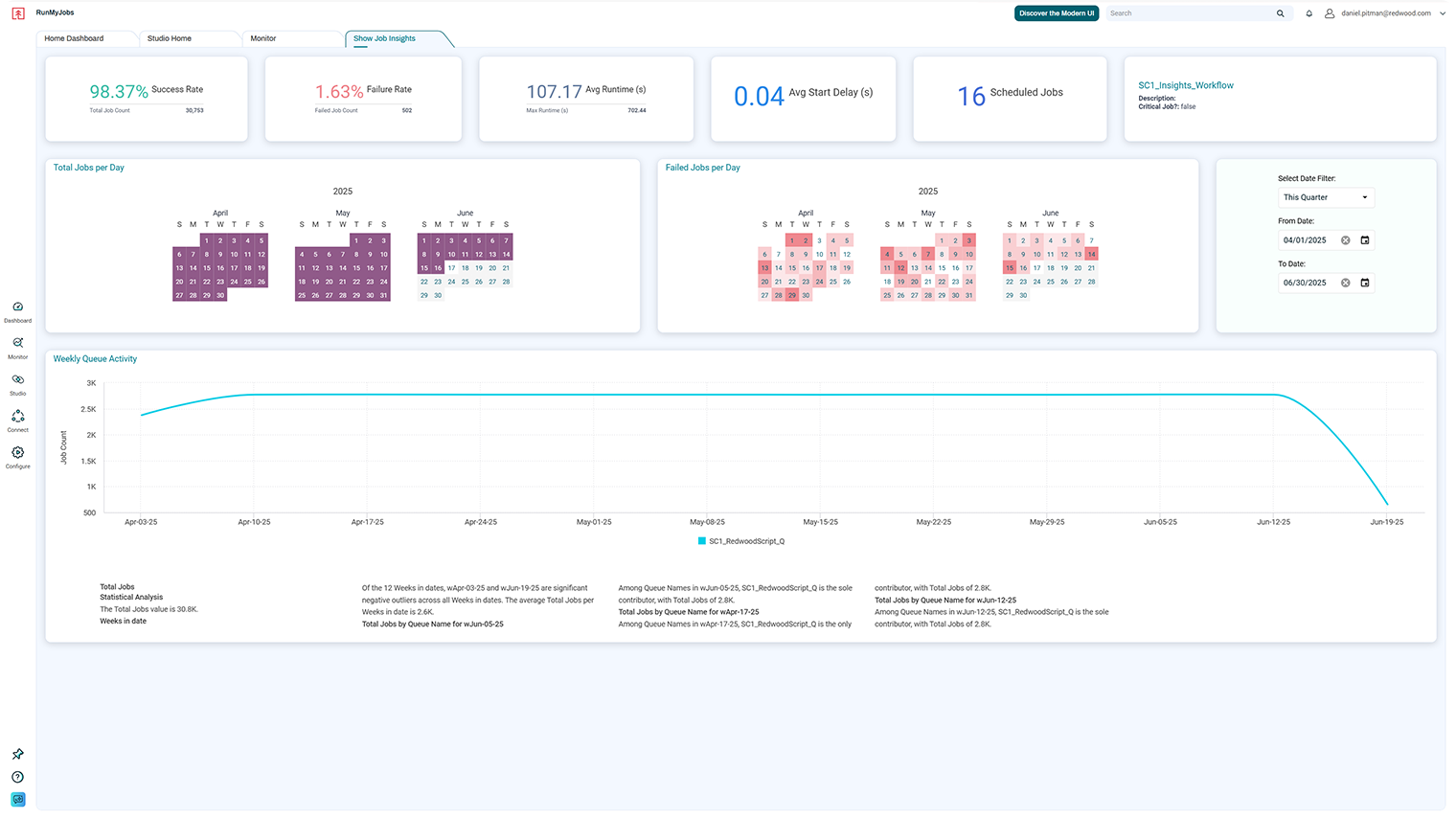
The Job Insights dashboards can be accessed when viewing jobs in the user interface for easy contextual analysis.
You open the Job Insights report for the failed job to get a complete historical view.
You use heat maps to see if failures have ever correlated with this specific date or time of month before, trying to identify patterns.
To determine if this was an infrastructure issue, you switch to the Job Server Analysis dashboard. This allows you to quickly rule out a systemic problem by comparing performance across your environment.
Confident that the infrastructure is sound, you return to the job’s execution data. As you analyze the widgets, you clarify the situation using a smart narrative, powered by AI: a simple, natural-language summary of the data.
The business outcome and ROI:
Action taken: Based on this clear, data-driven context, you can confidently classify the issue. You document the anomaly and close the problem record, avoiding an unnecessary and costly investigation into a one-off event.
Business outcome: This data-driven approach avoids wasting resources chasing ghost issues while ensuring that genuine systemic risks get the attention they deserve.
ROI: This leads to improved long-term service stability, more efficient use of skilled engineering resources (who now solve real problems) and increased business confidence in the automation platform.
2. Solving the recurring problem with data
The process: An end-of-day reporting workflow has been failing intermittently for weeks, creating a backlog of low-priority incidents.
The investigation with Redwood Insights:
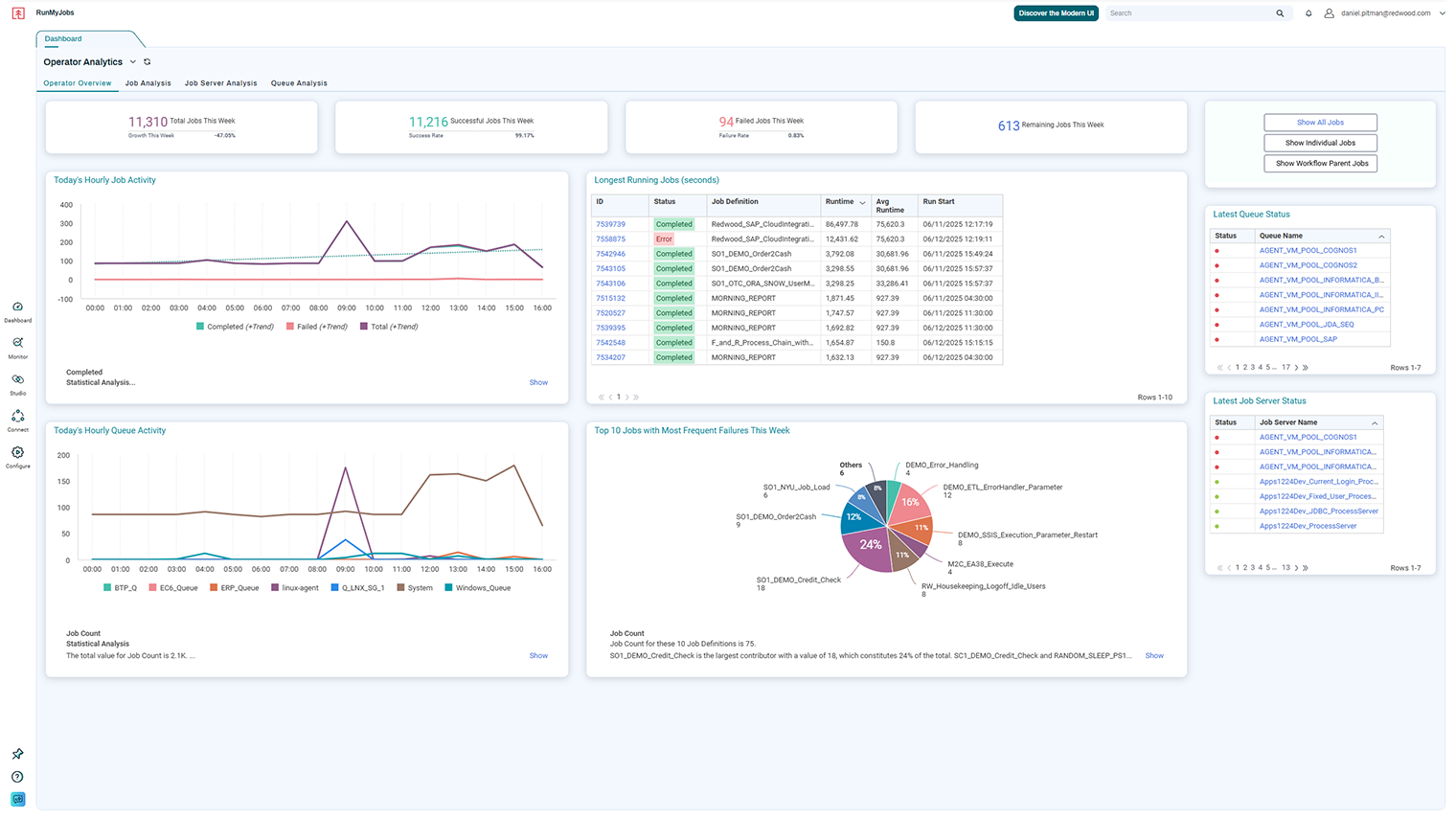
The Operator Overview is your starting point for problem investigations and analysis.
You begin your investigation on the Operator Overview dashboard. Your eyes are immediately drawn to a widget highlighting the “top ten jobs with most frequent failures,” which confirms this reporting job is a chronic offender that needs attention.
You analyze the job’s history and use heat maps to discover a clear pattern: The failures almost always occur on weekday afternoons.
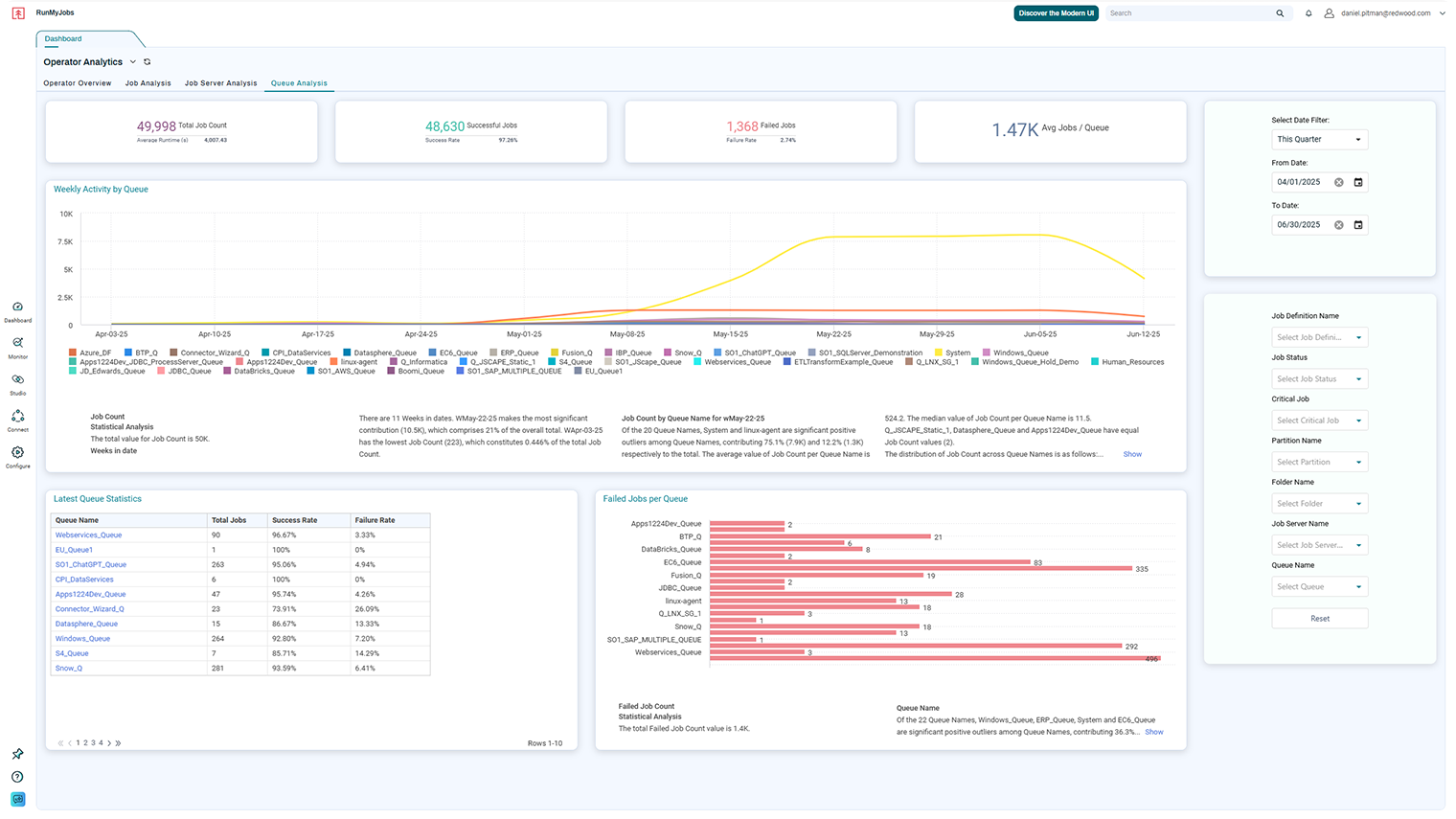
To understand why, you pivot to the Queue Analysis dashboard to drill down into the systems involved. Here, the data clearly shows that when the reporting job fails, queue wait times are consistently high, indicating resource contention is the likely culprit.
The business outcome and ROI:
Action taken: With definitive proof of the root cause, you submit a change request to create a dedicated queue for the reporting workflow, a targeted improvement based on historical data.
Business outcome: The recurring incidents stop completely. The business service becomes reliable, and the stream of low-priority tickets ceases.
ROI: This eliminates the hidden operational cost of repeatedly fixing the same small issue, frees up your Operations team from repetitive tasks and improves the reliability and timeliness of service delivery.
Your toolkit for proactive problem management
The Queue Analysis dashboards provide a system view that enables users to visualize the relationship between performance and platform configurations.
These tools give you the operational visibility and historical context to take IT operations from reactive troubleshooting to a data-driven, intelligent function.
Identify recurring issues: Use the Operator dashboards to prioritize the most impactful, systemic problems by highlighting key metrics, such as the top ten failing jobs.
Correlate failures to find patterns: Use interactive widgets like heat maps to uncover underlying triggers for recurring problems by correlating failures to specific dates or other factors.
Isolate system-specific problems: Use the Job Server Analysis and Queue Analysis dashboards to understand if failures are application-specific or tied to a particular component, which is crucial for problem management.
Drive data-driven improvements: Use the detailed Job Insights and Workflow Insights dashboards to perform targeted analysis, enhancing processes through redesign or resource reallocation based on historical performance data.
From reactive firefighting to strategic reliability
Redwood Insights provides the essential tools for a mature problem management practice. It allows you to move beyond the immediate incident and analyze historical trends to find and permanently eliminate the underlying causes.
The result is a more stable, reliable and optimized automation environment. This leads to fewer outages, more efficient use of IT resources and consistently more timely and reliable service management.
Watch this video preview of Redwood Insights to learn more.
Ready to move beyond firefighting and start solving problems for good? Discover how Redwood Insights can power your problem management process. Book a demo of RunMyJobs today.
In 2024, 39% of public company audits inspected by the Public Company Accounting Oversight Board (PCAOB) had significant deficiencies. That may be down from 46% in 2023, but nearly four in ten audits failing is still a major red flag. These represent substantial enough issues to question the reliability of financial statements, the effectiveness of internal controls and the overall integrity of financial reporting.
It’s tempting to point fingers at external auditors. But let’s not let internal accounting teams off the hook too easily. Audit firms assess the financial information you produce. The root cause of many audit failures isn’t fraud or negligence; it’s a combination of outdated processes, inconsistent procedures and systems that leave too much to chance. Two common culprits are a lack of objectivity and consistency.
These and other accounting principles should be built into your operations, but too often, they remain abstract — something your team relegates to a dusty handbook. Let’s look at how operational gaps undermine objectivity and consistency and how automation can reinforce them when they matter most.
Safeguarding professional judgment with structure
The PCAOB’s 2024 inspection report called out more than procedural issues. It highlighted a relatively widespread breakdown in professional judgment underpinning the audit process. Flawed evaluations, weak skepticism and insufficient support for critical assumptions, in particular.
These aren’t arising because internal auditors and accounting teams lack skill. In many cases, it’s because they’re forced to work with manual inputs, delayed data and undocumented workarounds that make objective judgment nearly impossible. When you’re reconciling accounts in Excel and building forecasts on stale numbers, subjectivity creeps in. Again, this isn’t out of carelessness, but because there’s not a reliable structure to keep judgment grounded.
Automation can’t replace human judgment, but it can reinforce it. With audit trails, workflow approvals and built-in control on data entry, automation operationalizes objectivity. It forces clarity and consistency in the places where human judgment is most vulnerable: under deadline pressure, with incomplete inputs or during handoffs between teams.
When your data is clean and your process is repeatable, your conclusions are clearer. That’s how objectivity holds.
The danger of doing things differently every time
Another principle worth revisiting in the audit conversation: consistency. Discrepancies and audit failures often trace back to inconsistent accounting practices:
Applying different thresholds across business units
Updating assumptions without documenting why
Inconsistent processes make it harder to detect fraud, forecast and audit. One of the biggest contributors? Tribal knowledge — when the “how” behind a task lives in someone’s head instead of in your systems. If one person handles intercompany eliminations a certain way and someone else does it differently, you get completely inconsistent (and unpredictable) outcomes.
Automation helps codify rules and apply them system-wide, remove reliance on institutional memory and ensure every action follows a known, repeatable process. You can still adapt when you need to, but automation forces that adaptation to be intentional rather than accidental.
Breaking the spreadsheet dependency
If 39% of audits are still failing, that’s not just an auditor problem. It’s a signal that objectivity and consistency aren’t being reinforced at the transactional level.
As regulators become more aggressive and public trust continues to erode, companies can’t afford to treat accounting principles like mission statements. There’s too much risk in relying on tools that weren’t built for control or consistency. Spreadsheets are flexible, but flexibility without structure is a liability.
Accounting principles must be enforceable through technology and process design.
If your tools and processes haven’t evolved to match the accounting standards you’re still expected to uphold, your audits will be at risk of failure. But going for just any shiny new tool won’t help. Automation will keep you true to the principles the profession is built upon, if you understand why new tech fails in finance and how to break that pattern.
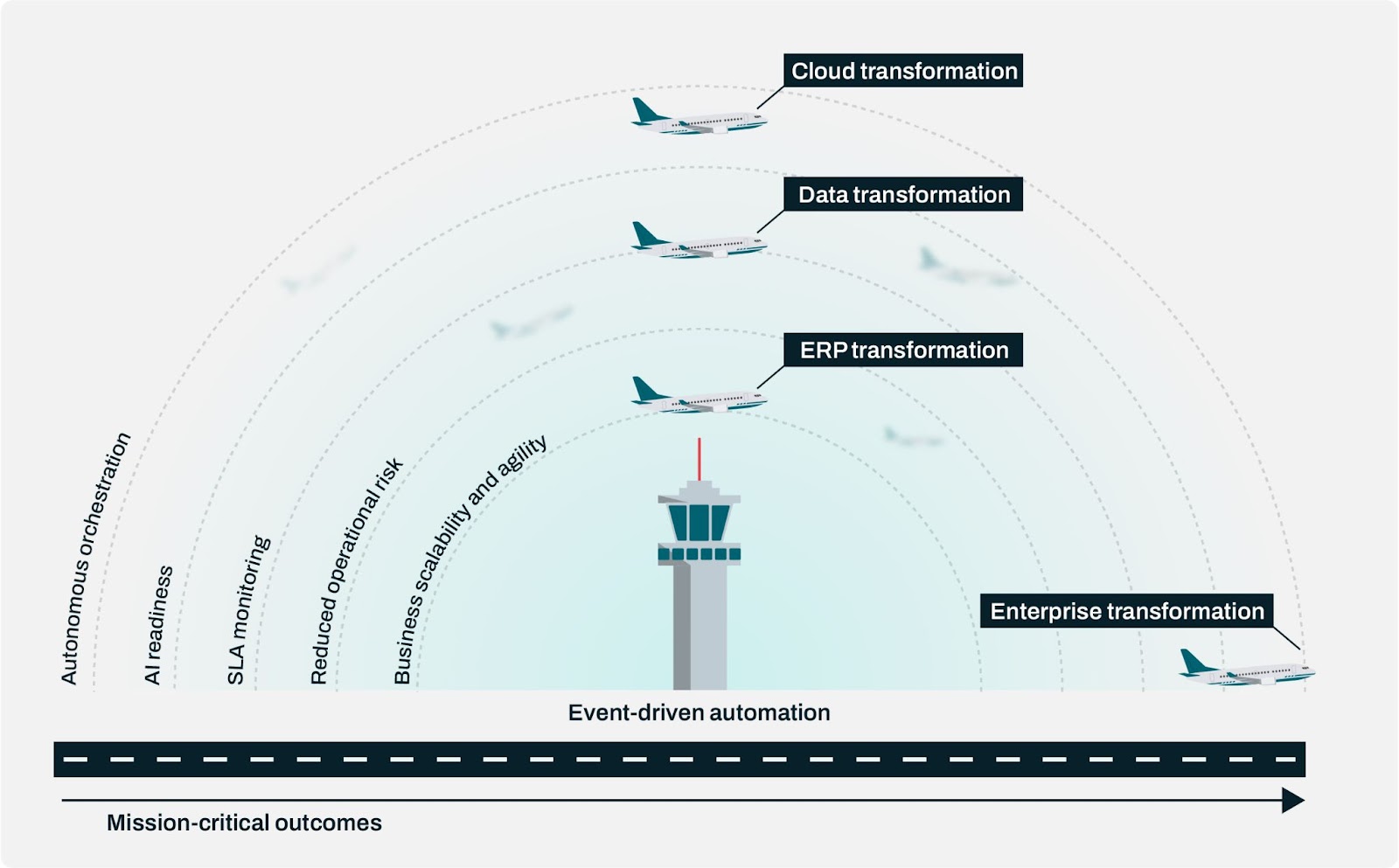
When operations stall at 30,000 feet, it’s rarely the plane’s fault. It’s the tower.
Earlier this year, radar failures at Newark Liberty International Airport grounded flights across the United States, not because the aircraft failed but because coordination broke down. A combination of aging systems, staff shortages and manual overrides created a chain reaction that left passengers stranded and schedules in chaos.
Enterprise IT isn’t so different. Cloud systems, data platforms, ERP modernizations and AI pilots are all taking off, but the control layer that’s supposed to orchestrate them is often still stuck on the ground.
When the automation “tower” fails, everything stops.
Who’s guiding your IT traffic?
CIOs and CTOs are moving fast. They’re focused on cloud-first, generative and agentic AI and workflow automation. Under all that progress is a quiet problem: The automation architecture powering it all hasn’t kept up.
Companies are building smarter systems but still relying on old job schedulers and hard-coded scripts to orchestrate between them. That creates delays, disconnects and blind spots. The sky might look clear now, but storms are coming.
The more systems you modernize, the more complex your operations become. And as this modernization goes faster and faster over time, the harder it is to coordinate workloads with high fidelity, especially across legacy systems that require custom-coded connectors, manual refactoring for continuous integration and automation designed for a different era. While it feels like you’re accelerating, legacy systems beneath the surface are quietly pulling the brakes.
Modernization without orchestration is like asking your control tower to manage new aircraft using equipment they’ve never trained on. The sky is getting more crowded, but the systems guiding the traffic are stuck in the past.
The illusion of progress
The problem with mainframes didn’t begin and end in the early 2000s. It lingered for decades. Even as businesses moved to the cloud in the 2010s, their most critical workloads and data remained locked inside monolithic, closed mainframe applications with no APIs, no agility and shrinking pools of technical talent.
During the COVID-19 crisis in 2020, the issue broke into public view when multiple U.S. states issued emergency calls for COBOL programmers to stabilize aging unemployment systems. Rather than isolated IT issues, these were architectural bottlenecks that made rapid response impossible. No DevOps, no iterative improvement, no access to real-time data. Just batch cycles, manual updates and fragile processes buried under decades of technical debt.
Today, many enterprises are facing the same limitations, just in a different disguise. Legacy job schedulers and automation tools are the modern mainframe, standing in the way of AI adoption, API-driven integration and autonomous orchestration across cloud-native ecosystems.
These schedulers were designed for predictable workflows and tightly coupled environments, not for hybrid cloud, continuous delivery and interconnected platforms like SAP Business Technology Platform (BTP), Salesforce and Snowflake. As a result, they can’t scale, they can’t adapt and they certainly can’t keep pace with AI-driven transformation.
None of that works without modern orchestration via a control center that can coordinate business processes, eliminate human error, trigger event-based workflows and deliver consistent outcomes. Without it, transformation becomes a patchwork of short-term fixes and long-term headaches.
Static scheduling vs. intelligent orchestration
Orchestration requires controlling systems with precision and context, rather than just connecting them. That’s where event-based architecture becomes critical.
Unlike traditional scheduling, which runs on fixed times or batch jobs, event-driven orchestration allows your processes to respond dynamically to business and system events. You react to what’s happening now, not just what’s scheduled. Orders get fulfilled the moment inventory updates. Reports run the second data hits the warehouse. Downtime shrinks. You meet service-level agreements (SLAs).
At Redwood Software, we call this architecture an automation fabric: a unified layer that weaves together cloud and on-premises systems and AI innovation with full visibility, scalability and control. What makes it different?
Built for hybrid: Connect SAP, Oracle, cloud services and custom apps across environments.
Agentless integration: Connect systems without installing or maintaining local agents, so no need for custom scripts. Reduce risk, friction and security vulnerabilities.
AI-powered observability: Identify SLA risks and optimize performance before problems arise.
Unified monitoring: View everything through a single pane of glass.
Why would you custom-code or patch together manual workflows when intelligent orchestration can adapt autonomously?
Avoid a Newark moment: Your flight plan
Let’s say your global energy company is modernizing for sustainability and scale. You’re juggling regulatory demands, transitioning to RISE with SAP, piloting AI in financial planning and managing dozens of custom systems. But your core automation is still dependent on a legacy scheduler designed for batch processing and nightly jobs.
You’re not alone.
This is where modernization breaks down. It’s not in the cloud migration or the AI launch, but in what keeps it all together. By upgrading to a modern orchestration platform, your company could retire fragile custom scripts, slash risk across compliance-heavy processes and move faster with fewer people.
Rather than just picking a tool, it’s essential to choose a partner with a forward-looking vision. RunMyJobs by Redwood is designed to be air traffic control for the modern enterprise. Even if you’re not feeling the turbulence yet, the future is coming faster than you think.
Don’t wait until delays, outages or compliance gaps force your hand. Modern orchestration isn’t optional — it’s foundational.
See it in practice: Read our guide to learn how automation fabrics are helping teams orchestrate SAP and non-SAP data across industries.
Imagine a brand-new, high-efficiency car. It’s got all the latest tech, promising to get you from point A to point B faster and more smoothly than ever.
Now, imagine you’re only using the basic functions — driving, accelerating, braking. You’re getting where you need to go, but you’re not using cruise control, lane assist or advanced navigation. That’s what it’s like when a team adopts a powerful automation platform without fully investing in training.
The car (the software) is fantastic, and it’s working, but there’s so much more it can do. A team of admins may have created basic automated tasks, transferred essential files and set up fundamental reports. But are they leveraging all the features that will help them achieve their goals? How much valuable time was spent setting up those rudimentary processes, and how often did they need to reach out to support or success teams to gain even minimal traction?
This is where a “learning champion” can shift things into high gear.
Learning champion: An individual who proactively seeks and shares software knowledge and best practices with their team, fostering a culture of continuous learning and improvement and driving increased productivity and efficiency
We’ll explore how becoming a learning champion boosts your individual productivity and career and amplifies that effect across your team and organization, especially if you’re in the process of adopting automation.
Taking control: Why become a learning champion?
According to the Customer Education Trends in 2025 report from Skilljar, the modern learner has been thrown into an “everything, everywhere, all at once” environment, consuming self-paced content, articles, documentation and live support on their own terms and at their own pace.
While the flexibility to find information in the format that makes sense to you and without waiting to be assigned a course can feel empowering, it also adds complexity. When you consider the number of people who must learn a given skillset or platform, you can understand the nth-degree potential for confusion or frustration — an undesirable and non-scalable state.
Individual ownership matters, especially when you’re adopting complex or evolving tools like automation platforms. A learning champion becomes a catalyst for team efficiency and organizational progress.
Elevate personal productivity
Proactive learners make fewer basic errors, reduce support tickets and implement automation faster. Plus, upskilling a team contributes to business agility. As BytePlus notes, “Employees with diverse, updated skills can adapt more quickly to technological and market changes.”
Quick tip: Gauge your starting point. How long does it take you to complete a process? How often are you asking for help? Once you complete training, measure again. You’ll see tangible signs of your growth, and so will others. Share these insights with your team and manager to make the case for upskilling.
Advance your career with certification
Becoming a learning champion isn’t just about helping your team; it’s a smart career move. Achieving certification, especially in complex automation software, validates your expertise and positions you as a subject matter expert. It signals to your organization (and future employers) that you’re not just using the tool but owning it.
Certifications in automation software demonstrate that you can do more than execute tasks: You can understand workflows, configure processes and lead others. For example, the Automation Developer Specialist Certification from Redwood University challenges your understanding of advanced functions, complex workflow automation and process scheduling best practices. Users with this certification leverage their deep knowledge of the software to drive transformation instead of just reacting to the tool.
The initiative can start during your onboarding: Learning champions don’t wait for permission to explore new things, and proactiveness is a quality your current leaders and future employers seek.
Quick tip: Ask about learning paths that align with your team and career goals, then dive in and get started. Share feedback with your immediate team on how the material helped you. Post your new credential on LinkedIn for wider reach.
Share what you learn
Knowledge is best when shared widely and in ways that are digestible. As Skilljar puts it, “Educators are curating, not just creating.” Software vendors can offer a full library of content (like what you’ll find in Redwood University), but it’s up to learners to enroll, complete lessons and share their knowledge.
Whether you’re forwarding helpful documentation, recommending training courses or showing a colleague how to fix a recurring issue, you become the go-to person. Don’t stop there. Your goal should be to elevate yourself AND others. A lone learning champion is a great start, but real efficiency comes when your whole team levels up.
Quick tip: Create a “Top 3 takeaways” list after every course you complete and email them to your team. Keep it light, useful and actionable.
The impact of software education on team productivity
A well-trained team is a fast team. When many users understand how to leverage automation software fully, you get better data, fewer bottlenecks and less reliance on external support.
In other words, you’re making the most of your investment.
According to TSIA, product adoption is a key business metric. Leaders expect returns on software purchases, and ongoing, quality training is how you get there.
The real power of education becomes clear when users go beyond the fundamentals of process automation. Too often, users are taught just enough to complete their tasks. But it’s essential to go deeper: to grasp why a process works the way it does, where automation eliminates inefficiencies and how to extend those benefits across other business processes.
This level of knowledge comes from hands-on experience — working through real use cases, experimenting in a safe environment and applying lessons immediately to daily work. If you discover a faster way to automate a handoff between departments, for example, you’re building consistency and making sure everyone is working from the same playbook.
Build a culture of curiosity
When one person steps up, others follow. A team that values education creates a ripple effect. Questions become learning moments, and continuous improvement becomes the norm.
That kind of culture pays off.
BytePlus emphasizes an SHRM stat: Replacing a single employee can cost up to 200% of their salary. Investing in learning reduces turnover and keeps your best people engaged and growing.
Bonus: Training builds loyalty. A team that learns together stays together.
User to influencer: How to lead the learning revolution
Whether you’re in leadership and setting up a flexible, comprehensive learning environment for your team or an individual looking to influence your peers, use the following steps to influence other automation software users.
Blaze the trail: Ask your vendor what training they offer and which courses fit your role. Choose the format that works best for you — live, self-paced, etc.
Elevate your team: Recommend key features or tricks your team can use today and encourage them to explore help centers, learning academies and documentation.
Look outward: In many enterprises, different teams use different tools for similar goals. Your experiences can help standardize education, in turn consolidating spend and scaling success.
Share your team’s gains: Are you submitting fewer support tickets? Are processes faster? Are you automating more? Compare your pre-training and post-training metrics.
Be the spark
Investing time in learning pays off at every level, from your own growth to company-wide productivity.
You gain:
The confidence to navigate the software
Mastery of tools that drive automation
Speed and accuracy in your day-to-day work
Recognition as a subject matter expert
Momentum to shape your career path
Your organization gains:
Stronger product adoption rates
Greater ROI
A lesser need for IT intervention and manual workarounds
Faster onboarding for new team members
Reduced turnover due to better engagement and support for each role
Become a learning champion for your team’s Redwood Software products by utilizing Redwood University. It’s free and open to all customers and partners. Sign up today.
An unexpected heat wave is hitting your area. Most people react with last-minute grocery runs or by cranking up the A/C and grumbling about what it will do to their next bill. But if you work in the utility industry, you know this affects you differently.
It means usage is spiking across the grid. Smart meters are flooding in data every 15 minutes, or faster. Restoration events from a recent storm haven’t fully cleared, and your billing engine is about to get overloaded. You know that if even one upstream dataset is missing or incorrect, your rates won’t calculate properly. And if you don’t hit billing SLAs, your call centers will be overwhelmed due to frustrated customers, cash flow will take a hit and revenue recognition will fall days or weeks behind.
In this moment, what matters isn’t just the data you’re collecting but how efficiently and cleanly it moves through your systems, from AMI and CRM to SAP Industry Solution for Utilities (IS-U) and billing. That’s why data orchestration isn’t a luxury. When the weather shifts, your systems have to shift with it automatically.
Data handoff: The origins of bottlenecks in utility billing pipelines
The journey from meter to money sounds simple on paper: collect usage data, calculate the bill, send the invoice and match it against incoming customer payments. But anyone working behind the scenes knows it’s far more complex. Between raw data and revenue is a sprawling digital ecosystem that spans:
Smart meters and AMI platforms
Distribution systems that track service status, outages and restoration events
CRM and customer service tools
SAP IS-U or SAP S/4HANA environments that handle contracts, rate logic, billing and cash application
Regulatory platforms and reporting systems
Each system excels at its job, but without frictionless orchestration, the handoffs between them are prone to failure. If meter data arrives late or out of sequence, you’re forced to estimate usage. If a service status update doesn’t land on time, billing logic may misfire. And if downstream systems don’t receive validated, structured consumption data, bills can’t go out.
Common consequences include inaccurate or estimated billing, SLA violations, delayed revenue recognition, failed compliance reporting, cash flow shortfalls and surging call volumes from disgruntled customers. Thus, it’s not just the billing team that feels it. When meter data is delayed or incomplete, every part of your operation experiences the fallout: Customer Service, Finance, Compliance and other departments.
A system that only works when nothing changes won’t cut it in an industry where change is constant.
Orchestration over integration
To build resilience, many utilities are investing in smarter, more connected data ecosystems. Platforms like SAP Business Data Cloud, which combines the power of SAP Datasphere, SAP Analytics Cloud and Databricks, make it easier to layer analytics and AI on top of operational consumption data. But the value of those platforms depends entirely on the quality, timing, structure and completeness of the data they receive.
Connection alone can’t guarantee this data will always be right and show up when and where it needs to. A modern automation fabric, a high-fidelity method of controlling and monitoring your data across SAP and non-SAP systems, validates each task and activity required to move data through each step of the pipeline and routes it to the right destination. It only triggers the next process when quality and other key thresholds are met.
Future-proofing meter-to-cash (M2C) automation at a large energy provider
When SAP announced the end of support for SAP BPA by Redwood, one of Australia’s largest utility companies needed to transition its mission-critical SAP M2C operations without compromising stability. They had relied on the solution for a decade to orchestrate daily billing, HR, purchasing and analytics workloads.
After evaluating alternatives, the team chose to stay in the Redwood Software ecosystem and migrated seamlessly to RunMyJobs by Redwood. The migration caused zero disruptions, fully preserving the company’s SLA performance and creating a smooth path forward for S/4HANA Cloud readiness under RISE with SAP.
An SAP Technical Analyst responsible for the company’s SAP process integration and security explains the role of their Redwood orchestration platform: “It was a business-critical system. We ran all our daily jobs through it, and we knew that if it went wrong, it would go very wrong.”
Your billing pipeline can only move as fast as your data pipeline does. An automation fabric carries your data on an effortless journey from the first smart meter reading to the final bill.
Here’s what a unified, orchestrated utility billing pipeline can look like.
Usage data ingestion and validation
Ingest raw meter data from AMI systems and IoT platforms
Estimate consumption where smart meter reads are missing, using SAP IS-U meter reading logic
Use tools like Databricks or Azure Synapse to pre-process high-volume raw readings and identify anomalies
Trigger alerts if data doesn’t meet billing quality thresholds
Send validated readings to SAP Datasphere for context-aware enrichment
Transformation and billing preparation
Trigger mass activity billing document creation via SAP IS-U
Trigger SAP IS-U to generate usage records, apply pricing and finalize billing logic with SAP Financial Contract Accounting (FI-CA)
Ensure all required meter data and service status information is available before SAP billing runs start
Standardize formats and units across devices, systems and regions
Load cleaned datasets into SAP IS-U or S/4HANA and apply rate structures and SAP FI-CA contract logic
Bank clearing and revenue processing
Execute SAP IS-U bank clearing by applying clearing locks, posting incoming payments and cash receipts and processing prepaid invoicing and credit card transactions
Initiate billing cycles in SAP only after the prerequisite datasets are verified and complete
Use event-driven orchestration to delay or reroute processes when exceptions are flagged
Automatically generate audit trails and trigger alerts for missing, duplicated or stale data
Route usage summaries and cost breakdowns to SAP Analytics Cloud, Power BI or Databricks for reporting and forecasting
Downstream system and stakeholder updates
Feed final billing and payment data to SAP Analytics Cloud and Databricks for forecasting and reporting
Feed structured data into SAP Datasphere and cloud storage for compliance reporting and AI model training
Push finalized consumption and billing data to SAP FI-CA and S/4HANA for cash application
Notify customer service teams of exceptions or late accounts via CRM updates before customers call in
RunMyJobs brings meter, CRM and billing data into harmony with orchestrated data flows purpose-built for SAP-centric utility environments.
Bonus: Powering grid modernization
The same orchestration fabric that streamlines your billing operations can also unlock faster, more accurate decision-making for your capital grid projects. Whether you’re expanding substation capacity or reinforcing the grid in anticipation of extreme weather, the ability to ingest and align data from multiple sources is critical.
Grid investments require input from asset condition data, load forecasts, GIS platforms, outage logs, customer growth models and more. Orchestration helps unify those sources and validate data quality in real time, so planning and forecasting are always based on the most current and accurate inputs.
RunMyJobs can coordinate data management across SAP, GIS systems, project management tools and platforms like SAP Datasphere and Databricks to:
Prioritize capital spend based on risk modeling
Synchronize rate impact data with financial planning and regulatory reporting tools
Route updated procurement or contractor schedules to SAP S/4HANA or project accounting and management models
Feed structured data into dashboards and AI models for stakeholder transparency and “what-if” scenario modeling
As electrification demands surge from new demands like electric vehicles and AI-powered data centers, utilities need more than project plans. They need dynamic data pipelines that drive fast responses and grid resilience.
Your systems, in sync
RunMyJobs isn’t another system you have to bolt on. It’s a full orchestration platform purpose-built for SAP environments and particularly effective in highly regulated industries. Whether you’re using SAP IS-U, S/4HANA or hybrid systems, RunMyJobs can precisely coordinate your end-to-end data pipelines without adding overhead or risk.
Planning to attend SAP Sapphire Madrid 2025? Stop by booth #10.332 to see how utility providers are making the switch from fragmented data flows to end-to-end orchestration.
What mission-critical process doesn’t require analytics automation? None!
Analytics power nearly every strategic business decision, but only when they’re delivered in context, on time and aligned with the end-to-end processes and stakeholders they’re meant to inform. That’s why forward-looking insights are no longer optional.
Whether you need to spot cash flow risks before they affect liquidity, adjust production plans before disruptions ripple downstream or re-forecast inventory before you notice a sales dip, your ability to predict and respond depends on analytics that move with your operations.
SAP Analytics Cloud (SAC) was built for exactly this kind of intelligent analysis, forecasting and agile planning. It brings together business intelligence, planning and predictive analytics in one place so you can always know where you stand and model future scenarios to be ready for what’s coming instead of what has just occurred.
But insights alone don’t create outcomes. Unless they’re integrated into an operational process, even the most advanced insights can’t drive impact. Worst case, they could guide you to wrong decisions and negative consequences.
The hidden liability of siloed analytics
Even in a powerful, cloud-based platform, analytics can still fall out of step with the business. Your systems might be automatically refreshing and publishing dashboards or verifying outputs, but if they’re doing so while disconnected from your end-to-end processes, you won’t be able to apply these outputs meaningfully to your role.
You shouldn’t have to wonder whether your numbers reflect just a small snapshot of what’s happening or the full sequence of updates across systems. That uncertainty chips away at trust, and it’s more than frustrating. It’s costly.
Take a high-stakes industry like manufacturing, in which a day-old production forecast can misalign plant operations with actual demand. Or healthcare, where even brief gaps in staffing or patient volume data can impact care and compliance. Siloed analytics workflows aren’t useful or timely in supporting complex, mission-critical processes that need to run continuously.
SAP Analytics Cloud: Built for insights, ready for orchestration
SAC is already a strategic hub for business insights. It connects natively to SAP S/4HANA, SAP Datasphere, SAP BusinessObjects and Databricks. It helps unify planning and analysis across departments and roles. But what transforms SAC from a great tool into an essential one is where it fits in the big picture of your business.
Think about it this way: SAC tells you what’s happening or what’s about to happen. It can publish dashboards and refresh models on a schedule, but to act on those insights in time, you need analytics to match the continuous rhythm of your operations instead of sitting still.
Orchestration with an advanced workload automation platform can embed those steps inside complex, multi-step job chains that include dozens of tasks, from ETL and ERP updates to file transfers, reconciliations, condition checks or even alert triggers. Reports can be triggered by events, conditions or thresholds from within SAP or external systems, then distributed, published or escalated based on logic.
Instead of standalone data, you get analytics in motion. What does this look like in the real world?
A multi-step financial close process automatically refreshes and publishes the appropriate dashboards at each stage as part of the normal process chain of the closing cycle — without needing to be managed in a separate analytics workstream
A disruption in supply chain data from SAP S/4HANA or SAP Datasphere triggers a refresh of demand forecast models in SAC as part of your continuous supply chain processes
Executive dashboards are scheduled within a larger workstream to update nightly and adjust to special schedules around holidays, peak seasons or system maintenance windows
These reports don’t stay isolated. They’re embedded in your broader business workflows and reacting to real-world conditions. In other words, they align with your operational priorities.
What full automation delivers
With SAC jobs built into your end-to-end business processes, you see the value compound across your organization.
There won’t be a need for separate analytics workstreams anymore. Dashboards and models, connected to your end-to-end processes, will update based on the logic you define at the cadence your business needs.
Analytics will follow the pace of your business, not the other way around. That means your leadership team can get ahead of issues and make proactive decisions. Everyone will see the same numbers, which are built on the same trusted foundation.
Instead of ad-hoc report refreshes or support tickets, your analytics will run as part of a monitored, auditable job chain, giving your key stakeholders insights as they happen in the everyday flow of business.
Ultimately, you’ll be automating business readiness — not just accurate or timely reporting.
Making insights flow: SAP Analytics Cloud + RunMyJobs by Redwood
The new RunMyJobs connector for SAP Analytics Cloud makes it easy to orchestrate your analytics processes within broader, mission-critical job chains without adding complexity or rework.
With the connector, you can:
Include SAC alongside ETL jobs, S/4HANA transactions, file transfers or external alerts
Monitor your analytics within each complete job chain from a single pane of glass
Refresh and publish reports automatically as tasks in end-to-end process rather than siloed triggers
Tie analytics tasks to business events, conditions or schedules from SAP and non-SAP systems
There’s no need to replace SAC’s native scheduling functionality. With RunMyJobs, you elevate its capabilities by embedding them into more complex and interdependent processes. SAC gives you top-notch insight, and RunMyJobs makes sure it’s delivered at the tempo you need and as part of the complete picture.