Finding and implementing automation solutions is no longer the challenge most enterprises face. Data from Redwood Software’s “Enterprise automation index 2026” makes this clear. Investment in automation continues to rise, and the majority view it as mission-critical. Yet, fewer than 6% of organizations have achieved autonomous automation in any core business process. That’s a substantial gap between intent and outcome.
This points to a deeper issue: Many organizations have automated tasks and implemented point solutions, but they haven’t fundamentally changed how work flows across their ecosystems.
Understanding why so many teams stop short of autonomous automation requires looking behind the technology curtain to examine how automation is governed and embedded into the operating model. It’s the accumulation of structural constraints that can quietly but consistently slow progress. These constraints show up less in tooling decisions and more in people and process issues.
Automation advances faster than operating models
If you introduce automation into environments that weren’t designed to support it at scale, your processes will be automated without being restructured. The risk is that ownership stays distributed and decision-making feels unclear.
There’s a practical ceiling you’ll reach in this scenario. Dependencies and exceptions will multiply, because what worked for a handful of workflows is difficult to extend across end-to-end processes. At this stage, automation won’t be slowed by technical limits, but by uncertainty around who can change what, when and under what conditions.
Autonomous automation is driven by shared accountability across IT, operations and the business. That doesn’t mean everyone owns everything, but it does mean no critical process lives entirely within one function’s control. Decisions about logic, exceptions, risk and change management have to be made in the open with a clear operating model behind them. Without that, automation can move quickly in pockets but will always stall when it reaches the seams between teams.
Complexity becomes institutionalized
The report shows that workflow complexity is the most commonly cited barrier to automation adoption. Such complexity is generally unplanned or accidental — the result of years of layered systems and incremental fixes.
Rather than being addressed directly, complexity is often worked around. Teams automate what they can without disturbing upstream or downstream dependencies. Over time, automations inherit the same structural complexity as the environment they operate in. This increases costs and makes change progressively harder to justify.
It also creates a troublesome paradox. You’re introducing automation to simplify execution, but it becomes embedded in architectures that are stuck in the proverbial mud. Autonomous automation depends on the opposite condition: predictable, observable systems designed to adapt without constant intervention.
Governance keeps automation in a holding pattern
As automation’s surface area expands, governance typically becomes more restrictive. Controls are added to reduce risk, but many times without a corresponding increase in transparency or coordination.
In practice, you end up performing cautious automation. Your teams avoid automating processes that cross organizational boundaries because changes require lengthy approvals. The automations you do have may be reliable, but they’re static and siloed.
The research shows that only 10% of organizations prioritize automation adoption at the enterprise level. This can manifest as a focus on preventing failure instead of enabling evolution. Your governance framework should support change in addition to stability.
Utilization plateaus before autonomy emerges
Most organizations own capable automation platforms, but only 27.5% fully utilize them, according to the same study. Underutilization isn’t simply a matter of missing features. It reflects how automation is positioned. Is it treated as a strategic capability or simply supporting infrastructure?
It’s common to only automate what’s immediately visible or urgent, then leave broader opportunities unexplored. You hit a plateau when you continue to do only this, normalizing automation but not expanding its reach. And it’s difficult to overcome without explicit goals tied to utilization and scale.
Autonomy requires confidence and capability
A less visible barrier to autonomy is confidence in automation itself. Many leaders hesitate to allow systems to operate without human oversight, especially when outcomes have financial, regulatory and operational consequences. That’s understandable, but only a true risk if you don’t have strong observability, auditability and recovery mechanisms in place. In which case, you have to default to manual checkpoints.
Redwood’s data suggests that organizations achieving higher levels of automation maturity tend to pair execution with visibility and control. Autonomy becomes possible only when trust in the system is established.
Orchestration determines what scales or stalls
Fragmented ownership, institutionalized complexity and cautious governance ultimately point to missing connective tissue. To move beyond partial automation, you need a way to coordinate processes across systems and adapt dynamically without risking inconsistent governance.
Orchestration changes the trajectory by:
Reducing complexity through coordinated, end-to-end process control
Accelerating adoption by enforcing consistency across teams and systems
Enabling confidence with built-in visibility
Creating a foundation for autonomy by replacing manual oversight
Be among the few that move forward
Those who progress toward autonomous automation behave differently long before they reach it. They treat automation as a coordinated capability, not a collection of tools. And they invest in simplification and accountability across IT, operations and the business — early, not after complexity has set in.
The “Enterprise automation index 2026” provides deeper insight into where most organizations stall and what differentiates those that continue to advance up the ladder of automation maturity. Use this data as a practical lens for evaluating and reworking your organization’s automation trajectory.
When orchestration works, no one talks about it. Files are arriving and systems are updating without anyone thinking twice. But what feels seamless to business users is often a result of carefully coordinated automation across dozens of tools and environments. Some are scheduled, some are reactive and many are barely documented.
Few organizations achieve that kind of orchestration consistently, because their automation is fragmented. One team might manage batch jobs, and another might script data pipelines. A third could rely on manual interventions and shared inboxes to keep business processes moving.
The value of a Service Orchestration and Automation Platform (SOAP) lies in its ability to unify these silos and support the workflows that actually run the business. In its 2025 Critical Capabilities for SOAPs report, Gartner® outlines five Use Cases that demonstrate this value in action. Here’s how, in my interpretation, those capabilities show up in real operations across industries.
IT workload automation: Still essential
No matter how much technology evolves, the reliance on routine workloads never really goes away. Nightly ERP updates, hourly job chains and critical data movements between systems are fundamental processes that keep your business running.
But those workloads aren’t confined to a single mainframe or on-premises scheduler anymore. They span hybrid environments, connect to cloud-based APIs and carry tighter service-level agreement (SLA) expectations than ever before. The hard part isn’t the workload itself but the web of dependencies and recovery paths that stretch across different systems.
A robust SOAP solution lets you orchestrate all these elements in one place: SAP jobs, custom scripts, data movements and file transfers, for instance. You gain centralized control with distributed execution — the perfect balance for hybrid IT environments. I feel Gartner points to this as a foundational Use Case because it tests how well a platform performs under enterprise pressure — securely, reliably and with minimal manual intervention.
What this unlocks: With dependable workload automation, your IT teams can start each day with confidence that core batch processes ran cleanly and dependencies resolved in the right order. Not to mention, any failures were isolated and didn’t cause unwanted ripple effects. Your operational tone can shift from checking for surprises to reviewing a clean audit trail and planning ahead.
Workflow orchestration: Running the business, not just jobs
Behind every business outcome is a complex chain of tasks, approvals and exceptions that span multiple systems and departments. Take the month-end financial close: it happens thanks to finance systems, spreadsheets, validations and cross-departmental collaboration. Or consider onboarding a new hire. Beyond provisioning accounts, it requires scheduling training, initiating background checks and activating access across multiple systems.
With a SOAP platform, these workflows can be orchestrated end to end. Instead of managing each step separately, you create a unified process that flows across boundaries. You get steadier execution and cleaner handoffs, which cuts down on the small errors that tend to compound over time.
It seems Gartner emphasizes this Use Case as a marker of maturity: it’s not about more automation, but using the right automation to move the business forward. By linking actions into cohesive workflows with decision points and exception handling, you transform fragmented activities into streamlined business processes.
What this unlocks: If your workflows run end to end, you’ll feel the difference immediately. Approvals and handoffs will happen without manual nudges, and any exceptions will surface early. The work is to oversee processes instead of managing dozens of micro tasks.
Data orchestration: Automating movement and storage
Analytics live or die on the reliability of the pipeline behind the dashboard. At 3 AM, your retail data might need to move from SAP to Snowflake, be validated, then trigger an update to executive dashboards before the morning meeting. That kind of flow can’t rely on spreadsheets, email notifications or ad hoc scripts — it requires systematic orchestration.
SOAPs plug into managed file transfer (MFT) solutions, ETL tools and data lakes to manage the full lifecycle of data movement: ingestion, transformation, validation and delivery. You can build flows that validate data quality, handle exceptions and ensure downstream systems receive accurate, timely information.
I believe Gartner calls out data orchestration because the stakes are high. Poor data hygiene slows decisions, introduces risk and devalues analytics investments. With proper orchestration, your data pipeline becomes a strategic asset rather than a constant challenge.
What this unlocks:Reliable data flows remove the daily uncertainty that slows decision-making. Your analysts don’t have to wonder whether today’s numbers are safe to use. And by the time business users open a dashboard, the underlying pipeline has already done the hard work.
DevOps: Coordinating pipelines across teams
It’s relatively easy to automate a deployment, but it’s much harder to orchestrate everything that comes before and after. When your infrastructure team needs to provision environments, QA needs to run tests and compliance needs to log every step, a simple webhook or CI/CD pipeline isn’t sufficient.
SOAPs can coordinate across your entire development lifecycle, trigger event-based actions and integrate with ITSM and monitoring tools. This coordination is especially valuable when different teams use different tools but need to work together seamlessly.
In my view, Gartner includes this as a distinct Use Case because orchestration here is a force multiplier: it aligns developers, operations and compliance without slowing velocity. By automating handoffs between teams and tools, you reduce waiting time, eliminate manual coordination and maintain an audit trail of all activities.
What this unlocks: Orchestration that supports the DevOps lifecycle ensures your release cadence reflects your engineering velocity. Your dev team doesn’t have to worry whether upstream tasks are complete, and your operations team gets predictable workflows they can trust.
Citizen automation: Putting control in the right hands
Not every routine workflow warrants an IT ticket. An HR manager initiating onboarding or a supply chain planner adjusting inventory levels need their workflows to be accessible without sacrificing governance. As your organization scales, the ability to distribute automation capabilities becomes crucial.
SOAPs support low-code interaction, reusable templates and full audit trails. Users get what they need when they need it, and IT maintains oversight of the entire automation ecosystem. Gartner likely highlights this Use Case because it balances empowerment and control: you reduce shadow IT while still enabling business agility.
What this unlocks:Governed self-service changes how work gets done. You can move faster without losing control because every action runs through the same orchestrated backbone with full visibility.
Your SOAP unifies it all
Every Use Case in the Gartner report points back to a simple truth: orchestration is how you scale automation without multiplying complexity. The best SOAP platforms make that orchestration real across jobs, data, workflows and teams, providing the connective tissue that binds your digital ecosystem together.
As you evaluate your options, look for platforms that support all five Use Cases with equal strength. Your business doesn’t operate in silos, and your orchestration platform shouldn’t either. The right solution will grow with your needs, adapt to new technologies and continuously deliver value as your organization evolves.
RunMyJobs by Redwood offers comprehensive, enterprise-wide orchestration, with deep integration into SAP environments and support for hybrid cloud architectures. Download the full Critical Capabilities report to see an extended analysis of the Gartner Magic Quadrant™ and learn why Redwood was recognized as a SOAP Leader two years in a row.
As 2025 comes to a close, we would like to take a moment to express our sincere gratitude to you, our Redwood Software customers, for your incredible support this year. Your dedication is the driving force behind Redwood, and together, we have achieved remarkable milestones.
This year, we have proudly welcomed over 100 new customers to Redwood. Our partnerships span the globe, as we collectively now serve over 7,600 customers in more than 150 countries. This growth highlights how organizations are embracing true end-to-end automation, and we believe the success our customers have achieved has played a significant part in this growth.
We’re inspired by the commitment our customers show in helping others realize the power of full stack automation. Filled with numerous speaking engagements, webinars and insightful conversations that made our shared vision a worldwide reality, this year has been exceptional.
Let’s take a look back at some of the most memorable moments of 2025.
Center stage: Event speakers
Sharing your success stories at major industry events provides invaluable, authentic insight. The customer sessions this year detailing the real-world business impact achieved with Redwood were truly inspiring.
Eugene Water & Electric Board
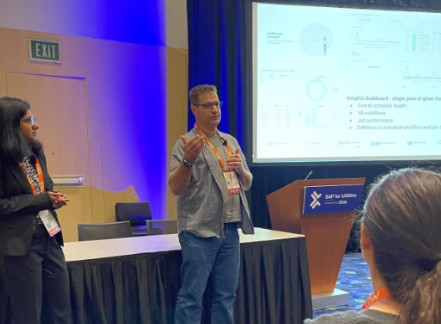
At the SAP for Utilities event in Denver, Leif Utterstrom and Prita Mani from Eugene Water & Electric Board (EWEB) detailed how RunMyJobs is enabling autonomous execution of complex processes like meter-to-cash while strengthening their core operations. They explained how they transformed resource-intensive work into faster execution and better business outcomes.
Leif and Prita described RunMyJobs’ impact on their meter-to-cash process.
RS Group
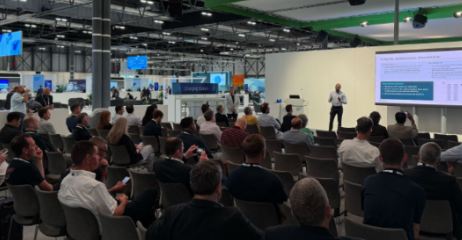
Dharmesh Patel spoke at SAP Sapphire Madrid about how RS Group now manages over one million global customers using RunMyJobs by Redwood for supply chain optimization on SAP via Amazon Web Services (AWS). The company runs approximately 150,000 executions per day to cater to its key SAP business processes.
The packed house was captivated by Dharmesh’s success story.
Schneider Electric
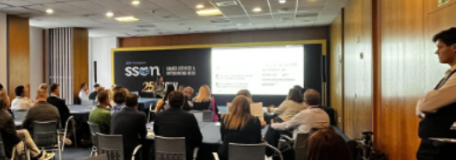
Schneider Electric showed us how to reshape the financial close and what an 80% reduction in manual effort looks like. Stefano Oliveri hosted a workshop at Shared Services and Outsourcing Week (SSOW) Europe, where he shared how the company moved from fragmented record-to-report (R2R) processes to integrated automation strategies. With Finance Automation by Redwood at the center, they saw 86% faster close tasks and increased compliance without increasing workload.
Redwood customers brought their expertise straight to the community this year through enlightening webinars and user group sessions. The major takeaway for 2025? It’s all about cost reduction and shifting focus from manual tasks to high-value strategy.
Sabari Swaminathan of Energy Transfer detailed how Finance Automation saved their accountants 45,000 hours annually, freeing them up for strategic analysis instead of time-consuming data entry. Watch the on-demand webinar here.
In a similar vein, Mary Shiena Johnson from Siemens Global Business Services showed exactly how Finance Automation cuts labor costs and accelerates the R2R close, proving the tangible financial impact for Siemens.
Our user groups were filled with practical insights from the true experts — the people using Redwood products every day. We saw great contributions from Srikanth Nellutla (CONA Services), Srinivas Udata (Corebridge Financial) and Sumit Sinha (HHS Technology Group) at the RunMyJobs and JSCAPE by Redwood sessions, helping the community learn best practices and accelerate their own automation journeys.
Don’t miss out on this collective wisdom — learn more about joining a user group.
A special thanks to our most engaged advocates
While every advocate’s effort makes a difference, we want to give a special nod to those who participated in an exceptional number of activities this year.
🏆Top advocates of 2025
Charles Sheefel from International Paper: Charles was deeply engaged this year, participating in multiple Customer Advisory Board meetings, speaking at our global kick-off and offering his insight in numerous conversations with customers and industry experts alike. Thank you!
Daniel Sivar from American Water Works: Daniel engaged in Customer Advisory Board meetings, spoke on the panel at our global kick-off, recorded a video testimonial and even took last-minute reference calls. We can’t thank you enough for the time and effort you’ve put in, thank you!
Darrin Ward from Energizer: Darrin has graciously lent his time and expertise for multiple reference calls and industry analyst conversations, plus internal feedback meetings that will help shape the future of Redwood. Thank you!
We are so grateful to all of our advocates for sharing their expertise and automation journeys this year. A heartfelt thank-you to all!
Join the movement in 2026
Your incredible efforts directly help other organizations see how Redwood’s automation fabric solutions can empower them to orchestrate, manage and monitor their mission-critical workflows.
We’re already planning for 2026, and we want you to be a part of it. Whether it’s in the form of a brief reference call, a quick case study interview or speaking on stage, every contribution makes a difference. Interested in sharing your Redwood success in 2026?
Siloed point solutions are just patching the cracks. It’s time for a platform-first strategy.
Your finance and accounting SaaS tools were supposed to make finance more efficient. Instead, they’ve created complexity, disconnected workflows and competing systems that are time-consuming and don’t talk to each other. You may have adopted reconciliation, journal entry and intercompany software, but none of them address the full scope of end-to-end automation. Instead, they create the need for additional automation tools and more manual effort.
It’s time to rethink the patchwork. Learn how a platform-first strategy solution like Finance Automation by Redwood offers something different: true automation that executes your accounting and finance functions, not just tracks them.
The trap of fixing problems one tool at a time
You likely didn’t set out to build a fragmented tech stack. But when you look at your finance automation tools today, do you see a streamlined process or a collection of isolated fixes?
This happens when teams search for a solution for a problem, not a solution to the problem. You need to automate account reconciliations, so you buy a tool. Then you add another tool or module for journal entries and additional automation tools for the unaddressed manual effort. It’s logical in the moment — but over time, it creates silos.
Instead of simplifying your financial close, this approach leads to disconnected systems, inconsistent validation and more complicated audits that require constant oversight.
According to the 2025 SSON R2R automation playbook, 76% of finance leaders say automation is critical to transformation, yet only 33% have strong executive support to scale it. The results? Projects stall. ROI suffers. And finance ends up stuck in a loop of disconnected tools that never quite deliver.
It’s a familiar pattern where good intentions lead to a pile of shelfware, disconnected workflows and a finance tech stack that resembles more of a SaaS graveyard than a unified strategy.
The SaaS graveyard: When financial point tools create more problems than they solve
Most SaaS tools promise to eliminate manual work. In reality, many just shift the burden elsewhere and require you to manage handoffs between them. You might use one system for reconciliations, another to validate journals and a third to execute SAP closing tasks. But without orchestration, you’re the one bridging the gaps.
SSON’s research highlights the disconnect: 81% of finance leaders believe journal entries are highly automatable, yet just 54% have made progress. Even more telling is that only 13% are satisfied with the ROI of their financial automation solutions.
So, what’s missing? Many of these tools were built for compliance, not execution. They track approvals or store documentation but don’t handle the actual work. They weren’t designed for seamless integration or built to automate end-to-end processes across the close. That’s what sets Finance Automation apart. The platform executes tasks inside your SAP systems and minimizes your reliance on separate systems to enable faster, more accurate decision-making and capacity release to support your business needs.
When tools don’t talk to each other, finance loses visibility
Each tool introduces a new data model, interface and set of permissions. You might reconcile account balances in one system, prepare reports in another and track their status in a standalone checklist. Meanwhile, your SAP contains the truth, but your dashboards aren’t in sync.
Disconnected tools create data silos and force your accounting and finance teams to align information manually across systems. This delays reporting, increases risk and undermines confidence in your numbers.
Finance Automation eliminates this fragmentation by embedding execution and validation inside your accounting and finance systems to provide a consistent, audit-ready view of every close task and its current status.
The longer you try to squeeze more value out of disconnected tools, the deeper your organization sinks into its own SaaS graveyard.
The costs you didn’t budget for
Task-level point solutions may seem cost-effective, but their hidden costs add up fast:
Building and maintaining custom integrations
Continuous onboarding and training across platforms
Delays in processing time and misaligned dependencies
Duplicate effort from manual data entry and rework
Inconsistent data and risk exposure across disconnected systems
SSON’s 2025 data confirms it. 88% of organizations report moderate or lower satisfaction with their automation ROI. Fragmented tools are a major reason why. However, Finance Automation avoids this spiral by offering a scalable automation model — no per-user fees and no per-task charges — just unified, coordinated execution across your accounting and financial processes.
What a platform-first strategy really looks like
A true automation platform doesn’t just plug gaps. It optimizes how you run finance. Finance Automation unifies fragmented business processes across your people, processes and technology, encompassing the entire record-to-report (R2R) process, into one connected solution.
Here’s what that looks like in real time:
Configurable controls to support multi-entity, multi-region finance teams
Coordinated, rules-based workflows that link one step to the next
Live views that show current status, bottlenecks and ownership
Native SAP execution
One shared data model for financial operations, tasks and compliance records
Instead of managing work, Finance Automation completes it. Instead of tracking outcomes, it delivers them.
Move from tactical fixes to strategic execution
Some accounting and finance teams confuse adoption with impact. If your automation is still dependent on people to push it forward by having them launch jobs, confirm steps and update dashboards, you’re still running the process manually. You’ve just added more interfaces.
Finance Automation takes a different approach. It removes manual intervention by design. The platform handles execution in SAP, tracks validation and results automatically and empowers your team to focus on what matters: analysis, strategy and making faster, smarter strategic decisions.
Instead of plugging gaps with more tools, Finance Automation helps you orchestrate your tech stack across people and processes to streamline your R2R operations with consistency and clarity.
Ready to push beyond the SaaS graveyard?
If your tech stack is full of disconnected financial and accounting software and your results still depend on manual processes, it’s time for a new approach. Finance Automation’s platform-first strategy gives you the execution power and scalability that task-level point tools can’t.
Instead of reacting to inefficiencies, you can start removing them. Instead of working around delays, you can eliminate them. And instead of managing a graveyard of SaaS, you can finally build the foundation for modern, connected finance.
Curious what your tech stack is really costing you? Explore the ROI of an end-to-end finance automation platform built to scale.
For many organizations, the first wave of AI delivered what amounted to speed upgrades: faster content, faster insights, faster answers. These early wins have been real, but they haven’t fundamentally changed the way work moves across the enterprise.
As soon as teams began trying to extend AI beyond isolated tasks — past the browser tab, outside the development environment or into workflows that cross departments — progress stalled. The models were perfectly capable, but in most cases, the enterprise wasn’t ready to support them.
AI today largely operates in silos:
Summarizing a document in one tool
Generating a draft in another
Answering a question inside a chat window
Those applications are useful, yes. But transformational? No. And certainly not autonomous.
The next phase of AI will operate very differently. Agentic AI promises to reason, plan and participate in the work, not just advise on it. For any AI system to influence real business processes, the organization must first create the environment to support it.
It’s critical to build a foundation for the next decade of AI to operate with clarity, coordination and control.
Why leaders often think they’re ready
When AI experiments stall, the reflex is to look at the model.
Should the prompt be rewritten?
Should the model be retrained?
Should the team switch providers?
In fact, most AI slowdowns have nothing to do with model quality. They’re caused by the operational surface the model enters. Across enterprises, the same foundational gaps appear again and again, regardless of industry or scale.
Work happens in silos. AI has no shared control layer. Automations, scripts, SaaS workflows and departmental tools all run independently. This fragmentation increases the likelihood of “shadow AI” — and the blind spots in security and cost that come with it.
Every department uses different guardrails. Access, approvals and policies vary wildly across teams. AI simply can’t follow rules that don’t exist consistently.
Workflows assume predictability, but reality doesn’t. Static, rule-based logic breaks the moment conditions change. AI becomes another exception handler instead of a force multiplier.
Leaders lack cross-system visibility. Throughput, failures, bottlenecks and downstream impacts are scattered across tools. You can’t operationalize intelligence you can’t see.
These gaps don’t make agentic AI unrealistic, but they reveal what’s missing. To safely give AI the ability to plan and act, enterprises need coordination, governance, adaptability and visibility working together under a unified orchestration approach.
Before autonomy: The architectural fundamentals
Across enterprises making real progress toward AI readiness, one theme is clear: they’ve perfected the architecture underneath the model. These organizations are doing more than just experimenting with clever tools. They’re building the conditions for intelligent systems to operate safely and consistently.
Unification: One orchestration layer to coordinate the work
Imagine an AI system evaluating a delivery delay. It checks order data in one application, inventory in another, customer records in a third and workflow timing in a fourth. Without orchestration, those steps become disconnected guesses. With it, they become a single, synchronized, visible and aligned action path governed by business rules.
A unified layer provides the control plane that keeps all forms of work — human, automated or AI-assisted — moving in the same direction.
Boundaries: Guardrails for scaling intelligence — not risk
Guardrails vary in format, but they all answer the same question: What is safe for this system to do? Instead of a long list, the most effective enterprises keep it simple with:
Actions that are always permitted
Actions that require verification or approval
Actions that are never allowed
When these rules are applied consistently across departments, intelligent behavior becomes predictable. AI stops guessing how decisions should work and starts following the same standards everyone else does.
Transparency: Governance that keeps humans in control
As soon as automation can influence workflows, visibility becomes non-negotiable. Leaders need to see how a decision unfolded, what it touched and why it behaved the way it did. That requires:
Observability into processes
Clear documentation of decision paths
Audit trails that withstand scrutiny
The ability to unwind or adjust actions when needed
Governance turns autonomy into something accountable, rather than opaque.
Coexistence: A blended environment of deterministic and dynamic automation
Enterprise leaders sometimes assume they must choose between traditional automation and AI-driven adaptability, but the highest performers do the opposite. They preserve their deterministic backbone: the scheduled workflows, validations and rule-based logic that keep operations steady. Then, they layer adaptability where variability actually occurs.
In other words, it’s reinforcement, not replacement. Rule-based processes handle what is predictable, adaptive decision loops handle what isn’t and orchestration brings the two together.
How experimentation becomes an operating model
AI experimentation is happening everywhere at once. Marketing might test a summarization tool, Finance could be exploring anomaly detection and Operations may pilot an automation assistant. The activity is high, but the impact is uneven. Some pilots work, others stall and many echo work already happening elsewhere in the organization.
What’s missing is structure. Modern AI only becomes meaningful when it’s connected, governed and repeatable. That requires shifting from scattered experimentation to an operating model that gives every team the same foundation to build upon.
The transformation underway resembles the moment when analytics matured from isolated dashboards into full data platforms. AI is undergoing a similar transition. What begins as a collection of tools eventually becomes an operational discipline shaped by shared infrastructure, shared controls and shared context.
In practice, this means we have to start thinking differently about how AI gets introduced and supported. Investment decisions move away from individual tools and toward foundational capabilities that every team can rely on, like interoperability and visibility. Talent evolves as well, with roles focused on designing supervised automation, not just building models in isolation.
Metrics also expand. Instead of measuring AI success through cost savings alone, executives are beginning to track the health of end-to-end processes: throughput, order delivery rate, consistency, service quality and customer satisfaction, for example. These are the signals that show whether the enterprise is truly becoming more adaptive.
Risk posture changes, too. Rather than waiting for AI to cause a problem, leaders establish guardrails and safety patterns before AI touches a core workflow. True autonomy starts with boundaries.
This evolution marks a larger shift: the move from experimenting with AI to preparing the enterprise for it. When you treat orchestration and governance as shared capabilities instead of departmental add-ons, innovation becomes faster, safer and easier to scale. AI moves from being something scattered teams try out to something the entire organization can trust.
What agentic orchestration will unlock (when the foundation is ready)
Agentic AI at scale remains a future capability, but the directional value is already clear. Once you have orchestration, governance and interoperability in place, you can unlock an entirely new class of capabilities:
Systems that adapt faster than conditions can destabilize them
Cross-system decision-making that reflects real business context
Self-service interactions where users request outcomes, not workflows
Operations that continue running even when inputs, timing and exceptions change
Insight that spans applications, dependencies and data in motion
Your teams can gain a level of clarity, context and control that may be elusive today.
The advantage will go to those preparing now
Organizations making progress toward autonomous operations share a common pattern. They’re not racing toward agentic AI, but building the scaffolding that will support it.
That means they’re:
Consolidating automation under a unified orchestration layer
Strengthening governance to define how decisions and actions occur
Insisting on interoperability across systems and tools
Using AI assistance to improve deterministic workflows
Piloting new AI patterns in controlled, low-risk environments
Defining KPIs that reflect throughput, delivery, consistency and service quality
Preparation accelerates innovation, creating an environment where AI can be introduced safely, evaluated clearly and scaled confidently. Enterprises that begin now won’t just be ready for agentic AI. They’ll be structurally positioned to benefit from whatever comes next.
To explore the now, next and beyond of AI, read “The autonomous enterprise” and get a deeper look at how orchestration, governance and preparation shape the path to more intelligent operations.
In conversations with operations, IT and architecture leaders, one question comes up most frequently: “What makes a SOAP different from our scheduler or iPaaS — and why should we invest now?”
It’s a fair question. And the answer isn’t just focused on why you should add another automation tool. Instead, considering a Service Orchestration and Automation Platform (SOAP) means you’re ready to think about the operational model behind how work moves across your organization.
A scheduler triggers tasks, an iPaaS connects applications, but a modern SOAP coordinates end-to-end business processes across systems, teams and environments in a way that maintains reliability at enterprise scale. That difference shows up directly in operational resilience, business agility and cost control.
The 2025 Gartner® Critical Capabilities for SOAP report is the clearest framework I’ve seen for tying platform strengths to financial outcomes. Here’s how I help leaders like you use that framework to build a credible business case.
The framework: Mapping Use Cases to your P&L
The Critical Capabilities report doesn’t start with architecture diagrams or methodology. It starts with how platforms perform against five operational Use Cases, each representing a measurable part of your business. I find these especially useful because they line up almost perfectly with the major categories of cost, risk and productivity that executives care about:
Operational resilience
Business agility
Cost optimization
Risk management
Speed to insight
Instead of thinking of them as technical buckets, think of them as the five pillars that determine whether your automation investments actually return value. A SOAP that scores well across all five transforms automation from a technical initiative into an engine for enterprise performance.
Pillar 1: IT workload automation and the ROI of unbreakable operations
The business challenge: A pervasive pattern I see is IT teams stuck in a reactive mode. Excessive time is spent on firefighting and manual monitoring, which draws focus away from strategic process improvement. This reactive posture results in costly consequences, including missed service-level agreements (SLAs), silent failures in critical overnight processes and a constant backlog of expensive incidents.
What this Use Case measures:
Gartner considers this the foundation of SOAPs: Can the platform run critical workloads reliably across hybrid and multi-cloud environments? Think financial close, inventory syncs, regulatory reporting — with real-time awareness and automated recovery. This means it must offer dependency management that understands system context, recovery paths that prevent cascading failures and observability that lets operators diagnose and resolve issues quickly.
Where the ROI shows up:
Reduced downtime costs: Preventing failures before they hit the business
Lower operational overhead: Fewer hours spent monitoring or intervening
Strategic consolidation: Eliminating multiple schedulers, licenses and skillsets
This is the first place most organizations find real cost savings, because reliability is expensive when you’re compensating for it manually.
Pillar 2: IT workflow orchestration and the value of cross-team agility
The business challenge: Most delays don’t come from individual tasks. They come from the handoffs: the approvals that get stuck in someone’s inbox, the data that wasn’t validated, the system that didn’t trigger the next step. Teams often automate inside their own domains but leave the gaps between them unmanaged.
What this Use Case measures: Gartner looks at how well a SOAP can coordinate entire processes, not just tasks:
Orchestration spanning on-premises and cloud environments
Where organizations see ROI:
Shorter cycle times: End-to-end processes move without waiting on human intervention
Higher throughput: Fewer restarts, errors or duplicate work
Greater adaptability: Workflows that adjust as business requirements change
The payoff is simple: people get hours back. Not to mention, change doesn’t feel risky anymore.
Pillar 3: Data orchestration and the payoff of faster, smarter decisions
The business challenge: Analytics teams can only move as fast as the data feeding them. Many organizations are still juggling multiple disjointed ETL solutions, insecure file transfers or inconsistent handoffs between systems. The result is predictable: delays, inconsistent data and missed windows for decision-making.
What this Use Case measures:
Gartner evaluates a SOAP’s ability to orchestrate reliable, governed data pipelines:
Event-driven movement from systems like SAP to data warehouses like Snowflake
Managed file transfers with dependency tracking
Data validation, reconciliation and exception handling
Automated triggers to BI, AI or other downstream applications
Where organizations see ROI:
Faster time-to-insight: Data arrives validated and on time
Improved compliance: Centralized audit trails remove the risks of custom scripts with no single source of truth
Eliminated bottlenecks: Analytics teams spend less time waiting and more time analyzing
This is where organizations often unlock value they didn’t realize they were losing.
Pillar 4: Citizen automation and the advantage of empowered teams
The business challenge: IT teams become bottlenecks when every routine request — from report generation to onboarding steps — has to be manually actioned. The backlog grows and the business slows.
Yet handing automation directly to business users without governance isn’t an option.
What this Use Case measures: Gartner evaluates this capability by looking at how well a platform can distribute automation safely without losing control. It’s essentially a test of whether your Operations team can create guardrails that let business users trigger approved workflows on demand without introducing risk. A strong score here reflects a platform that supports low-code execution, reusable templates and full auditability, so non-technical users can initiate routine actions while IT retains oversight. This Use Case ultimately measures how effectively a SOAP can push automation closer to the edge of the business without allowing fragmentation or shadow IT to creep back in.
Where organizations see ROI:
Faster turnaround: Teams get what they need without waiting days or weeks
Reduced IT ticket volume: Freeing technical staff to focus on higher-value work
Fewer errors: Standardized workflows eliminate risky and error-prone manual steps
When done right, citizen automation is not “shadow IT.” It’s a controlled extension of enterprise automation.
Pillar 5: DevOps automation and the competitive edge of continuous delivery
The business challenge: Software teams often automate their CI/CD pipelines but leave the surrounding processes — environment provisioning, test data setup, dependency coordination — untouched. Those manual steps are what slow releases and introduce inconsistencies.
What this Use Case measures: For DevOps automation, Gartner focuses on how deeply the platform can integrate into modern delivery pipelines and how reliably it can coordinate the steps surrounding deployment. It’s about assessing whether automation can move at the same pace as engineering, from provisioning and testing to promotion and release. High-performing platforms demonstrate support for automation-as-code practices, event-based triggers and consistent orchestration across environments. Use these parameters to gauge a provider’s ability to remove bottlenecks from the software lifecycle so teams can deliver changes quickly without compromising reliability or governance.
Where organizations see ROI:
Shorter release cycles: Faster, safer path from commit to production
Higher developer productivity: Fewer manual tasks around the deployment lifecycle
More reliable deployments: Consistency enforced across environments
A scheduler reduces manual effort, whereas a SOAP reduces friction across your entire operating model. When a single platform delivers across all five Gartner Use Cases, you’re not just buying automation capabilities — you’re buying:
Fewer outages
Faster decisions
Higher team velocity
Lower integration costs
Stronger risk posture
A future-proof automation foundation
This is the business case every CFO wants: clear outcomes tied to operational, financial and strategic value. The next time you evaluate platforms, don’t ask, “What does it automate?” Ask, “Where does it impact my P&L?”
That’s the difference between a tool and a transformation partner.