I’ve spent most of my career working closely with SAP customers who are running complex, automated landscapes. Over time, one challenge has kept coming up in different forms: operations teams don’t lack data — they lack context.
As automation grows across SAP and non-SAP systems, there’s a risk that operational visibility becomes fragmented. Process and transactional execution data lives in one place, application health in another and incident handling somewhere else entirely. When something goes wrong, teams may spend more time switching tools than actually resolving the issue.
That’s why, as SAP Product Lead, I was personally committed to shaping how RunMyJobs by Redwood integrates with SAP Cloud ALM. The goal wasn’t to add another dashboard, but to make sure SAP operations teams can see what matters, from where they already work.
Transparent observability across SAP and automated workloads
Traditional monitoring happens in individual tools and is good at telling you that something failed. True observability helps you understand why, whether it matters and how and where to access the issue for resolution.
In SAP-centric environments, SAP Cloud ALM is increasingly becoming the control center for operations, especially for RISE with SAP and cloud-focused landscapes. It provides health monitoring, alerting and root-cause analysis across applications and services.
As automation and orchestration become a core part of how SAP business processes run, extending that same level of transparency to automated workloads is a natural evolution. RunMyJobs contributes execution-level insight for background jobs and workflows that support SAP processes, making that information available and actionable directly from a single point of control — within SAP Cloud ALM — and expanding its operational visibility beyond application-level monitoring.
What the SAP Cloud ALM connector for RunMyJobs does
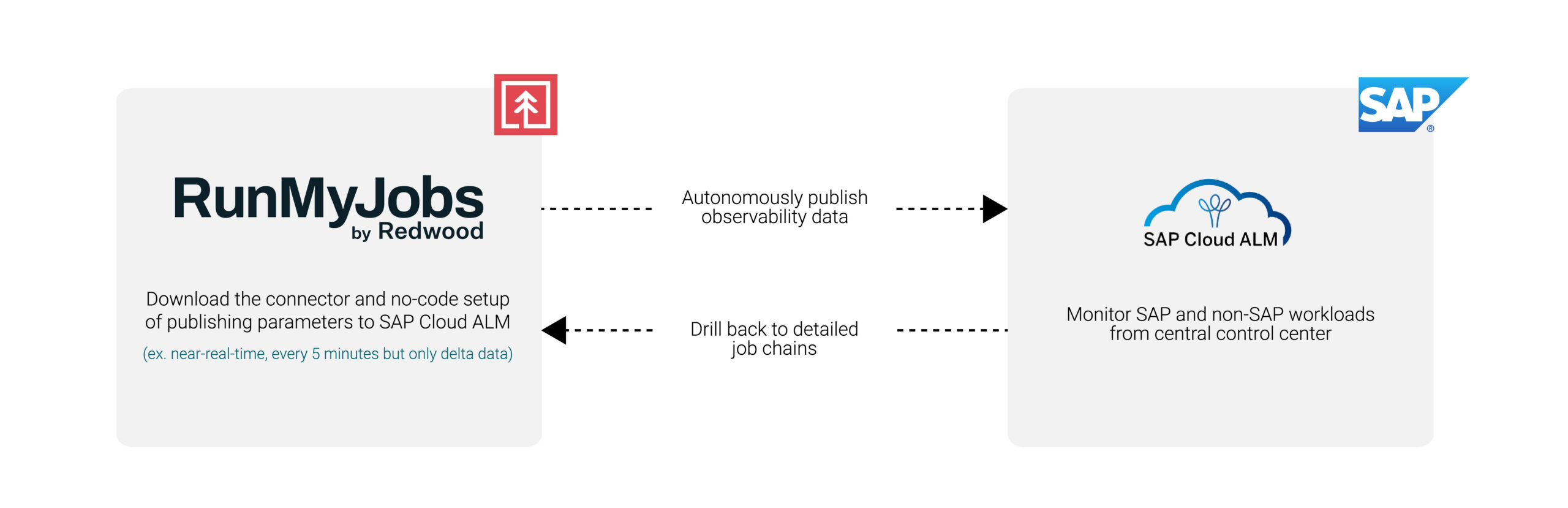
The SAP Cloud ALM connector for RunMyJobs synchronizes automation and orchestration data directly into SAP Cloud ALM Job and Automation Monitoring.
In practical terms, this means:
Job definitions, workflows and execution status from RunMyJobs are pushed into SAP Cloud ALM
Operations teams can monitor SAP and non-SAP background processes in one place
Failures, delays and abnormal statuses are visible without switching tools
It’s easy to drill back from SAP Cloud ALM to RunMyJobs to take action and resolve issues
You get a single operational view inside SAP Cloud ALM, eliminating the need to jump between systems to understand health, performance and where issues need to be resolved.
The impact on day-to-day operations
For SAP operations teams, the integration reduces friction in a few concrete ways:
Faster triage: Job failures and workflow bottlenecks are visible where incidents are already managed.
Less context-switching: No need to check separate tools just to confirm job status.
Clear accountability: Automation health is part of the broader SAP operational picture.
This is especially useful for customers standardizing on SAP Cloud ALM as they move further into cloud operations.
Setting up the integration
The setup is designed to be simple and aligned with how SAP operations teams work.
From the RunMyJobs side, configuration consists of:
Installing the SAP Cloud ALM connector from the RunMyJobs Connector Catalog
Setting up the connection to SAP Cloud ALM with its endpoint and authentication parameters
Scheduling the SAP Cloud ALM synchronization job provided with the connector, with the option to define a custom schedule for synchronization updates (e.g., every five minutes)
Once configured, RunMyJobs automatically synchronizes job definition and job run data to SAP Cloud ALM on an ongoing basis. No manual exports or custom monitoring scripts are required.
SAP Cloud ALM becomes the command center, while RunMyJobs remains the orchestration system.
In the demo below, you’ll see:
How to install the SAP Cloud ALM connector from the RunMyJobs Connector Catalog
How to set up the connection to SAP Cloud ALM
How to schedule the SAP Cloud ALM synchronization job provided with the connector
How RunMyJobs jobs appear in SAP Cloud ALM monitoring views
How operators can access RunMyJobs directly from SAP Cloud ALM with a simple click to initiate deeper analysis and resolution
Bridge the visibility gap
Extending SAP Cloud ALM to include automation workloads acknowledges the evolution of SAP landscapes into hybrid cloud, AI-enabled ecosystems, where automation is foundational and orchestration is key.
This connector is another representation of Redwood Software’s long history as a roadmap-aligned, SAP Endorsed App partner. It enables SAP customers to bring automation execution transparency into SAP Cloud ALM in a way that feels native, operationally consistent and easy to adopt.
Ready to enhance observability even further? Explore more updates released in RunMyJobs 2026.1.
ETSY Store Automation : Achieving High ROI with Boho Dog Art and AI Workflows
The solution utilizes Make.com to connect five key platforms into three distinct automation scenarios:
Leonardo.ai: For high-quality AI image generation.
Google Drive: Serves as the central storage and “command centre”.
Metricool: Manages multi-platform social media auto-posting.
Printify & Etsy: Handles product creation, fulfillment, and sales.
——————————————————————————–
2. Technical Implementation (Make Scenarios)
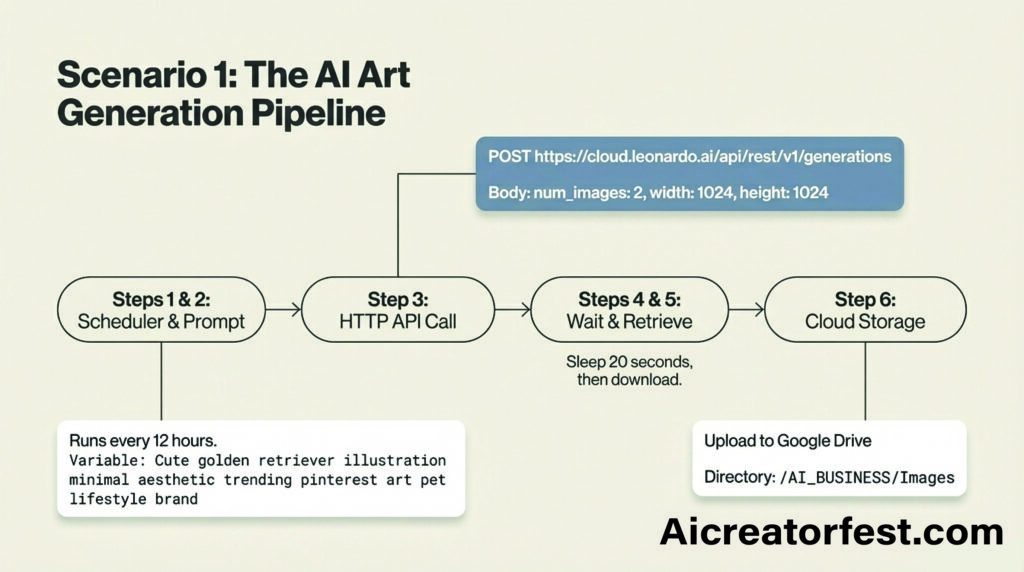
Scenario 1: AI Image Generation (Leonardo to Google Drive)
Trigger: A Scheduler runs every 12 hours.
Action: Uses an HTTP Module to call the Leonardo API with a pre-set prompt (e.g., “Cute golden retriever illustration minimal aesthetic”).
Output: Generates two images, waits 20 seconds for processing, and automatically downloads and saves them to a specific Google Drive folder (/AI_CONTENT/Images).
Scenario 2: Social Media Auto-Posting (Google Drive to Metricool)
Trigger:Google Drive “Watch Files” detects new images in the generation folder.
Captioning: An OpenAI module generates a relevant Instagram/Pinterest caption with emojis and hashtags based on the image.
Execution: The image and caption are sent to Metricool, which automatically schedules posts for Instagram, Pinterest, TikTok, and YouTube Shorts.
Scenario 3: Etsy Product Pipeline (Google Drive to Printify)
Trigger:Google Drive “Watch Files” monitors a manual folder (/Product_Designs).
Action: Once the client moves an image here, the system uploads it to Printify.
Execution: The system creates a product (e.g., Poster, Sticker, or T-shirt) and automatically publishes the listing to the connected Etsy store.
——————————————————————————–
3. Client Daily Workflow
The system is designed to minimize manual labor, requiring only 2 minutes of effort per day:
Open Google Drive to review the latest AI-generated images.
Move the best designs from the automated /Images folder to the /Product_Designs folder.
The automation takes over, immediately creating and publishing the Etsy product.
——————————————————————————–
4. Return on Investment (ROI) Analysis
Metric
Value
Initial Investment
$250 (Project setup cost)
Daily Time Commitment
2 Minutes
Human Labor Savings
Replaces hours of manual prompting, image downloading, caption writing, social scheduling, and product listing creation.
Content Output
Continuous social media presence across 4+ platforms (IG, Pinterest, TikTok, YT Shorts).
Revenue Potential
Automated “Print-on-Demand” pipeline to Etsy, allowing for rapid scaling of product catalogs without inventory risk.
Summary of Value: For a one-time setup fee of $250, the client receives a fully automated business engine that generates assets, markets them across social media, and lists them for sale, requiring only a few moments of daily oversight.
——————————————————————————–
I can also create a tailored report or a slide deck if you would like a more formal document to present this solution. Would you like me to do that?
Please create a tailored report for the solution
I would like you to create a formal slide deck
How can we scale this for more Etsy product types?
ROI ETSY Store Automation write complete case studies
Case Study 1: The $250 MVP Automation Pipeline
Objective: To establish a functional Etsy store and content engine with a one-time setup budget of $250 and near-zero daily maintenance.
The Solution: The system uses Make.com to link Leonardo.ai, Google Drive, Metricool, and Printify into a cohesive pipeline.
Automated Art Generation: A scheduler triggers Leonardo.ai every 12 hours to generate two high-quality images (e.g., “Boho golden retriever illustration”) based on a pre-set variable. These are automatically saved to a brand folder in Google Drive.
Social Media Synergy: Once a new file is detected in Drive, an OpenAI module generates a caption with relevant hashtags/emojis and sends it to Metricool. This ensures a continuous presence on Instagram, Pinterest, TikTok, and YouTube Shorts without manual posting.
Simplified Product Creation: The business owner performs a single manual task: moving the best AI-generated designs into a /Product_Designs folder. This movement triggers the Etsy Product Pipeline, which uploads the image to Printify, creates a product (e.g., a sticker or poster), and publishes the listing to Etsy with AI-generated SEO tags.
Return on Investment (ROI):
Time Savings: The owner’s daily effort is reduced to just 2 minutes, spent reviewing and moving files.
Operational Efficiency: The system replaces the need for a graphic designer, social media manager, and e-commerce assistant.
Scalability: For a fixed $250 investment, the store can scale its catalog indefinitely as the automation generates and lists new products daily.
——————————————————————————–
Case Study 2: Data-Driven Growth and Customer Lifecycle Automation
Objective: To move beyond simple posting by using automated engagement and analytics to create a self-optimizing growth loop.
The Solution: This advanced implementation focuses on the External User Journey and performance data.
Automated Engagement: The system performs hashtag searches (e.g., #dogmom) and automatically likes or follows relevant users to drive traffic back to the brand profile.
Performance Detection: The automation monitors social metrics like Pinterest saves and Instagram likes. If a specific design shows high engagement, the system automatically marks it for product creation on Etsy.
Continuous Optimization: Every night, an AI analysis module evaluates which styles (e.g., “Boho dogs vs. cartoon dogs”) convert best. It then automatically updates future prompts to focus on the highest-performing aesthetics, such as “warm neutral minimalist wall art”.
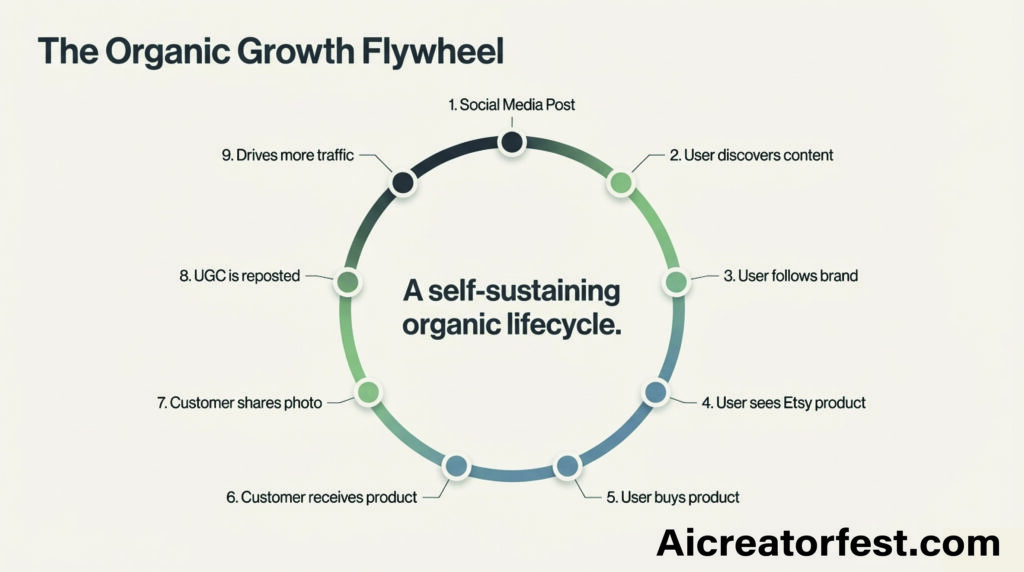
The Growth Loop: A user discovers a post on social media, visits the profile, clicks the Etsy link, and makes a purchase. This purchase triggers a fulfillment flow (Etsy → Printify → Customer), and the resulting user-generated content is reposted to drive further organic traffic.
Return on Investment (ROI):
Conversion Optimization: AI-driven prompt updates ensure the store always produces content that trends, increasing the conversion rate of social traffic to sales.
Maximized Visibility: Automated engagement keeps the brand top-of-mind for potential customers on multiple platforms.
Minimal Oversight: Despite the complexity of the data analysis, the business owner only spends a total of 5 minutes per day checking dashboards and approving new listings
Boho Golden Retriever Poster – Dog Lover Gift – Minimalist Pet Wall Art
7. SOCIAL ENGAGEMENT AUTOMATION
Another scenario runs to grow accounts.
Step 1: Hashtag Search
Example:
#dogmom
#veganrecipes
#spiritualawakening
Step 2: Automated Engagement
System performs:
like posts
save posts
follow users
comment occasionally
Example comment:
This is beautiful! 🐾
Limits ensure accounts stay safe.
8. ANALYTICS USER JOURNEY
Every night the system evaluates performance.
Metrics collected:
Likes
Comments
Shares
Clicks
Sales
Step 2: AI Analysis
AI determines:
what styles perform best
what colors convert
what topics trend
Example output:
Insight:
Boho dog art performs 3x better than cartoon dogs
Step 3: Prompt Optimization
Future prompts change automatically.
Example:
Old prompt
Cute dog illustration
New prompt
Boho golden retriever illustration
warm neutral aesthetic
minimalist wall art style
This creates continuous growth.
ETSY Store Automation
9. YOUR DAILY USER EXPERIENCE (BUSINESS OWNER)
Because everything is automated, your daily tasks are minimal.
Morning (2 minutes)
Open:
Make dashboard
Check:
scenarios running
errors
Midday (2 minutes)
Check:
Metricool analytics
Look for viral posts.
Evening (1 minute)
Check:
New Etsy listings
Approve or disable if needed.
Total daily effort:
5 minutes
10. CUSTOMER LIFECYCLE JOURNEY
Full lifecycle:
Social Media Post
        ↓
User discovers content
        ↓
User follows brand
        ↓
User sees Etsy product
        ↓
User buys product
        ↓
Customer receives product
        ↓
Customer shares photo
        ↓
User generated content reposted
        ↓
More traffic
This study guide provides a comprehensive overview of the financial and technical requirements for developing, deploying, and maintaining a WhatsApp AI automation system. It analyzes the one-time development costs, recurring software fees, messaging expenses, and professional service strategies associated with this technology.
1. Short-Answer Quiz
Question 1: What is the estimated total range for the one-time development cost of a WhatsApp AI automation system, and what factors influence this price? Question 2: List the specific tools required for the monthly software stack and their typical combined cost range. Question 3: How does WhatsApp determine the cost of messaging for businesses using its API? Question 4: Describe the three different service packages an agency might offer for development. Question 5: What are the three categories of WhatsApp conversations, and which is the most expensive? Question 6: What specific technical tasks are involved in the “WhatsApp API setup” and “Automation workflow” stages? Question 7: Name three optional add-on features that can be integrated into the system for an additional fee. Question 8: What services are typically included in a monthly maintenance or support contract? Question 9: Why can agencies justify charging between $3,000 and $8,000 for a system that costs significantly less to build? Question 10: What are the estimated monthly costs for the OpenAI API and Airtable within this system architecture?
——————————————————————————–
2. Answer Key
Answer 1: The estimated one-time development cost ranges from $1,000 to $2,000. This range is determined by the complexity of the project, including hours spent on API setup, workflow automation, AI integration, CRM setup, and appointment scheduling.
Answer 2: The required software stack includes Twilio (WhatsApp API), n8n Cloud, OpenAI API, Airtable, and a scheduling tool like Calendly. The combined monthly cost for these external tools typically ranges from $60 to $150, depending on usage and message volume.
Answer 3: WhatsApp charges on a per-conversation basis rather than per individual message. The specific price per conversation depends on the geographic region and the category of the conversation, such as marketing, utility, or service.
Answer 4: Agencies can package their services into three tiers: a Starter Automation System for approximately $1,200, an Advanced AI Assistant for $1,800, and a Full AI Customer Support System starting at $2,500. These tiers reflect increasing levels of complexity and functional depth.
Answer 5: The three categories are Marketing, Utility, and Service conversations. Marketing conversations are the most expensive, costing between $0.05 and $0.10, while Service conversations are the least expensive at $0.02 to $0.05.
Answer 6: WhatsApp API setup involves roughly 3–4 hours of work at a cost of 150–300. The automation workflow, utilizing tools like n8n or Make, requires 6–8 hours and costs between $300 and $600 to implement.
Answer 7: Optional add-ons include knowledge base AI training for $300, a multi-language chatbot for $200, and an analytics dashboard for $250. Other options include CRM pipeline systems and lead qualification AI.
Answer 8: Monthly maintenance, which typically costs between $100 and $500, includes monitoring automations to ensure they run correctly. It also covers fixing bugs, updating AI prompts to improve performance, and refining workflows.
Answer 9: Agencies can charge higher premiums because the system provides significant value by replacing the need for a human receptionist. The high price point reflects the return on investment for the client rather than just the hourly labor of the developer.
Answer 10: The OpenAI API is estimated to cost between $10 and $50 per month depending on the volume of AI-generated responses. Airtable, used as the CRM system, carries a flat monthly cost of approximately $20.
——————————————————————————–
3. Essay Questions
The Economic Value of Automation: Analyze how the replacement of a human receptionist with an AI automation system justifies the disparity between development costs (1,000–2,000) and agency retail pricing (3,000–8,000).
Scalability and Variable Costs: Discuss how the cost structure of a WhatsApp AI system changes as message volume increases, specifically referencing API fees and conversation-based pricing.
The Role of Integration in AI Ecosystems: Evaluate the importance of connecting different software tools (n8n, Airtable, OpenAI, and Calendly) to create a cohesive customer service experience.
Maintenance as a Revenue Stream: Explain why ongoing support and maintenance are critical for the longevity of AI automations and how this benefits both the service provider and the client.
Feature Prioritization in AI Development: Compare the utility of “Starter” systems versus “Full Customer Support” systems, detailing which features are essential for a basic setup and which provide advanced competitive advantages.
——————————————————————————–
4. Glossary of Key Terms
Term
Definition
Airtable
A cloud-based platform used in this system as a CRM to store and manage customer data and lead information.
Automation Workflow
The sequence of programmed steps (using n8n or Make) that routes data between the WhatsApp API, AI, and CRM.
Calendly
An appointment scheduling tool integrated into the system to allow customers to book meetings or services automatically.
CRM (Customer Relationship Management)
A system for managing a company’s interactions with current and potential customers; in this context, powered by Airtable.
Knowledge Base AI Training
An advanced feature where the AI is specifically trained on a client’s unique data to provide more accurate and relevant answers.
Lead Qualification AI
An automated feature designed to evaluate potential customers and determine if they meet specific criteria for a business.
Marketing Conversation
A category of WhatsApp interaction, often used for promotions, that carries the highest per-conversation fee (0.05–0.10).
n8n / Make
Workflow automation tools used to connect various software applications and APIs to create a seamless automated system.
OpenAI API
The interface used to integrate advanced artificial intelligence (such as GPT models) into the WhatsApp chatbot for natural language processing.
Service Conversation
A category of WhatsApp interaction usually initiated by a customer request, carrying the lowest per-conversation fee (0.02–0.05).
Twilio
A cloud communications platform often used to provide the infrastructure for the WhatsApp Business API.
Utility Conversation
A category of WhatsApp interaction related to specific transactions, such as post-purchase notifications or billing, costing 0.03–0.07.
Digital Workforce Services Plc invites its investors and analysts to an Investor Day on Thursday March 19, 2026 at 14-16 EET. Preliminary agenda of the day:
CEO Jussi Vasama will outline the company’s strategic priorities and the key 2026 objectives for its new business areas.
CFO Laura Viita will walk through the company’s financial performance and targets.
Karli Kalpala, Head of Strategy and AI Business, will present the company’s AI strategy, AI agent–driven product portfolio, and related partnerships.
Juha Nieminen, Chief Growth Officer of Healthcare business area, will discuss the healthcare automation market, growth outlook, and recent customer implementations.
The event takes place in Flik Studio Eliel, Sanoma House (address: Töölönlahdenkatu 2), and coffee will be served to participants before the program begins.
Participants attending on-site are kindly asked to register by Tuesday, 17 March 2026 via email to address finance@digitalworkforce.com.
The event will be held in English.
In addition to the on-site event, the session will be streamed live as a webcast starting at 14:00 EET. Participants will have the opportunity to submit questions to the speakers via the webcast platform’s chat function. The webcast link will be published on the company’s website prior to the event.
Legacy payment systems are deeply woven into the operations of most financial institutions. They’ve evolved through years of upgrades, integrations and regulatory adjustments. New payment methods were layered on, reporting tools were added and APIs were connected.
From the outside, everything appears functional, but there’s a false sense of stability.
The payments ecosystem has shifted dramatically. ISO 20022 standards, FedNow, Real-Time Payments (RTP), digital wallets and cross-border payments now operate alongside traditional batch settlement. Payment systems must coordinate richer transaction data, tighter fraud controls and more demanding customer experience expectations than ever before.
What strains first isn’t always the system itself but the workflow around it. That includes the reconciliation steps, exception handling and manual oversight. Plus, the integration logic that only a few people fully understand.
The financial cost of legacy infrastructure doesn’t typically arrive as a dramatic system failure. It shows up in slower decision-making, rising operational effort and growing governance pressure. For many institutions, payments modernization has become less about innovation and more about containing risk inside an increasingly complex payments landscape.
Why legacy payment systems create risk — even when payments still go through
It’s easy to argue against modernization when transactions continue to clear. Most legacy payment systems were built for a world with fewer payment rails, predictable transaction volumes and scheduled settlement windows. That model supported traditional banking well. Batch processing was aligned with end-of-day accounting, and integrations were limited and relatively stable.
Today’s payments ecosystem operates on a far different tempo. Financial institutions support real-time and faster payments alongside traditional rails. Customers expect multiple payment options, immediate confirmation and full transparency. Fintech partnerships can introduce new APIs and service dependencies. And cross-border payments often add regulatory complexity and data requirements.
Modern payment systems now sit at the intersection of:
Real-time and batch payment rails
Cloud-based and on-premises infrastructure
Fraud detection, authentication and liquidity management
Multiple providers within a broader payments ecosystem
Legacy infrastructure can often be extended to handle these demands, but each extension increases the density of the architecture. Payment systems that once felt straightforward become harder to troubleshoot, harder to scale and harder to govern.
Hidden risk #1: Manual reconciliation and fragmented payment experiences
Fragmentation is a persistent side effect of legacy infrastructure. Payment initiation may occur in one payment platform, settlement in another payment hub and reporting in a separate system. As new payment methods and instant payments are introduced, inconsistencies increase. Exception handling becomes routine. Operations teams spend growing amounts of time reconciling transaction data across systems.
Real-time payments have to align with batch-based accounting workflows that were never built for immediate execution. When routing rules, pricing structures or payment capabilities change, manual processes often bridge the gap. What looks manageable at low volumes begins to strain as transaction counts increase. At scale, even minor inefficiencies escalate quickly. A reconciliation process that once required limited oversight can become a daily operational constraint.
A well-designed modernization strategy standardizes workflows at the orchestration layer. Automation coordinates routing, validation and transaction data handling across payment rails. Instead of managing downstream exceptions, institutions streamline processing at the source to improve operational efficiency while strengthening control.
Hidden risk #2: Fragility inside legacy integrations and scripts
Many legacy payment systems rely on custom scripts, aging schedulers and point-to-point integrations built over years of incremental upgrades. These components often manage core functionality, including authentication, routing logic and handoffs between payment networks. They operate reliably until something changes.
Consider what happens when a new payment rail, such as FedNow, must be integrated quickly, or when ISO 20022 requirements expand required data fields. Perhaps transaction volumes spike during a seasonal peak, or a key engineer who understands the legacy routing framework moves on. None of these scenarios is unusual. Yet each one can reveal how tightly coupled and fragile the underlying integrations have become.
From a business perspective, the implications are tangible. Incident resolution takes longer because dependencies aren’t fully documented. Outage impact increases because workflows are interconnected in ways that aren’t immediately visible. Maintenance costs rise as teams devote more time to sustaining legacy technology rather than advancing modernization initiatives.
Centralized orchestration reduces reliance on isolated automation. Standardized APIs and scalable control layers reduce reliance on undocumented scripts. It’s possible to introduce new payment capabilities without amplifying structural risk.
Hidden risk #3: Limited visibility across the payments ecosystem
As payment methods and networks expand, visibility becomes a prerequisite for control, but many legacy payment systems were never designed to provide end-to-end observability. Real-time payments and traditional batch processing often run in parallel, monitored by separate tools. Payment hubs, core banking platforms and external service providers may each offer partial views of transaction data. When an issue arises, teams piece together the story manually. This lack of unified visibility negatively shapes how leaders manage liquidity, assess operational efficiency and evaluate customer experience.
They may find themselves asking basic but critical questions:
Where in the workflow did a delay occur?
How many transactions are exposed to a routing issue?
Is liquidity positioned correctly across payment rails?
Can we produce a complete audit trail without manual aggregation?
In a global and fast-moving payments environment, those questions need timely answers.
Effective payments modernization integrates monitoring directly into orchestration workflows. Unified dashboards, centralized logging and automated alerts provide a consolidated view across payment systems. With stronger visibility, financial institutions can move from reactive troubleshooting to proactive problem management.
Hidden risk #4: Expanding compliance and audit pressure
Regulatory expectations across financial services don’t remain static. Global standards, cybersecurity mandates, fraud prevention requirements and cross-border reporting obligations continue to evolve. At the same time, real-time payments generate continuous streams of transaction data that need to be captured and governed accurately.
In many legacy environments, compliance controls sit alongside payment systems rather than within them. Audit preparation may involve extracting reports from multiple platforms, reconciling inconsistencies and documenting manual controls. As payment complexity increases, so does the effort required to demonstrate control. And effort isn’t limited to audit season — it’s every day.
Teams spend additional time validating data integrity, confirming routing logic and ensuring reporting consistency across payment networks. Compliance timelines feel tighter because internal workflows are fragmented.
When modernization includes orchestration, governance can be embedded directly into the payment platform architecture. Automated logging, standardized routing and centralized reporting make compliance part of the operational fabric. Growing transaction volumes aren’t a problem, since control scales with them.
Hidden risk #5: Legacy systems constrain modernization efforts
Operational strain and compliance pressure are immediate concerns, but strategic constraints can be just as significant. Traditional banking systems often require substantial upgrades to support new payment technologies, open banking APIs or scalable cloud-based infrastructure. The perceived cost and disruption of those upgrades lead many to defer modernization.
Meanwhile, business strategy continues to evolve. Product teams want to launch new payment solutions and support emerging use cases across digital channels. Executives pursue fintech partnerships. Meanwhile, customer expectations around digital payments and instant confirmation continue to rise. Technical capability begins to lag behind strategic intent, which means friction increases and long-term competitive advantage gradually erodes.
An incremental payments modernization roadmap provides an alternative to large-scale replacement programs. By introducing orchestration layers that coordinate legacy systems with modern payment platforms, institutions can support new payment rails in parallel with existing infrastructure. Modernization can be phased and controlled, aligned with defined timelines and business priorities.
Turning hidden risk into a payments modernization roadmap
Legacy payment systems don’t typically collapse overnight. The warning signs are subtle: exception reports get longer, integration diagrams become more complex each quarter and compliance reviews require broader coordination. Teams devote more energy to maintaining workflows than refining them. Eventually, an external catalyst like a regulatory deadline accelerates change.
A structured payments modernization roadmap allows institutions to move deliberately rather than reactively. It clarifies where operational risk is concentrated within legacy infrastructure. It prioritizes workflows that would benefit most from automation and orchestration and supports real-time payments alongside traditional processes while strengthening governance across the payments ecosystem.
In the evolving future of payments, maintaining legacy systems can appear to be the safe, reasonable choice. But as payment networks expand and customer expectations rise, the greater exposure often lies in postponing modernization. Institutions that approach payments modernization incrementally and strategically position themselves to improve operational efficiency, strengthen control and build scalable, modern payments infrastructure.