Manufacturers have invested heavily in automation, and most will tell you it’s working. Uptime is good, dashboards are green. But ask them what happens when a supplier calls with a three-day delay or when a quality deviation surfaces mid-run. The answer is almost always the same: someone figures it out. Manually. Across a handful of systems and a few phone calls.
That pattern is exactly what Redwood Software’s “Manufacturing AI and automation outlook 2026” research confirms. Only about 40% of manufacturers have automated exception handling, yet 22% call it a top operational bottleneck.
I find that gap genuinely striking. The workflows that carry the most risk, the ones where a slow response costs you, are the ones most likely to depend on a person in the right place at the right time.
Automation stops at the system boundary
Most automation tools are built for predictable conditions: known inputs, fixed sequences and logic that lives inside one application. That works fine when everything goes to plan, but exceptions are the opposite of that.
Take a supplier delay. It doesn’t sit in your supply chain platform. It touches your production schedule, inventory positions, customer commitments — almost immediately. A quality deviation detected in your MES needs to reach your ERP for financial impact, feed into compliance tracking and trigger replanning. None of that happens in one system.
This is where a lot of automation strategies fall apart. The tools you’ve deployed were designed for steady-state operations. When an exception hits a system boundary, the automated response stops and a person picks it up. The orchestration doesn’t extend across systems, so humans become the connective tissue.
Point automation solves for execution within a single system. But exception handling requires the ability to detect a state change in one place, evaluate what it means in context and trigger the right sequence of actions across multiple systems in the right order. That’s orchestration, and most manufacturers haven’t built that layer yet. Instead, they’ve built siloed automation inside individual systems and informal coordination between them.
Manual exception handling also limits where AI can go. AI-driven tools in manufacturing depend on consistent, event-driven data across systems. When exceptions break that flow, or when a quality deviation sits unresolved in one system while others operate on stale context, the operational foundation AI needs simply isn’t there.
Manufacturers asking why their AI pilots aren’t scaling often find the answer in the gaps that manual exception handling creates. That connection between data flow maturity and AI readiness runs deeper than most automation roadmaps account for.
Running on schedules while exceptions don’t wait
Another research finding that stuck with me: roughly 78% of manufacturers have automated less than half of their critical data transfers. That’s a lot of data still moving on schedules.
The problem with scheduled data movement is that exceptions surface late. If your systems are syncing every few hours, you’re working with a picture of what happened, not what’s happening. By the time the exception shows up in the right system, the downstream effects — inventory misalignment, planning data out of sync, decisions made on stale information — are already in motion.
Event-driven workflows change that. When the exception occurs, it propagates immediately. Paired with well-defined SLA rules, which surface delays before they compound, the response starts before the damage has time to spread. That’s an entirely different operating model, not just a faster version of the same one.
Build your automation capabilities around orchestration rather than mere task execution, and you get end-to-end processes designed to handle conditional logic across systems rather than within them. It changes what your automation solutions can deliver.
Uptime is the easy metric. This is the hard one.
Here’s how I think about automation maturity: How much of your operation holds together when something goes wrong — without someone having to step in?
Early-stage automation gets individual tasks off someone’s plate. Mid-stage gets processes partially connected. But exceptions still route to people, because the automation wasn’t built to handle variability across systems. High-maturity organizations have extended automation into that gap: detecting exceptions automatically, triggering coordinated responses across ERP, MES and supply chain systems, without waiting for a human to notice and act.
A manufacturer that hums along under normal conditions but loses hours to manual firefighting every time something deviates is operating at a lower maturity than its uptime numbers suggest. KPIs like inventory turns and data accuracy lagging behind operational uptime, which we saw consistently in the research, are often a symptom of this exact gap.
Think about what happens during manual firefighting. Someone:
Identifies the exception
Figures out which systems are affected
Contacts the right people in each function
Waits for responses
Manually updates records across platforms
The outcome depends heavily on who’s available and how well they know the cross-system dependencies. Two people handling the same exception type can produce meaningfully different results. That inconsistency doesn’t show up on an uptime dashboard. But it does show up in inventory accuracy, planning reliability and, eventually, customer commitments.
Don’t treat disruption as an edge case
Exception handling often gets treated as something you’ll address after the core processes are running smoothly. The next phase, the future state, the thing on the roadmap after the bigger wins.
That sequencing is backwards. Your most critical workflows are also the ones most likely to break down under real conditions. Automating the steady-state version of those workflows and leaving the exception paths manual means your automation coverage is highest exactly where the stakes are lowest.
Automation metrics tell you what you’ve built for, but how your team handles exceptions tells you how well it works. It’s key to automate disruption as well as execution.
The full “Manufacturing AI and automation outlook 2026” goes deeper on exception handling, with benchmarks on automation maturity and common challenges in the industry. Read the full report.
Most agentic AI strategies start in the wrong place. They start with agents: how to build them, where to deploy them, how fast they can take over work. That instinct is understandable because the technology carries genuine transformative potential, and the business pressure to act on it is real. But it skips the harder question: what your enterprise is actually ready to support. And it overlooks what enterprises already have decades of encoded process intelligence that agents need to be worth anything in production.
We’ve been here before. When cloud arrived, the early playbook was lift-and-shift. The organizations that came out ahead paused and asked something different first: “How do our systems need to change to work in this new model?”
Agentic AI demands the same reframe, and the stakes are higher. Enterprises want to move fast on AI. What they don’t want is to find out later that speed came at the cost of control over the processes the business runs on. Getting both requires more than deploying agents.
Cloud gave you a decade to adapt, but agentic AI demands control from day 1
Announcing an agentic AI strategy and being ready for one are two very different things.
With cloud, most enterprises had years to figure it out. There was room to watch early adopters, learn from their mistakes and still close the gap. Agentic AI is unfolding differently and at a pace that makes the old timeline irrelevant. SAP alone has announced more than 200 agents and assistants spanning finance, procurement, supply chain, HCM and customer experience, all in a single product cycle. The window for “wait and see” is compressing in real time.
The market is progressing from co-pilots assisting individual users to agents executing discrete tasks to multi-agent systems operating across end-to-end business processes. Most enterprises are somewhere in the first two stages right now, running pilots, testing where agents can be trusted and working out how they fit into broader workflows.
But the coordination challenges that come next are already visible. As agents start touching the same systems and processes, questions about governance, dependency management and accountability don’t stay theoretical for long.
Who owns the outcome when agents are working across the same systems simultaneously?
What happens when one agent’s action invalidates another’s mid-workflow?
Most current strategies don’t have good answers to those questions yet, because the focus has been on getting agents deployed rather than on what governs them once they are.
The path to agentic AI runs through orchestration, not around it.
The real bottleneck? Execution, not intelligence
Every enterprise process an agent touches was built before agents existed, so it was designed for deterministic logic, human oversight and predictable inputs. Layering intelligence on top of that infrastructure adds a new source of complexity that the underlying systems have no way to absorb.
Agents can decide what to do. That part is getting easier every month. What they can’t do reliably is operate inside the constraints those systems were built around.
Ask an AI assistant to help close the books at month-end. It can summarize status and flag anomalies, but the moment it needs to trigger the intercompany elimination run, check whether the prior step completed successfully, wait on a dependency from a separate system and then kick off consolidation in the right sequence, it hits a wall. The business logic that governs how that process runs lives inside your enterprise systems, and it wasn’t written down last year. It was encoded over years of implementation, audit cycles and hard lessons. The agent has no reliable way to operate within it, and no way to reconstruct it on its own.
The same is true in the supply chain. An agent can analyze demand signals and recommend a replenishment order, but executing that recommendation means touching inventory systems, ERP planning runs, supplier APIs and warehouse management in a specific sequence, with specific dependencies and under specific business rules. One step out of order, and you’re looking at a broken process.
Enterprises run on deterministic, interconnected workflows built for consistency, compliance and predictability. AI models are probabilistic. They explore, reason and adapt, which is exactly what makes them useful. But because enterprise workflows follow defined paths, bringing those two worlds together requires more than giving agents access to your systems.
A model that can see your workflows isn’t the same as one that can reliably execute them. Without a controlled execution layer between the agent and the process, you end up with something that looks capable in a demo and falls apart in production.
What about legacy systems you don’t want to refactor?
For enterprises with mature ERP environments, legacy middleware or on-premises systems built over decades, the calculus is clear: you aren’t going to refactor SAP ECC, Oracle EBS or a 20-year-old mainframe process to “become agent-ready.” Nor should you.
This is where a protocol-based approach changes the equation. A well-designed MCP implementation allows those systems to surface what they know and what they can do to AI agents, without touching the underlying code. The agent doesn’t need to know that it’s talking to a legacy system; it just needs a consistent interface. The hard-won process logic, the business rules, the compliance controls, all of it stays in place. What changes is that agents can now reach it.
Consider what that means. The process logic inside a mature SAP ECC environment or a mainframe-based supply chain isn’t just code. It’s 20 or 30 years of business decisions, regulatory responses, exception handling and operational learning made concrete. That’s not a liability to modernize away. It’s institutional capital. A protocol-based architecture treats it that way: as something to expose and extend, not replace.
This is one of the most underappreciated advantages of a protocol-based architecture for enterprise AI. It doesn’t require you to modernize everything before you can start. It lets you extend agentic capability to the systems you already rely on, at whatever pace your organization can absorb.
Multi-agent systems need more than access
The moment multiple AI agents start interacting with enterprise systems without a control plane, the questions become very practical, very quickly:
Who orchestrates execution across agentic workflows?
How are dependencies enforced?
What happens when two agents act on the same process simultaneously?
How do you reconstruct an audit trail when decisions were made at machine speed across multiple systems?
The answers don’t come from the agents themselves. An agent optimizing a procurement workflow doesn’t know (and shouldn’t be expected to know) that another agent just put a hold on the same supplier for a compliance reason. Without orchestration, both actions proceed, and the impact is difficult to untangle.
The same force that makes agentic AI powerful — its ability to act quickly across systems — also makes it a new kind of liability when left ungoverned. Orchestration debt starts with the second agent you deploy. Most teams don’t feel it until the tenth, by which point the untangling is considerably more expensive than building the control layer upfront.
MCP is the right protocol — and the wrong place to stop
Model Context Protocol (MCP) solves a real and longstanding problem: how AI systems connect to enterprise tools and applications. Since Anthropic released it as an open standard in late 2024, adoption has been striking, with every major AI vendor now on board, more than 10,000 active public MCP servers and the protocol donated to the Linux Foundation’s Agentic AI Foundation to ensure it stays open and community-driven.
The breadth of enterprise investment reinforces why MCP matters. SAP has built MCP server support directly into its ABAP development environment, opening its core ERP ecosystem to the full agentic AI ecosystem. AWS has embedded MCP as the connectivity standard inside Amazon Bedrock AgentCore, its production platform for enterprise agent deployment. These aren’t experiments. They are architectural commitments from the largest enterprise software vendors in the world.
But understanding what MCP is and what it deliberately isn’t is critical for enterprise architects.
MCP is a connectivity protocol. It standardizes how agents discover and call tools, read data from systems and receive context. That scope is intentional. MCP was designed to solve the integration layer: the “M × N problem” of every AI model needing bespoke connectors to every enterprise system. It solves that elegantly.
What MCP doesn’t do — and doesn’t try to do — is orchestrate execution, manage dependencies, enforce sequencing or provide the governance layer that enterprise processes require. It gives agents a door into your systems, but it doesn’t control what happens once they walk through it.
It’s worth noting that a second protocol layer, Agent to Agent (A2A), is emerging to address how agents coordinate with each other. Where MCP governs what an agent can reach, such as tools, data and systems, A2A governs who an agent can call on: other specialized agents, orchestrator agents managing broader workflows or entirely external agent services operating outside your own environment. That means an agent handling a procurement exception can delegate to a compliance agent, escalate to a human-in-the-loop workflow or hand off to a third-party agent service, all through a standardized handshake rather than bespoke integrations.
SAP has drawn this distinction clearly in its AI Agent Hub: if an agent needs a resource, it uses MCP; if it needs another agent, it uses A2A. That separation is deliberate and important. Together, the two protocols create an agnostic and extensible fabric for enterprise agentic AI that doesn’t lock you into a single vendor’s orchestration model and accelerates how quickly new agents and capabilities can be added. Neither protocol was designed to govern what happens at the process execution layer underneath, though. Without that layer, connecting agents to your enterprise simply accelerates fragmentation: more actions, across more systems, with less control. That gap remains architectural, and it’s where enterprise implementations succeed or fail. The implications of A2A for enterprise orchestration deserve a longer conversation.
The market is arriving at this conclusion simultaneously
The ambition at SAP Sapphire 2026 was clear. SAP CEO Christian Klein launched the SAP Business AI Platform with a vision of the “Autonomous Enterprise, where agents run the business.” The platform encompasses agent development, agent governance and a reworked application portfolio built to make that vision real.
What Klein also acknowledged is the prerequisite that makes it possible: “No AI agent can compensate for a bad data landscape.” SAP’s own analysis is that agents fail when enterprise data is fragmented, inconsistent or trapped in disconnected systems. The ambitious 200-agent roadmap and the operational challenge are the same problem stated two different ways.
This is a validation of the underlying architecture question. The vendors who are most serious about agentic AI are the ones most clearly articulating that connectivity is necessary but not sufficient. The governance and execution layer is what determines whether agents deliver real business outcomes or just faster ways to create new problems.
The same principle applies one layer down. No AI agent can compensate for ungoverned process execution either. Data quality is the prerequisite for decisions. Process governance is the prerequisite for actions. SAP is right about the first. The second is what most agentic strategies still don’t account for.
RunMyJobs: The execution and control plane for agents
For over 30 years, Redwood Software has been the system of record for how enterprise work gets done. Not just automating tasks but encoding the business logic, dependency maps, exception rules and compliance controls that mission-critical processes run on. That institutional knowledge, accumulated across hundreds of enterprise environments, is what RunMyJobs by Redwood carries into the agentic era.
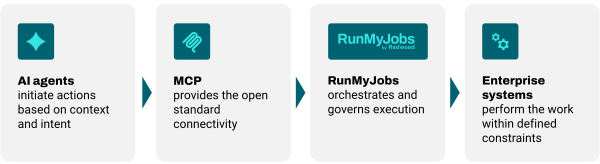
When an agent initiates an action through MCP, RunMyJobs becomes the execution layer behind it, orchestrating that action across systems, enforcing dependencies, handling exceptions and ensuring every step is observable and traceable. Agent-driven actions operate within enterprise guardrails, including the auditability and control required for SOX and other compliance frameworks.
Importantly, this works with the systems you already have. Existing workflows and business logic become accessible to AI systems through a protocol they already understand, including the legacy environments you don’t intend to refactor. Instead of rebuilding workflows, you expose what already exists, bringing your full automation ecosystem to agents without migration or starting from scratch.
The architecture is straightforward:
Plan for what comes after agent deployment
The early stages of agent adoption are manageable. A pilot here, a discrete use case there, humans reviewing outputs before anything consequential happens. What’s coming next is not.
As agent adoption scales, the challenge shifts from capability to coordination. Agents that operate independently will begin to duplicate work, contradict each other and create unpredictable outcomes as they interact with the same business processes. Manual oversight won’t scale with them.
The question is already changing from “Can we build agents?” to “How do we manage hundreds of them across enterprise systems, in production, with accountability for every action?”
Autonomy will evolve in stages, from human oversight to exception-based control to constrained autonomy operating within defined guardrails. Each stage depends on the same thing: a control layer that governs how work gets done.
The enterprises that will get agentic AI right aren’t starting from scratch. They’re sitting on decades of encoded process intelligence, business logic, compliance controls and exception handling that agents need to act reliably in production. Redwood has been building and maintaining that foundation for 30 years. MCP is what makes it available to the agentic era, without losing a single rule that took years to get right.
Artificial intelligence (AI) and machine learning models are rarely the bottleneck. The fragmented automation beneath them is.
A regional bank approves a project to score transactions for fraud in real time. The machine learning model works. The data science team is strong. Six months later, it still isn’t in production. The model can detect fraud. It just can’t reliably get the data it needs because that data lives across seven systems that were never built to hand off data cleanly. A score that depends on current account history, a sanctions check and a customer record can’t pull all three in sequence, fast enough to act. So the project stays a pilot.
That pattern is common, and it explains something most banks miss about AI applications in financial services. The thing blocking them usually isn’t the AI. It’s the automation underneath it.
Most financial institutions already run a deep automation stack: workload automation, robotic process automation (RPA), integration platforms and a growing layer of AI tools on top, increasingly including generative AI. What they tend to lack is the connective tissue that binds those pieces into a single system. According to original research by Redwood Software, 80.4% of financial institutions use a centralized automation platform, yet only 18.6% have enterprise-wide orchestration with cross-system visibility. Adoption is nearly universal. Coordination is rare.
That gap is the real problem. Banks don’t have a banking automation problem. They have a coordination problem, and it sits directly between their AI ambitions and AI-ready operations.
AI already runs across the banking industry
Step through a bank today and AI shows up in nearly every function. On the front line, chatbots, virtual assistants and other AI assistants handle customer support, field routine customer interactions inside mobile banking apps and raise customer satisfaction without adding headcount. Behind them, machine learning models power credit scoring and underwriting and judge creditworthiness to speed loan origination, loan processing and loan approvals on everything from credit card limits to commercial loan applications.
Markets, risk and compliance
In the financial services sector, algorithmic trading and AI-driven portfolio management shape investment decisions and react to shifting market conditions. Investment firms and investment management teams use forecasting to plan for volatility in financial markets by weighing signals ranging from market data to social media sentiment. Pricing teams use the same models to set the price of financial products. In risk and compliance, AI handles risk assessment and risk modeling, surfaces anti-money laundering (AML) patterns and trims the false positives that slow fraud detection on card and payment activity.
The data layer beneath every model
Most of this depends on data analytics applied to vast amounts of data, including the unstructured data buried in contracts, statements and customer messages. Natural language processing (NLP) and document processing read those documents. Deep learning and other algorithms find patterns across datasets that no analyst can review by hand, and related techniques watch for cyberattacks to strengthen cybersecurity around sensitive customer data. Banks and fintech firms treat these AI capabilities as table stakes now, and the benefits of AI are well understood across the financial services industry.
So the breadth is not in question. Using AI is no longer the hard part. The AI tools, platforms and technologies behind these functions are mature and widely available. Across the financial sector, AI helps with pricing, fraud, lending and service, and the use of AI keeps expanding into new corners of the bank. The harder question, the one that decides which of these AI applications actually reach production, is whether the bank’s systems can act on what the models produce.
AI applications in financial services depend on modern automation infrastructure
An AI model is only as good as the systems that feed it and surround it. That sounds obvious. It’s also where most banking AI programs quietly break.
Look at what your environment holds: core banking platforms, payment systems, customer relationship management (CRM) platforms, data platforms, compliance systems, mainframes and a widening field of cloud applications. Any AI application that does real work, whether it flags a suspicious transaction, scores credit risk or summarizes a customer’s exposure, has to reach across several of those systems, pull current and accurate data, then trigger the right action in the right order. The machine learning and predictive analytics are the visible part. The plumbing is the hard part.
Without orchestration to coordinate that plumbing, AI initiatives stay isolated pilots. They demo well in a controlled setting, then stall the moment they hit a production environment where nobody can constrain them. Redwood’s research backs this up: 65.1% of financial institutions say legacy automation platforms limit their ability to modernize, and 61.4% say siloed environments constrain their AI readiness.
So the issue isn’t that banks need more AI. The value of every AI application, from fraud detection to regulatory reporting to customer servicing, depends on the ability to connect data, systems and processes across the enterprise. Get that layer right, and AI scales. Skip it, and you have a smarter model sitting on a foundation that can’t act on what it concludes.
The hidden problem: banking automation is usually fragmented
The uncomfortable part is that the fragmentation blocking AI wasn’t an accident. It’s the result of how banks built automation in the first place: one process, one tool, one team at a time. Each decision made sense on its own. The sum is a web of automation that can’t see itself.
It tends to show up in a few predictable places:
Workload automation and integration run on separate tracks: The teams running scheduled workloads, integrations and applications manage different tools with different priorities, and limited visibility across them creates silos.
RPA solves isolated tasks but spawns new silos: Bots automate routine, repetitive work well, but they run independently of the broader process, so disconnected automations pile up faster than anyone can govern them.
AI projects launch without operational controls: Many start as standalone experiments with no standardized oversight, so their outputs don’t integrate reliably with the processes meant to consume them.
Legacy systems stay cut off from modern platforms: Core banking systems, mainframes and older applications need custom integration to talk to anything new, and every custom connection slows modernization.
Underneath all of it sits the layer that the rest depend on, which is data movement. This is where fragmentation does the most damage, and it’s the part banks consistently underestimate. In Redwood’s research, three of the top four automation challenges relate to data pipelines and cross-system coordination, not to automating individual processes. Specifically, 42.2% of institutions cite difficulty integrating data pipelines into workflows. When the data layer is inconsistent, everything built on top of it inherits that inconsistency.
Fragmentation also has a price. It drives up operational costs and processing times, multiplies manual tasks and manual effort across teams and quietly erases the cost savings that justified the automation in the first place. In banking, the stakes go further. Regulators expect auditable, controlled workflows across every system a process touches. High-stakes transaction processing leaves no room for silent failures, and brittle scripts behind payment rails like ISO 20022 and instant payments invite processing delays, reconciliation backlogs and compliance exposure. Know Your Customer (KYC), AML and credit decisions routinely run across systems that don’t share state. Fragmentation here isn’t a tidiness problem. It’s a financial and reputational one.
How IT teams can unify workload automation, RPA and integration under one governance model
When you finally confront this, the instinct is to rip everything out and standardize on one tool. That’s almost always the wrong move. It’s slow, risky and unnecessary. The goal isn’t fewer tools. It’s one coordinated system. There’s a more practical path, and it’s the one the most AI-ready institutions have already taken.
Put one orchestration layer over your existing tools
Start by adding a single orchestration layer on top of the tools you already run. Connect existing systems through APIs instead of brittle custom code, so workload automation, RPA and integration report into one control plane rather than consolidating onto a single vendor overnight. The aim isn’t more automation tools or another point automation solution. It’s coordinating the automation technology you already own, so rule-based jobs and no-code automations run as part of one chain instead of a dozen disconnected ones.
Bring it all under one governance model
Then bring those three under common governance, observability and audit. One policy model. One set of role-based access controls. One audit trail spanning scheduled workloads, bots and integrations. This is what turns “we run a lot of automation” into “we can prove how our automation behaves,” which is the distinction regulators actually care about.
Treat data movement as a first-class concern, not an afterthought. Standardize how data flows between systems so pipelines are monitored and recoverable rather than stitched together with scripts that fail quietly. This is the layer that analytical and agentic workloads draw on, so it can’t be the weakest link in the chain.
Finally, extend the same governance to AI and agentic processes. As AI shifts from recommending to acting, it should inherit the guardrails, approvals and accountability that governed, automated processes already follow, instead of operating in a separate ungoverned lane. Done well, automated workflows and automated systems streamline operations, optimize processing times and cut the manual intervention that slows everything down. Those are the gains in operational efficiency and scalability that make the rest of a digital transformation possible. None of it requires starting over. It requires deciding that orchestration and governance are the architecture, not a layer you bolt on later.
What a unified governance model looks like for banks
In practice, the target is one governance framework that spans everything that moves work or data: workload automation, RPA, integration, data movement, AI services and agentic AI systems. A few capabilities define it.
Capability
What it gives you
Centralized orchestration
End-to-end visibility, cross-platform workflow control and dependency management, so a stalled step gets isolated instead of cascading across a batch of customers
Consistent governance and auditability
Policy enforcement, role-based access, change management and complete audit trails applied the same way across every automation type
Unified observability
Workflow monitoring, service-level agreement (SLA) management, exception handling and risk management from a single view rather than five disconnected dashboards
AI-ready operational controls
Human oversight, explainability and accountability, with explicit rules for when an automated decision escalates to a person
The reason to insist on one framework rather than four good ones is simple. AI doesn’t respect org charts. An AI-driven workflow will reach across the silos your teams maintain, and the only way to keep it accountable is to govern those silos as one.
Banking automation use cases that benefit from unified governance
This isn’t theoretical. AI-powered processes become more accurate and scalable when they run under a single governance model. The use cases banks care about most are exactly the ones that fall apart without coordinated automation. Redwood’s research shows what institutions have already automated, led by payment processing at 70.8% and regulatory compliance at 68.4%, and what they’re prioritizing next. The AI use cases banks are targeting over the next three to five years converge on a short list: AI-driven portfolio management, real-time risk and compliance coordination and customer onboarding with KYC. Every one of those depends on coordinated, real-time data and workflows.
Customer onboarding and digital identity
Customer onboarding and digital identity are the clearest examples. KYC, AML, identity verification and customer provisioning have to execute in sequence across on-premises, cloud and third-party data providers. A unified model traces and audits each step, rather than reconstructing it after a customer complains. We’ve made the case elsewhere that onboarding is a risk story, not just a customer experience metric.
Fraud detection and financial crime prevention
Fraud detection and financial crime prevention is another. Transaction monitoring, sanctions screening, case management and regulatory reporting all run on machine learning models whose real-time decision-making is only as reliable as the data feeding them.
Payments modernization
Payments modernization raises the bar further, since real-time payments, cross-border flows and ISO 20022 settlement are unforgiving of timing failures. Regulatory compliance and reporting benefits directly from a single audit trail and consistent governance across data collection, validation, compliance reporting and audit readiness. Few corners of the banking sector are untouched by these demands.
Customer experience and digital channels
One area deserves an honest caveat. Customer-facing processes are less automated and a lower investment priority than the compliance-driven workflows above, according to Redwood’s research. That’s not a reason to ignore omnichannel servicing, customer support or personalized, AI-driven recommendations. It’s a signal of where the next wave of value sits once the operational foundation is solid. Banks that orchestrate their back offices well are well positioned to extend automation across more of their banking operations without spinning up a new generation of silos.
Governance becomes the constraint as AI adoption grows
It’s tempting to treat governance as the brake on AI. It’s closer to the opposite. Governance is what lets AI reach production at all, and the reasons compound as adoption grows.
Regulators increasingly expect banks to demonstrate accountability for AI-driven decisions, with transparency, controls and auditability across AI-enabled operations. AI systems run on large volumes of sensitive customer data, which makes access control and privacy a governance question, not only a security one. Teams need explainability into how AI recommendations are generated, plus monitoring to prevent AI failures from quietly disrupting a critical process.
Then there’s the part still arriving: agentic AI. AI agents can take actions across multiple systems with limited human intervention. That’s the promise and the exposure in the same sentence. Governance frameworks define the guardrails, approvals and accountability that make autonomous action safe in a regulated industry. As AI moves from making recommendations to taking actions, governance has to extend past the model into the operational workflows where those actions land.
The maturity data shows how early most banks still are. Only 8.6% have reached fully autonomous operations. The distance between today and that number is the distance most institutions have to travel, and the route runs through governance rather than around it.
How leading banks are preparing for AI-ready operations
The institutions furthest along aren’t waiting for one platform to fix everything. They’re modernizing legacy automation, consolidating fragmented tooling and standardizing governance across the systems they already run, so AI has a coordinated foundation to build on instead of another silo to inherit.
Redwood’s research shows both the momentum and the distance left to cover:
80.1% of financial institutions increased automation spend in the past year
91.4% say automation improves compliance and resilience
54.8% still operate across five or more automation environments
That last figure is the fragmentation that holds AI back, and closing it pays off in daily operations. Redwood customers cite manual intervention as a recurring challenge 25% less often.
Building the foundation for AI in banking and financial services
AI success in financial services depends on operational execution. Fragmented banking automation caps the value of every AI application built on top of it. Closing the gap means running workload automation, RPA and integration as one orchestrated ecosystem under a single governance model, with infrastructure that supports compliance, resilience and scale rather than working against them. This is what a serious digital transformation in banking actually rests on.
The orchestration foundation this takes
This is the environment RunMyJobs by Redwood is built for. As an enterprise-grade data orchestration platform and the only SAP Endorsed App in the workload automation category, RunMyJobs connects hybrid data pipelines and workflows across SAP, cloud data platforms, partner systems and legacy infrastructure into one governed execution layer, with end-to-end monitoring, SLA management and dependency visibility. Rather than replacing the workflows that already run reliably, it coordinates them from outside the ERP core, so teams can manage data delivery like a production service instead of a collection of disconnected jobs. The agentless architecture means there’s no agent infrastructure to maintain as the estate grows.
The data backs this up. Redwood customers in the study were 1.5 times more likely to have enterprise-wide orchestration and 1.4 times more likely to reach the highest levels of automation maturity. They didn’t get there with better models or bigger AI budgets. They built a different kind of automation program, organized around coordinated data flows and end-to-end visibility instead of isolated process automation.
Recognize this early, and you do more than deploy another model. You give every AI application a foundation it can rely on, one that’s auditable, resilient and ready to scale as complexity grows, which in financial services it always does. That is what separates an AI pilot from the AI your business actually runs on.
AI is reshaping the risk function – faster than most teams are ready for.
The real question isn’t whether to use AI – it’s what your team should own, and what you should buy.
We’re hosting a live session on Tuesday, the 16 of June to help you figure that out.
Build, Buy or Keep Control? A practical framework for AI in the risk function
This session is for risk leaders, heads of internal audit, and compliance officers at banks and insurers.
Mikko Ayub, Board Member at LähiTapiola and Senior Advisor at Digital Workforce, and Jonatan Larsen, Senior Agentic Risk Domain Lead at Digital Workforce, will share how to decide what should stay with your team and what you should buy.
You’ll walk away knowing exactly where to start and what to do next.
Digital Workforce has joined the Lloyd’s Market Association as an Associate Member, marking an important step in the company’s focus on the UK insurance market.
The announcement continues Digital Workforce’s recent strategic investments into the insurance sector and further strengthens the company’s growing Agent Workforce capability for regulated industries.
It follows the appointment of Rob Myers, former Operations Director at the Lloyd’s Market Association, as Advisor to the Agent Workforce team, reinforcing Digital Workforce’s commitment to deep London Market and insurance domain expertise at a time when demand for enterprise-grade AI agent solutions is accelerating across the sector.
The membership also reflects growing market demand for Agent Workforce use cases, including claims, risk governance, contract compliance, and policy interpretation across both open market and delegated authority books, demonstrating how Agent Workforce supports regulated insurers with auditable, governed, and outcome-driven AI agents across critical operations.
“Joining the Lloyd’s Market Association gives us an important platform to engage with the Lloyd’s and London speciality insurance market at a pivotal moment for enterprise AI,” said Karli Kalpala, Head of Strategy and Agentic AI Business at Digital Workforce. “Our focus is on helping insurers move beyond experimentation and deploy AI agents as governed, auditable digital colleagues that deliver real operational outcomes while keeping humans in control.”
Agent Workforce is designed for regulated enterprise environments, with every agent action logged, explainable, and auditable. The service is delivered as a managed outcome-based model, helping insurers adopt AI agents without building and operating the technology stack themselves.
The Easy Steps for Partners to Update Brand and Product Pages We’re happy to share an exciting new feature that lets Works with SmartThings (WWST) partners manage their brand and certified product pages, seen by millions of SmartThings users. Partner brand pages, found on Partners.SmartThings.com and in the SmartThings app, are some of the most […]
Digital Workforce, a global leader in enterprise automation and AI-driven solutions, today announced that Raiffeisen Bank International (RBI), one of the leading banks in Austria and Central and Eastern Europe, has centralized and expanded its SS&C Blue Prism automation technology partnership with Digital Workforce. Under the expanded agreement, Digital Workforce now serves as RBI’s partner for the group-wide SS&C Blue Prism license management and managed automation services in the RBI Head Office, deepening the relationship that has been built over several years.
RBI has been leveraging SS&C Blue Prism’s Robotic Process Automation (RPA) technology for over 10 years to drive efficiency and streamline operations across its organization. With this new agreement, the bank has chosen to integrate its automation partnership with its service delivery provider, Digital Workforce, a trusted automation partner for the RBI Head Office.
Digital Workforce supports RBI’s automation operations through its Outsmart Cloud platform, providing a fully managed environment where the bank has the scalability and flexibility to grow its digital workforce without the operational burden of managing the infrastructure. Through Outsmart Cloud, RBI can easily access its automation estate, including Blue Prism tools, with security and compliance controls tailored to banking-sector requirements, while Digital Workforce ensures the underlying platform runs smoothly and securely.
“With the recent transition to Digital Workforce as our RPA service provider, we have significantly improved service levels, quality, and resolution times, while gaining access to Digital Workforce’s full range of automation solutions. RPA remains a vital part of RBI’s automation portfolio, as GenAI and AI Agents are not always the optimal solution. Many business challenges can still be effectively addressed with rule-based automation, which often remains more reliable and cost-effective than GenAI or Agentic AI”, said Claus Mitterlehner, Head of Smart Automation, Raiffeisen Bank International.
“We have built a strong relationship with RBI based on trust, flexibility, and delivering results,” said Tapio Niinikoski, Chief Growth Officer, Enterprise & Public, at Digital Workforce. “Being chosen as their consolidated automation partner, for both managed services and license management, is a reflection of that. We are proud to support one of Europe’s leading banks in making automation a true driver of operational excellence.”
Digital Workforce Services Plc (Nasdaq First North: DWF) is a leader in business automation and technology solutions. With the Digital Workforce Outsmart platform and services—including Enterprise AI agents—organizations transform knowledge work, reduce costs, accelerate digitization, grow revenue, and improve customer experience. More than 200 large customers use our services to drive the transformation of work through automation and Agentic AI. Digital Workforce has particularly strong experience in healthcare, automating care pathways across clinical and administrative workflows to reduce burden, enhance patient safety, and return time to patient care. Following the acquisition of e18 Innovation, the company has further strengthened its position in the UK healthcare pathway automation. We focus on repeatable, outcome-based use cases, and we operate with high integrity and close customer collaboration. Founded in 2015, Digital Workforce employs more than 200 automation professionals in the US, UK, Ireland, and Northern and Central Europe.
Lighting moves in real time with music through SmartThings Music Sync, creating a seamless, in-the-moment experience from the first beat to the last. Lighting shapes the entire experience of a space, influencing how it looks, feels, and functions from the moment you walk in. With SmartThings expanding its partnership with Nanoleaf, your lights don’t just […]
Digital Workforce Services Plc | Interim Report (Q1 and Q3) | April 22, 2026 at 8:00 EEST
Strong performance in all businesses and markets; new partnerships in agentic AI business
Digital Workforce started the year with a strong growth of both its Professional services revenue (55% growth) and Continuous services (38% growth). The growth was driven by strong performance of the healthcare sector in both Finland and the UK, as well as expansions in the Enterprise & Public customers. Profitability improved from the comparison period to a solid level, with a 7% adjusted EBITDA.
January-March 2026 financial highlights:
Revenue was EUR 7.6 (5.3) million and increased by 45%
Revenue from Continuous Services was EUR 4.6 (3.3) million and increased by 38%. The Continuous Services percentage of revenue was 60 % (62 %)
Revenue from Professional Services was EUR 3.1 (2.0) million and increased by 55%. The percentage of revenue was 40% (38%)
Adjusted EBITDA was EUR 0.5 (-0.3) million, 7% of revenue
Operating profit (EBIT) was EUR -0.1 (-1.3) million
Earnings per share (EPS) amounted to EUR -0.02 (-0.12)
At the end of the reporting period, cash and bank receivables and other liquid assets were
at EUR 7.6 (10.2) million
The number of employees at the end of the reporting period was 186 (171) and the
average number of employees was 183 (173)
Other events during the period:
Business
On February 22, 2026, the company announced a strategic partnership with Davies. Davies is a global specialist professional services and technology firm working in partnerships with leading insurance and other regulated industries. The intention is to pursue joint client deliveries of agentic AI solutions, initially focused on insurance and other regulated industries. The arrangement is a framework agreement with no minimum commitment; client-specific orders will be announced separately. The agreement does not change the 2026 financial outlook.
Management team and organization
On January 26, 2026, Digital Workforce announced a new operating model with two global business areas (Healthcare and Enterprise & Public). Juha Nieminen was appointed Chief Growth Officer for Healthcare and Tapio Niinikoski Chief Growth Officer for Enterprise & Public. Karri Lehtonen (Head of Sales, North America and Head of Legal) and Kristiina Åberg (Head of Marketing), as well as Stefan Meller (Europe region sales of Enterprise & Public) stepped down from the management team but continue with the company.
Governance
On February 22, 2026, the company announced it had completed its share repurchase program (January–February 2026), acquiring 98,648 own shares for EUR 249,974.30 (average price EUR 2.5340 per share). Potential intended uses for the treasury shares can be e.g., acquisitions, incentive schemes, reassignment, holding or cancellation. The company also confirmed that Lago Kapital Plc will continue as liquidity provider after the program.
On March 17, 2026, the company announced that it will change the accounting and presentation for license sales in its financial reporting, to improve visibility into the development of the recurring services business. Qualifying license sales will be reported net (customer payment deducted by fee to license supplier), and for new contracts from January 1, 2026, revenue will be recognized in the period when the customer agreement enters into force rather than being allocated over the contract term. The change lowers reported revenue but does not affect gross margin or EBITDA in absolute terms. In addition, the company aligned its 2026 outlook and strategy-period targets with the new presentation.
Outlook for 2026
(aligned with change of accounting principles on March 17, 2026)
Digital Workforce Group’s full-year 2026 revenue is expected to grow 15% or more from the year 2025. Adjusted EBITDA margin is expected to be 7–13% of revenue.
Financial targets for the strategy period
(aligned with change of accounting principles on March 17, 2026)
Growth: The company aims for an annualized revenue level of EUR 40 million exiting year 2026. The share of strategically important continuous services is aimed to increase from the level of 2025.
Profitability: The company aims to reach an adjusted EBITDA level of over 15% by the end of 2026.
Key Figures
1 000 euros
1-3/2026
1-3/2025
Change %
2025
Revenue
7 636
5 279
45 %
24 263
Professional Services revenue
3 075
1 984
55 %
10 218
Continuous Services revenue
4 560*
3 295
38 %
14 045
Continuous services’ share of revenue
60 %
62 %
58 %
Gross profit
3 051
1 789
71 %
10 258
% of revenue
40 %
34 %
42 %
Adjusted EBITDA
499
-324
254 %
1 265
% of revenue
7 %
-6 %
5 %
EBITDA
421
-1 203
135 %
57
% of revenue
6 %
-23 %
0 %
EBIT
-125
-1 294
90 %
-625
% of revenue
-2 %
-25 %
-3 %
Net income
-223
-1 317
83 %
-851
EPS, eur
-0.02
-0.12
-0.07
Personnel at the end of the period
186
171
181
Average number of personnel
183
173
174
*Change in accounting principles generated an approximately EUR 150 thousand additional impact on the Continuous services revenue of the first quarter, not expected to recur going forward.
EBITDA adjustment includes the following items:
Q1 26
Q1 25
FY 2025
Restructuring
0
-881
-939
M&A
-49
0
-216
Other (write-offs, brand)
-29
0
-53
-78
-881
-1 208
CEO Jussi Vasama:
In the first quarter of 2026, we reached a 45 % revenue growth leap, resulting from both organic growth and the acquisition of October 2025. In the end of 2025, and in early 2026 we announced several large customer contracts that are now supporting the strong performance in both Professional services as well Continuous services businesses. We are investing in the initiation of large customer contracts but simultaneously reached a strong profitability for the first quarter, with adjusted EBITDA of 7% of revenue.
In Healthcare, we progressed in all main markets – Nordics, the UK, and the United States. Our productized, modular care pathway solutions provide a unique, scalable opportunity to provide customer benefits and improve patient safety swiftly and efficiently.
In the Agentic AI business, the new customer contracts and partnerships are mainly supporting the Enterprise & Public business area, especially the customers in financial and insurance sector. The early-stage experiments and pilots have evolved into deployments that significantly transform knowledge work and support our customers’ core business. We are increasingly operating with the highest management of our customers, to enable a transformation of the business.
In March 2026, we arranged the first Investor Day in company history. It raised a lot of interest among both existing and potential investors. The company’s unique positioning, long experience of knowledge work transformation and multi-technology solutions, and the strong financial start of 2026 support our progress towards our targets in the year.
Events after reporting period
On April 10, 2026, Digital Workforce announced it had received a significant customer order of approximately EUR 2.6 million. The new order is a continuation of a partnership started first in 2020, whereby Digital Workforce delivers services to support the client in analyzing business process automation potential and developing process automations that execute the client’s multi-platform strategy effectively using different technologies while minimizing license costs.
Annual General Meeting (AGM) of shareholders was held on April 16, 2026. The meeting resolved on the adoption of annual accounts and discharged the members of the board and the CEO from liability for the previous financial year. The meeting resolved that a dividend of EUR 0.09 per share will be paid for the previous financial year. Antti Kummu, replacing Juha Mikkola, was elected as new board member. Other members of the Board of Directors were re-elected. Full disclosure of the AGM resolutions is available on the company website.
Financial calendar 2026
In 2026, Digital Workforce Services Plc will publish financial information as follows:
Half-Year Financial Report for January-June 2026 on July 17, 2026 at 8:00 EEST
Business review for January-September 2026 on October 21, 2026 at 8:00 EEST
This is not an interim report pursuant to the IAS 34 standard. The company adheres to the semi-annual reporting arrangement laid down in the Securities Markets Act and publishes business reviews for the first three and nine months of each year, which present the key information on the company’s financial development. The financial information provided in this business review has not been audited. Unless otherwise stated. The figures in parentheses refer to the corresponding period of the previous year. Percentages and figures presented may include rounding differences and might therefore not add up precisely to the totals presented.
Contact information:
Digital Workforce Services Plc
Jussi Vasama, CEO
Tel. +358 50 380 9893
Finance and accounting teams believe intercompany is under control because their systems can match balances across entities. However, matching is only the signal. It’s not the movement. The real work begins after the discrepancy is flagged, and that’s exactly where the process breaks down. Intercompany transactions stall between detection and execution, which leaves journal entries unposted, ownership unclear and the close process waiting on decisions that never happen fast enough. If your intercompany process looks complete on the surface but still delays your close or forces last-minute manual adjustments, it’s worth asking a harder question: What actually happens after the match?
Flagging is not the finish line
Picture your intercompany accounting process as a rail network. Each intercompany transaction is a train moving between legal entities, like company A to company B or subsidiary A to subsidiary B. This train carries intercompany balances, cost allocations and expense allocation entries across your corporate group.
Matching is the signal light. It tells you something is aligned. It tells you something is misaligned. But it doesn’t actually move the train.
Most manual intercompany processes stop at that signal. Accounting software flags discrepancies between intercompany receivables and intercompany payables. Dashboards show that balances are “matched.” Accounting and finance teams see green lights and assume progress is being made when, in reality, nothing has moved.
The intercompany journal entry, which includes the debit and credit that updates general ledger accounts, adjusts liabilities and reflects the correct financial position, still hasn’t been created, approved or posted in SAP.
Take a manufacturing group operating across multiple legal entities. Subsidiary A records intercompany sales to subsidiary B. Company B records the payable, but timing differences and exchange rates create a mismatch. The system flags it. The match appears “resolved” on the dashboard. But over the next three days, finance teams debate ownership. Who posts the intercompany journal entry? Which chart of accounts should be used? Should the adjustment sit in the base currency of the parent company or the receiving subsidiaries?
The signal turned green, but the train never left the station.
Blame the manual hand-off
This is where intercompany management breaks down. Once a discrepancy is flagged, resolution depends on people. And people introduce friction.
When finance and accounting teams are stuck doing manual tasks, they get stuck in a loop of discrepancies instead of resolving them because they have to:
Debate timing differences and ownership between company A and company B
Hesitate on complex scenarios like intercompany loans, fixed assets transfers and internal transactions
Route approvals through disconnected workflows instead of in-system execution
Rely on email and spreadsheets to track decisions that never return to SAP
Fragment the audit trail, which makes it harder to trace what actually happened
Meanwhile, the intercompany journal entry sits in limbo.
Accounts payable and accounts receivable teams wait on each other. Intercompany payable balances don’t align with intercompany receivable balances. Allocation decisions stall. No one owns the final step: posting the entry that resolves the issue.
In the manufacturing example, the delay compounds. The parent company can’t merge the data. Intercompany elimination is postponed. The close process stretches. What started as a minor mismatch in intercompany transactions became a missed group close deadline. The train is still sitting at the signal because no one is driving it forward.
Matching without posting is a false positive
A matched status without a posted intercompany journal entry is a false positive, not a resolution. Dashboards show aligned intercompany balances, but underneath:
The accounting records haven’t changed
The general ledger still reflects outdated positions
Financial reporting pulls from incomplete data
Accurate financial reporting becomes a matter of timing rather than truth
This is where risk builds quietly.
Without orchestration, visibility becomes misleading. Finance teams believe intercompany processes are complete, while intercompany journal entries remain unposted. During the audit, these gaps surface as discrepancies between reported numbers and actual ledger activity. Adjustments are made late. The audit trail shows delays. Questions follow.
Finance Automation by Redwood approaches this differently. It connects intercompany matching directly to execution. Once a match or mismatch is detected, the platform applies rules to generate the intercompany journal entry, route it through approvals within the system and post it natively in SAP.
This includes both sides of the transaction. The intercompany payable in company B and the intercompany receivable in company A are updated together. Debit and credit entries are aligned. General ledger accounts reflect the same reality across entities.
The manufacturing organization would’ve benefited from this automated process. Finance Automation would’ve generated, routed and posted both sides once rules, ownership and approvals were satisfied. The train wouldn’t have waited for manual coordination. It would have moved.
Put the train back on track
Intercompany accounting doesn’t fail at detection. It fails at execution. Orchestration is the reliable way to move from matching to resolution because it connects every step — detection, ownership, approval and posting — into one automated flow.
With Finance Automation, intercompany processes no longer rely on manual hand-offs. The system detects mismatches in real time across subledgers and general ledger accounts. It assigns ownership based on predefined rules tied to legal entities, transaction types or chart of accounts structures.
From there, workflows operate inside the platform, not outside it. Approvals happen in context. Audit trails are complete. Once approved, the intercompany journal entry is posted directly into SAP, which updates both sides of the transaction.
This applies across complex scenarios: intercompany loans, expense allocation, cost allocations, sales of goods and fixed assets transfers. Whether dealing with base currency adjustments, exchange rates or arm’s-length requirements under International Financial Reporting Standards (IFRS), the process remains consistent.
When your intercompany solution orchestrates the process, the train doesn’t stop at the signal. It continues through to its destination.
Finish what matching starts
Matching is only a signal, but the discrepancy continues without execution. Unresolved intercompany balances delay consolidation. They distort currency translation. They create double-counting risk in financial statements. They trigger internal disputes between business units and receiving subsidiaries. And they weaken decision-making because leadership is working with numbers that are still shifting.
Another example of intercompany journal entries makes this clear. If company A records a debit to intercompany receivable and company B fails to post the corresponding credit to intercompany payable, the imbalance carries forward. That single gap can cascade across reporting cycles and affect the balance sheet, financial position and consolidation outcomes.
Finance Automation ensures this doesn’t happen. Through rule-driven automation, it generates mirrored intercompany journal entry pairs, enforces approvals and posts across both entities’ books simultaneously. Cross-book posting orchestration keeps accounting records aligned and provides a complete audit trail from detection to resolution.
What begins as a small mismatch doesn’t grow into a bottleneck because it’s resolved at the source. Without this level of execution, intercompany accounting remains reactive. With it, the process becomes controlled, predictable and aligned with the demands of modern financial reporting.
Finance Automation is a platform designed to fully resolve this cycle end-to-end. The train won’t stall because underlying manual processes are still waiting for your team to complete them.