For NHS organisations, this means continuity where it matters, combined with greater scale, resilience and innovation.
What remains the same?
NHS focus
Same specialist healthcare team
Same trusted customer relationships
Practical delivery approach
Commitment to measurable outcomes
Ongoing engagement with the NHS automation community
What is enhanced?
Access to a wider range of automation and AI capabilities
Broader healthcare expertise and access to broader range of proven approaches from the UK, Nordics and the US
Greater delivery capacity and resilience
Managed services and ongoing support
Access to broader automation capabilities and solution models built to scale
NHS organisations now benefit from greater scalability in both solutions and delivery models, helping automation programmes move beyond individual use cases towards wider, sustainable transformation across services.
Specialised solutions for care pathways and end-to-end process transformation
Digital Workforce brings globally leading expertise in end-to-end process transformation and orchestrated care pathway solutions. In collaboration with leading Nordic university hospitals, the organisation has developed configurable care pathway solutions that automate and coordinate entire patient journeys, delivering significant results in live healthcare environments.
Designed to support long-running pathways rather than individual tasks, these configurable solutions can be adapted to a wide range of use cases, including patient monitoring, screening programmes, diagnostics and outpatient care, helping NHS organisations improve patient flow, increase visibility and reduce administrative burden across the patient journey.
Scalable delivery model: multi-technology platform and 24/7 managed service
NHS organisations now have access to Digital Workforce’s Outsmart cloud platform, bringing together all the technologies and services needed for process transformation within a single platform. Combined with 24/7 managed services, Outsmart provides a secure and scalable foundation for automation programmes.
Designed to simplify both delivery and growth, the platform includes pre-built components that help organisations achieve results faster while reducing implementation complexity. A flexible consumption-based model allows organisations to scale up or down as needed, paying only for the capacity they use.
Applying Digital Workforce capabilities to NHS priorities
The Digital Workforce team continues to focus on helping NHS organisations address some of their most significant operational challenges and priorities.
Including->
Reducing waiting lists and improving access
Orchestrated pathway solutions help automate and coordinate referrals, waiting lists, patient communications and outpatient pathways, improving access and reducing delays.
Improving patient flow
By connecting processes across teams, departments and systems, pathway solutions help reduce bottlenecks, improve visibility, enable more effective resource planning and support smoother patient journeys.
Supporting cancer and diagnostic pathways
Configurable pathway solutions support complex, long-running pathways, helping improve coordination, tracking and operational efficiency. These proven solutions have already delivered significant results in cancer care and can be rapidly configured to support a wide range of NHS pathways.
Transforming outpatient care
Proven pathway models can be configured to support a wide range of outpatient, monitoring and follow-up pathways, including patient communications, screening programmes, diagnostics and long-term condition management.
Increasing productivity and reducing administrative burden
Automation, AI and pathway orchestration help reduce manual work, streamline administrative processes and enable staff to focus on higher-value activities.
Efficient and impactful scaling of automation programmes
The Outsmart platform brings together all the technologies needed for process transformation in a single managed environment, reducing complexity and eliminating the need to manage multiple suppliers or rely on a single technology. Through one flexible cloud platform, organisations gain access to market-leading automation, process orchestration and AI technologies, along with pre-built components and proven solution models that support faster deployment and improved outcomes. Combined with a flexible consumption-based model and managed services, organisations can scale securely with demand while helping to optimise costs.
Supporting population health and proactive care
Configurable pathway solutions can be applied to screening programmes, patient monitoring and preventative care pathways, supporting more proactive and preventative models of care.
Get in touch with our team of experts
e18’s NHS expertise is now combined with Digital Workforce’s international healthcare experience, creating a stronger healthcare automation and AI capability for NHS organisations.
If you have any questions or would like to explore how Digital Workforce could support your organisation’s transformation journey, we’d be pleased to hear from you.
Digital Workforce will participate in Viva Technology 2026 in Paris together with companies representing the Łódź region.
Representing Digital Workforce at the event will be Kinga Chelińska-Barańska from the company’s team in Poland.
VivaTech is one of Europe’s leading technology and innovation events, bringing together startups, enterprises, investors and technology leaders from around the world to discuss emerging technologies, artificial intelligence, automation and digital transformation. The 2026 edition marks the event’s 10th anniversary and is expected to welcome thousands of companies and innovation leaders to Paris.
In addition to participating in VivaTech, Digital Workforce will also take part in the Lodzkie Business Mixer networking event, connecting with innovators, technology leaders and international business representatives from across Europe.
The 2026 edition of VivaTech takes place from 17–20 June at Paris Expo Porte de Versailles in Paris.
Participation in the economic mission to the Viva Technology 2026 trade fair is carried out by the Marshal’s Office of the Łódź Voivodeship as part of the project “InterEuropa – internationalization of the activities of enterprises from the Lodz Voivodeship through participation in trade fairs and expansion into European markets”, co-financed by the European Funds for Lodz 2021–2027 program.
Follow along as Digital Workforce joins VivaTech 2026 in Paris:
Think about programming a destination into a GPS before the roads to get there are fully built. The route looks clear on screen and the technology is working exactly as designed. But somewhere along the way, the path runs out, and you’re left improvising.
That’s a fair comparison to where many manufacturers are in their efforts to achieve autonomous SAP production planning right now. The destination is well defined: AI-driven production scheduling that anticipates disruptions, adjusts in real time and executes across SAP and connected systems without constant manual intervention. Investments and roadmap conversations are happening. SAP Cloud ERP has the capabilities, and the SAP Production Planning (PP) module continues to evolve.
But according to Redwood Software’s “Manufacturing AI and automation outlook 2026,” roughly 98% of manufacturers are exploring or preparing for AI-driven automation, whereas only about 20% consider themselves fully prepared to execute on it.
The destination is there, but the path hasn’t been cleared. Here’s what’s in the way.
1. Production data is still fragmented across systems
SAP production planning is only as accurate as the inputs feeding it. Demand signals, inventory positions, quality results and MES outputs all need to arrive consistently and on time. In most manufacturing environments, those sources still live in separate systems that weren’t intended to share data automatically.
Around 20% of manufacturers identify a lack of integration across ERP, MES and PLM as a direct bottleneck. That number likely understates the problem, because partial integration — where connections exist but data quality or timing is inconsistent — can be just as limiting as no integration at all. Planning in SAP operates on whatever it can see. When visibility is incomplete, the plan reflects that.
2. Manual exception handling breaks the automation loop
Production rarely runs exactly as planned. Equipment fails, suppliers miss windows and quality deviations surface mid-run. Those disruptions need a response, and right now, for most manufacturers, that response is a person.
Only about 40% of manufacturers have automated exception handling. The other 60% rely on teams to identify, triage and act on disruptions, then manually update the systems involved. That process takes time, creates gaps between what happened and what SAP knows about it and makes closed-loop planning effectively impossible.
If exceptions are the moments that matter most in production, automating around them while leaving the exceptions themselves to manual workflows puts a ceiling on how autonomous your planning can get.
3. Planning cycles are batch-driven, not event-driven
Traditional SAP environments run planning jobs on schedules: nightly MRP runs, periodic capacity updates, batch refreshes of demand data. That made sense when the alternative was manual. It doesn’t make as much sense when production conditions are shifting continuously throughout the day.
A schedule change, a material shortage or a machine coming back online are things that happen in real time. Planning tools that update on a cadence can’t reflect them until the next cycle runs. By then, decisions downstream have already been made on outdated information.
Autonomous planning assumes the system responds to events right when they happen. Getting there requires moving from time-based job scheduling to event-driven orchestration, where a change in one system triggers the right response across all the connected ones, immediately.
4. Forecasting inputs are inconsistent and disconnected
Accurate production planning in SAP starts upstream, with the demand forecasts and signals feeding into it. When those inputs come from disconnected sources, arrive on inconsistent schedules or require manual reconciliation before they’re usable, the planning outputs reflect the same uncertainty.
Roughly 24% of manufacturers cite forecasting accuracy as a major supply chain bottleneck. What’s often behind that number isn’t the forecasting model itself, but the data reaching it. Disconnected demand signals, late updates from commercial systems and cross-functional coordination done via email rather than integrated workflows all degrade forecast reliability before any planning algorithm runs.
You can’t optimize what you can’t trust.
5. Skills and ownership of automation are unclear
Autonomous production planning sits at the intersection of SAP configuration, systems integration, process design and operational knowledge. That’s a lot of ground for any one team to cover, and in practice, it tends to fall awkwardly between IT and operations. It’s not owned by either clearly enough to move fast.
About one-third of manufacturers cite a skills gap in advanced automation technologies as a barrier to progress. This points to organizational structure rather than a lack of talent. When automation initiatives require coordination across multiple teams and knowledge domains, momentum slows. People spend cycles on alignment that could go toward execution. The work that needs to be done is clear; who’s accountable for doing it often isn’t.
This is one of the more underestimated barriers. Technical complexity gets a lot of attention, but organizational complexity doesn’t get enough.
6. Change management feels riskier than the status quo
Production-critical processes carry a particular kind of weight. When something touches the line, the tolerance for disruption is low. That’s a reasonable instinct, and it’s also one of the reasons autonomous planning initiatives stall.
Around 22% of manufacturers cite retraining teams and change management as barriers to adopting new automation approaches. Shifting how planning decisions get made, how exceptions get handled and how workflows are structured touches roles and habits that teams have built over years. Even when the destination is clearly better, the path there feels uncertain.
The organizations making progress have found ways to reduce that perceived risk: starting with contained workflows, building confidence incrementally and showing teams how the changes work before asking them to trust them at scale. Incremental adoption isn’t a compromise. It’s often the only path that actually holds.
7. Perceived integration complexity causes teams to stall
SAP production planning doesn’t operate in isolation. It touches finance, procurement, warehouse management, quality systems and shop floor execution. Making planning more autonomous means those connections need to work reliably, not just for the data going into SAP but for the actions coming out of it.
About 24% of manufacturers cite system integration concerns as a primary barrier to automation progress. That’s not surprising when you consider what the integration surface generally looks like, with multiple SAP modules, third-party platforms, cloud environments and on-premises systems, all of which need to stay in sync as planning decisions cascade through them.
The perceived complexity here often leads to underinvestment. Teams assume the integration work will be costly and disruptive, so they defer it. What they’re deferring is the connective tissue that autonomous planning depends on.
Autonomous planning is closer than it seems
These seven challenges share a common thread. None of them is about SAP being insufficient. And none of them is about AI not being ready. They’re about the data pipelines, production processes and connections — the roads — not yet being ready to support autonomous operations end to end.
Organizations that have worked through these gaps by connecting data sources, automating exception responses, replacing scheduled MRP run cycles with event-driven triggers and clarifying ownership of automation are already seeing measurably better resource utilization and operating at higher levels of automation maturity. When infrastructure catches up to ambition, autonomous production planning stops being a future goal and starts being next quarter’s project.
RunMyJobs by Redwood has been providing this kind of deterministic orchestration infrastructure for manufacturers for years — the event-driven workflows, cross-system coordination and purpose-built SAP integrations that make autonomous planning operationally possible. Think of it as the paving crew that’s already been at work: many Redwood customers are already running production environments where planning responds to real conditions rather than scheduled cycles. The roads to autonomous operations are more built out than most teams realize.
The “Manufacturing AI and automation outlook 2026” examines where manufacturers stand across all of these dimensions: where the gaps are, what separates early adopters from those still in early stages and what the path forward looks like for organizations at different points in the journey.
Download the report to see how other manufacturers are approaching the shift to autonomous, AI-driven operations.
There’s a pattern I keep seeing in technology. It’s a common one in everyday life, too: fix the part people can see and leave the part they can’t alone. You repaint the house and ignore the foundation. Then, when something goes terribly wrong, everyone acts surprised. I’ve watched this play out across enough technology cycles — client-server to web, web to cloud, on-premises to SaaS — that at this point it’s less a surprise and more a kind of grim recognition.
Customer onboarding in financial services is one of the most consequential places this pattern is playing out right now. Financial institutions have invested heavily in the onboarding experience with cleaner application flows, faster identity verification, biometric authentication and near-real-time decisions. The digital customer onboarding process feels faster, more intuitive and closer to the frictionless experience customers expect. And they notice that, so completion rates and customer acquisition have increased in many cases. The onboarding journey looks like a success.
But the process doesn’t end at submission. In fact, that’s where the risk starts to build.
Encompass Corporation’s 2025 research found that 86% of organizations have already reported direct financial losses from lengthy or complex onboarding journeys. Yet the factor most responsible for that complexity — the automation coordinating workflows, compliance checks and account opening across systems — often remains fragmented, legacy-driven and difficult to change.
In most financial institutions, there’s no single system coordinating the end-to-end onboarding process. Execution is split across legacy workload automation tools, point solutions and manual handoffs. As digital onboarding accelerates, that disjointed model increases the likelihood of exceptions, inconsistencies and compliance risk.
The gap between “approved” and “done”
What looks like a single step in a digital onboarding process is anything but simple. When a new customer submits an application, a chain of dependent actions begins: identity verification, Know Your Customer (KYC) and Anti-Money Laundering (AML) checks, risk scoring, data validation and account opening across multiple systems. Some run in the cloud, some on-premises and many through third-party providers. Every step has to complete correctly and in sequence for the outcome to be trustworthy.
In most financial institutions, that coordination isn’t unified. It’s split across application, data and infrastructure technologies and tools, stitched together with APIs and custom integration scripts and often reliant on legacy, batch-driven automation that assumes everything runs on time.
A customer can be “approved” in seconds while a compliance check completes minutes later — or fails without any immediate indication. An account can be opened in one system but not fully set up in another. No one notices that the underlying customer record is lacking because speed masks the inconsistency, at least for a little while.
Speed exposes what wasn’t built to scale
Onboarding workflows weren’t designed for the speed they’re now expected to support. At lower volumes and longer timelines, gaps between systems were manageable. That buffer is gone. Now, thanks to “born-in-the-cloud” digital competitors, customers are more used to and demanding of a real-time app experience. If a customer can be approved while a compliance check is still in progress, and their data moves forward before it’s fully validated, the compliance risks compound — and at scale, they get expensive.
As digital onboarding accelerates, exceptions multiply, meaning more rework, more investigation and more pressure on operations teams to resolve issues after the fact. In a regulated onboarding process, every KYC, AML and compliance step must execute correctly, in order and with proof.
Most financial institutions still rely on self-hosted, legacy workload automation or batch scheduling to hold this process together. The infrastructure costs are visible in servers, upgrades and maintenance support. But the bigger impacts are harder to quantify and often overlooked: the human resource costs of manual remediation, the customer impact of delayed onboarding outcomes and the growing regulatory risk exposure from workflows that don’t execute consistently.
The total cost of ownership (TCO) and opportunity cost have increased, driven not just by infrastructure, but by the growing costs of change, delayed modernization and the effort required to keep inconsistent workflows running.
Turning onboarding into a system you can trust
A modern application and data pipeline orchestration platform changes how onboarding executes. It’s purpose-built for hybrid environments, delivered as SaaS and designed around event-driven execution.
Workflows move when something actually happens — a KYC result returns, a document is verified, a risk score is issued. Steps don’t progress until the required conditions are met. When something fails, it’s isolated and visible instead of cascading across the process.
Instead of drifting out of sync as volume increases, workflows stay aligned. Instead of relying on manual intervention, execution is consistent by design, and errors and failures are remediated automatically. And instead of reconstructing what happened after the fact, every step is tracked as it happens to meet the most difficult compliance requirements with ease.
That last point is what shifts onboarding from an operational concern to a control point. When a regulator asks whether a specific AML check was executed correctly, the answer comes directly from the system, and it’s complete, ordered and auditable. There’s no gap between what was supposed to happen and what you can prove happened.
How you reduce risk: Orchestration control
RunMyJobs by Redwood is built to operate in exactly this environment. As a cloud-first, SaaS Service Orchestration and Automation Platform (SOAP), RunMyJobs replaces self-hosted legacy infrastructure with a fully managed platform delivering 99.95% uptime, frictionless connectivity and event-driven execution across hybrid onboarding architectures.
It doesn’t require you to rebuild onboarding from scratch. It gives you control over how it runs, enabling:
Fewer exceptions and less manual remediation
Lower infrastructure and maintenance overhead
Faster, more reliable onboarding outcomes for new customers
Stronger, provable control over compliance workflows
RunMyJobs connects on-premises systems and modern cloud platforms without requiring you to rearchitect stable workflows that already run reliably, enforces consistent sequencing across KYC, AML, identity verification and account provisioning and gives compliance and operations teams end-to-end visibility across every dependency. UBS cut costs by 30% and replaced 16 applications by consolidating onto a modern SaaS orchestration layer.
When you move mission-critical application and data workflows from fragmented, legacy workload schedulers to a modern, hybrid cloud orchestration platform, you can innovate faster, eliminate technical debt and — as an added bonus — you stop paying the hidden tax of maintaining infrastructure that’s working against your transformation goals.
The investment case is straightforward
The real cost of fragmented onboarding orchestration isn’t on anyone’s budget. It’s spread across server infrastructure, upgrade cycles, operations headcount absorbing exceptions that shouldn’t exist, compliance remediation triggered by workflows that can’t prove what they did and modernization projects perpetually delayed because the team is too busy keeping inconsistent processes running.
Digital onboarding can scale with less risk. But if your exception rate is climbing alongside your completion speed, a better application form won’t fix it.
See how RunMyJobs can bring reliable, efficient orchestration to your onboarding environment.Book a demo.
Retail has changed faster in the last five years than in the previous 20. Unified commerce, same-day fulfillment, dynamic pricing, loyalty programs sophisticated enough to feel genuinely personal — these aren’t competitive differentiators anymore. They’re the baseline.
What hasn’t kept pace is the infrastructure making it all run.
Underneath most large retail operations sits a collection of scheduling tools, batch processes and integration scripts that accumulated over years of platform additions, acquisitions and tactical decisions. None of it was designed with unified commerce in mind, because unified commerce didn’t exist when most of it was built. And now it’s the foundation that real-time retail is running on.
The omnichannel promise has a back-end problem
Your customers don’t think about systems. They think about whether the promotion they saw online applied at checkout, whether the item that showed as available for in-store pickup was actually there when they arrived and whether the loyalty points from last weekend’s purchase showed up before the offer expired.
What they experience as a seamless retail interaction is, behind the scenes, a chain of scheduled and event-driven jobs, batch processes and file transfers running across systems that weren’t designed to talk to each other. That interaction depends on a pricing update that ran overnight and actually reached every channel. On a replenishment batch that finished before the procurement window closed. On order routing logic threading through eCommerce, warehouse and store systems fast enough to mean something. Most of the time, it works.
The problem is that “most of the time” is doing a lot of heavy lifting. When the chain holds, nobody notices. When it breaks, the customer finds out before IT does. The failures aren’t visible, and they’re almost always downstream from automation that wasn’t built to operate as a connected whole.
What’s running underneath retail
Most large retailers are managing a fragmented set of legacy and application-native schedulers accumulated over years of platform additions, acquisitions and tactical decisions. The fragmentation itself isn’t the biggest issue. But what does it mean for specific retail operations and workflows?
Pricing and promotions are where timing risk is most visible. Retailers run thousands of price changes weekly across promotional batches, markdown schedules and flash sale activations — all dependent on jobs running in sequence with no real tolerance for delay. When one slips, the chain slips. The customer finds out at the register.
Inventory and replenishment carry a different kind of exposure. Replenishment cycles depend on forecasting batches completing before procurement windows close, but fragmented tools give no unified view of whether that actually happened. Poor inventory management means stock sitting in the wrong location while the right locations run dry — and inventory levels that don’t reflect what’s actually on the shelf. The data to prevent stockouts exists.
The gap between retailers who have solved this and those who haven’t is measurable. nShift research found that only 17% of retailers consider their omnichannel logistics mature, and those in the top tier with truly unified back-end operations achieved 31% lower fulfillment costs and 24% higher customer satisfaction. The operational advantage of a connected back end isn’t theoretical. It shows up in the numbers.
Order fulfillment is where the complexity compounds. Buy online, pick up in store (BOPIS), ship-from-store and same-day delivery aren’t one process in most retail environments. There are three or four integrated, event-driven workflows running in sequence across eCommerce, warehouse management systems (WMS) and store systems, monitored across separate tools, with no single view of end-to-end completion. The customer doesn’t get an error if something fails. They just get a missed pickup window.
Loyalty processing fails the quietest. Point calculations and offer distribution run as scheduled jobs across customer relationship management (CRM) and transaction systems. Late runs mean points that don’t appear and offers that expire before they apply. No single failure is dramatic, but the cumulative erosion of customer satisfaction is.
Peak season: A stress test the infrastructure wasn’t built for
Black Friday and Cyber Monday are when fragmented retail automation becomes a genuine operational crisis. Promotional batches, inventory syncs and order routing all spike simultaneously across tools configured for average load, not peak load.
The response is almost always manual intervention. IT teams staffing war rooms during holiday events aren’t a sign of operational maturity. They’re a sign that the automation layer can’t hold without human backup.
Holiday 2025 made that visible at scale. Retail Insider’s post-mortem on the season described how peak volumes broke legacy systems lacking real-time data capabilities. Inventory inaccuracies and overwhelmed warehouses created cascading operational failures across retailers that had no unified view of whether end-to-end processes were on track.
Peak is no longer seasonal, either. A major loyalty event or flash promotion can produce holiday-level processing demand on a random Tuesday. With no unified view across tools, teams are watching multiple monitoring consoles and making judgment calls about whether a delayed batch will recover in time — while the sale is already live. Customer data flowing between POS systems, CRM platforms and eCommerce touchpoints depends on those processes completing reliably, not approximately.
What changes with orchestration
Retailers consolidating onto RunMyJobs by Redwood aren’t just replacing schedulers. They’re replacing a fragmented and siloed operating model with something built for how retail works today.
The foundation is a unified application and data pipeline orchestration plane connecting commerce, POS, ERP and data workflows into a single execution layer. Pricing updates, inventory signals and fulfillment jobs stop running across disconnected tools and move through one platform, which is meaningfully cheaper than maintaining the parallel infrastructure most large retailers are currently running.
From there, the order-to-fulfillment lifecycle stops breaking at system boundaries. BOPIS, ship-from-store, CRM-triggered promotions and logistics coordination are automated end-to-end across every channel and handoff. If something changes upstream, the response propagates downstream automatically.
A cloud-native, globally scalable architecture means price changes, promotional activations and replenishment triggers execute on time even when event-driven demand spikes without warning. The platform handles peak load by design, not by adding infrastructure or staffing a war room. Governance is built into execution rather than added afterward. Compliance, auditability and security controls are enforced consistently across every workflow, including loyalty and customer data platforms where regulatory exposure is highest.
And AI runs across the full automation lifecycle, embedded into development, monitoring and optimization. Potential failures get flagged before they cascade. Issues that previously required manual investigation surface and can be remediated automatically before the customer notices.
The foundation your next initiative depends on
Demand forecasting, dynamic pricing, real-time inventory visibility — these are where retail is investing, and the pace is picking up. According to a recent Revionics survey, 67% of retailers plan to increase investment in AI-powered pricing over the next two years. Every one of those initiatives depends on reliable, connected application and data pipeline workflows underneath them. You can’t deliver dynamic pricing on a scheduler that drops jobs under peak load.
When the orchestration layer is fragmented, every initiative built on top of it inherits that fragility. Personalized recommendations, demand forecasting and real-time inventory can’t work consistently if the underlying processes don’t.
The automation layer is invisible when it works. When it doesn’t, the customer pays for it first. If a legacy scheduling tool renewal is approaching for your organization, it’s worth asking honestly whether your current foundation can support what you’re promising customers and whether another cycle of maintenance is really the answer.
At Redwood Software, we’ve had the privilege of working closely with some of the largest SAP landscapes in the world — across industries, continents and decades of transformation. Today, many of those same enterprises are entering a new chapter: RISE with SAP.
With our leadership in workload automation (WLA) through RunMyJobs by Redwood, we see firsthand the opportunities RISE unlocks — and the architectural considerations that follow.
One of the most critical, yet often overlooked, shifts? How file movement is handled in RISE.
The cloud transformation brings new rules for file exchange
Most enterprises adopting RISE are modernizing from highly customized, often decades-old SAP environments. These landscapes typically include:
Multiple ERPs, CRM and legacy systems of record
OS-level scripts, direct database writes and mounted network shares
Hundreds of file-based integrations with internal teams and external partners
These legacy approaches depend heavily on infrastructure-level access. But in a RISE architecture, those access models change. SAP clearly defines this shift:
“In the SAP S/4HANA Private Cloud environment, direct server access is unavailable.” — SAP Community Blog: Proposed Architecture for File Transfer
In short, file transfers must now align with strict ingress and egress controls, with no OS-level jobs or mounted file systems permitted.
This shift creates architectural friction that legacy models can’t easily resolve. What worked for file movement in the past may not translate to a clean core, cloud-first model — especially in hybrid enterprise environments.
The 2027 end-of-mainstream maintenance for SAP PI/PO
As organizations map out their RISE with SAP transformation or Cloud ERP transition, a critical deadline is approaching: SAP PI/PO’s 2027 end-of-mainstream maintenance and 2030 end-of-extended maintenance. For years, PI/PO has served as the workhorse for file-based integrations, yet many enterprises underestimate the impact of its end of support and looming retirement.
The risk is not just the deadline, but rather that SAP Integration Suite is not a full feature-parity replacement for dedicated file transfer. Moving B2B integrations from PI/PO often requires new licensing and trading partner components. Additionally, missing protocols like AS2 client, OFTP2 and SFTP server capabilities may force re-architecture of processes and trading partner connections.
Failing to plan for these differences can force your organization into two undesirable choices:
Building fragile, custom workarounds: Dedicating significant resources to maintaining complex solutions that don’t scale
Paying for extended maintenance: Settling for temporary support through 2030, which adds cost and delays your transformation without solving the underlying architectural gap
While SAP offers dedicated migration tooling to assist PI/PO customers in their transition, the recommended destination, SAP Integration Suite, falls short of the robust file transfer and data movement requirements mandated by modern, high-volume enterprise organizations. This creates a functional gap, particularly when handling the scale and complexity of data that defines today’s hybrid landscapes.
SAP BTP and high-volume file transfers
While SAP’s Integration Suite (part of SAP Business Technology Platform (BTP)) can manage file transfers through Cloud Integration flows, it was not designed as a dedicated, large-scale MFT hub capable of supporting any file size or file volume.
SAP experts acknowledge that files larger than ~40 MB frequently see performance degradation. Streaming, while supported, may still lead to timeouts, memory strain or complex workaround flows in real-world conditions, according to the SAP Community.
Routing thousands of files daily through a multi-tenant integration service can also introduce:
Latency due to multi-tenant queueing
High processing costs tied to data volume
Limits in protocol diversity (e.g., no native AS2, SFTP server, on-demand or OFTP2 support)
Challenges with file-level automation, error handling or audit logging
Additionally, for organizations in highly regulated sectors, data governance and long-term visibility present another layer of complexity. While SAP Integration Suite offers robust logging, its 30-day retention limit can inadvertently lead to a compliance gap for enterprises governed by mandates like SOX, PCI DSS or GDPR that require significantly longer look-back periods. Without a dedicated, long-term audit trail for every file exchange between trading partners and SAP applications, organizations may find themselves unintentionally non-compliant with strict regulatory requirements — even after a successful technical migration.
The bottom line? SAP Integration Suite wasn’t built to be a full-featured MFT platform. For organizations exchanging financial payloads, batch files or high-throughput transactional data, these constraints become increasingly apparent during RISE migration.
RunMyJobs + JSCAPE: Redefining the hybrid automation layer
This is where our customer conversations tend to deepen. File transfers aren’t isolated events; they’re tightly woven into broader enterprise process automation. That’s why RunMyJobs is so critical. It stands alone as the only SAP Endorsed App that combines agentic orchestration with its status as the leading cloud-native WLA platform.Redwood’s customers are using RunMyJobs and JSCAPE by Redwood together to address the demands of modern SAP workloads.
RunMyJobs orchestrates end-to-end processes across SAP and non-SAP systems, offering a wide range of connectors and templates for the latest SAP technologies and cloud solutions. These include SAP Cloud ERP, SAP Cloud ALM, SAP Integration Suite, SAP Datasphere, SAP Analytics Cloud and more, in addition to non-SAP and partner solutions like Databricks, Snowflake and many others. For SAP customers moving their ERP to the cloud via RISE, RunMyJobs is the only agentic orchestration platform that’s a part of the RISE with SAP reference architecture.
JSCAPE handles the secure, scalable movement of files across protocols, partners, clouds and compliance boundaries.
JSCAPE capabilities that matter in a RISE world
Multi-protocol Gateway: Support SFTP, AS2, OFTP2, HTTPS, REST APIs, SharePoint, on-demand, S3, Azure Blob, Google Storage, SMB and more
Automation integration: Trigger RunMyJobs or REST APIs based on file events
Security and compliance: Ensure encryption, integrity checks, SIEM streaming and SSO/LDAP
Scalability: Enable high availability (HA) clusters and horizontal scaling to support global 24/7 operations
Cloud-ready: Deploy MFT to be containerized OR hybrid-aligned with zero-trust principles
These two platforms are fully integrated and supported by a single vendor with over 30 years of experience in automation: Redwood Software.
Trusted by SAP, engineered for what’s next
RISE with SAP customers already trust RunMyJobs as the only orchestration platform that’s an Endorsed App and part of the RISE with SAP reference architecture, with many extending that trust by integrating file transfers through JSCAPE.
RunMyJobs’ Secure Gateway is a fully supported, SAP-compliant method for enabling secure, outbound automation from a RISE landscape, avoiding inbound firewall rules or non-compliant access patterns.
Together, RunMyJobs and JSCAPE provide a unified, secure framework for automating file transfers and workflows across hybrid SAP environments while respecting clean core principles and future-proofing your architecture.
Where to go from here
If your enterprise is moving to RISE or you’re simply re-evaluating file movement in a modern SAP architecture, Redwood’s experts would welcome the opportunity to talk about your file transfer plans to help ensure a successful transformation
We’ll share what we’ve learned through years of customer partnerships and how other organizations (like yours) are rethinking hybrid file flows, automation triggers and compliance boundaries during their cloud transformations.
Let’s define a file movement strategy that supports your business — and your future state. Find out more about JSCAPE.
SAP Sapphire 2026 will be underway starting next week, and as in past years, Joule has been central to nearly every conversation about the future of enterprise AI. That’s no surprise. Since its official announcement in September 2023, Joule has evolved from a conversational copilot into a genuinely agentic system that can reason through multi-step workflows, coordinate across SAP applications and initiate action rather than simply respond to prompts.
The industry trajectory behind this shift is well-documented. The November 2022 launch of ChatGPT accelerated enterprise AI adoption faster than most anticipated, moving organizations from isolated experimentation to embedding AI directly into daily business operations. Analysts at Gartner and Forrester now converge on the same conclusion: the near-term future of enterprise AI is defined by the transition from passive, prompt-based assistants to autonomous AI agents capable of goal-driven execution.
But the capability to act and the infrastructure to execute and scale reliably are two different things.
When Joule acts, something has to execute
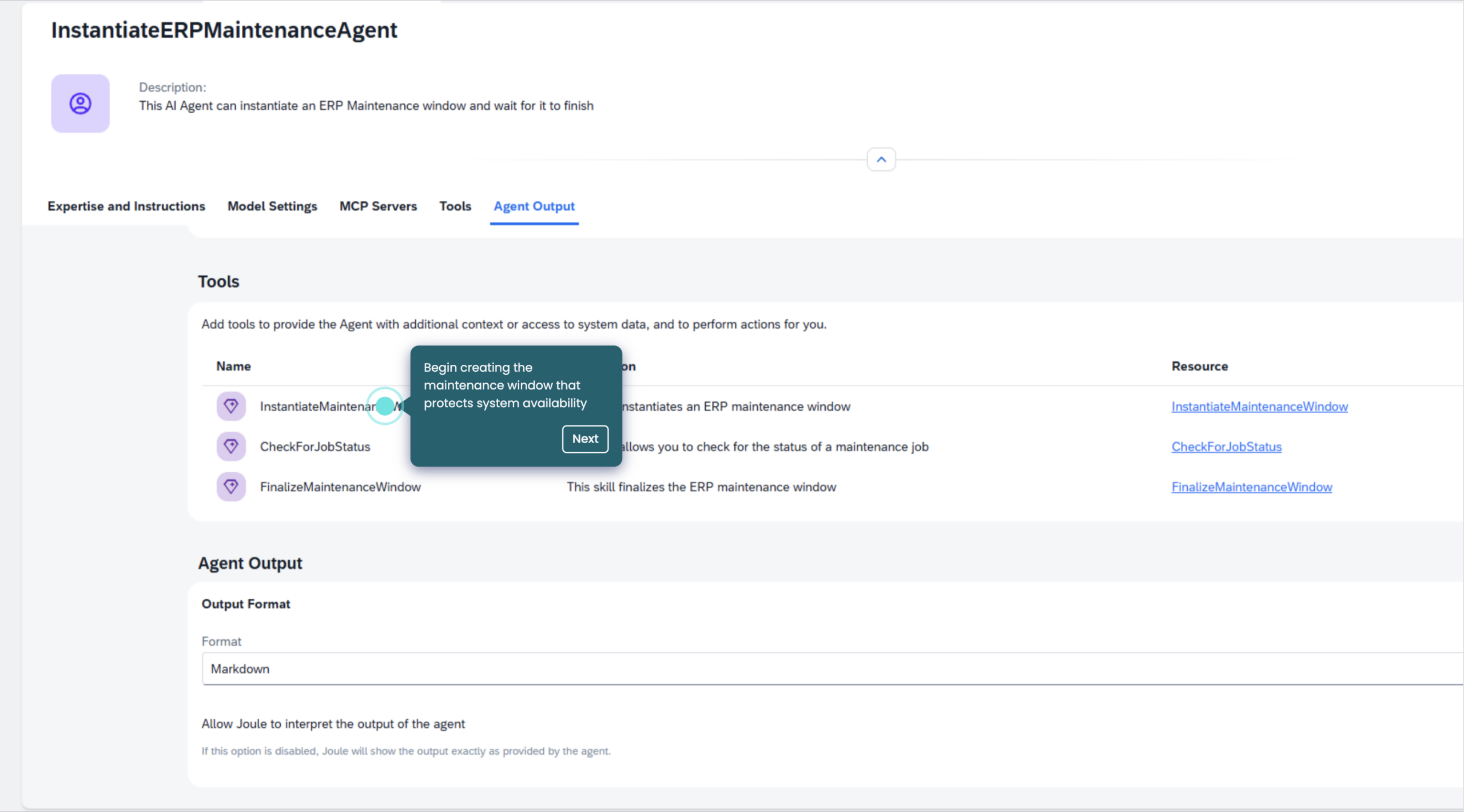
The maintenance window is a solid use case to examine that gap, because it exposes exactly where agentic intent meets operational complexity.
Consider an unplanned SAP system maintenance window. Traditionally, this requires multiple manual steps and cross-team coordination: pausing background jobs, stopping dependent integrations, managing approvals and verifying that dependencies are resolved before maintenance can proceed. The SAP Business Technology Platform (BTP) team handles iFlows. The Basis team manages job suspension separately. Each manual handoff introduces risk, and as SAP landscapes become more interconnected, that complexity only increases.
With RunMyJobs by Redwood integrated into Joule, a Basis administrator can take a goal-oriented approach instead. They express intent — preparing systems for a maintenance window — and Joule handles the conversational layer, understanding the request and applying business context. RunMyJobs handles execution: orchestrating the required actions across SAP and connected systems using predefined workflows, policies and controls that have already been defined, approved and governed.
In other words, Joule is responsible for understanding and interacting while RunMyJobs is responsible for deterministic, auditable execution. Every step that runs has been scoped in advance. What changes is how teams interact with automation, but not the rigor with which it operates.
Conversational and agentic AI alone aren’t sufficient for enterprise automation. Without a reliable orchestration layer, AI initiatives introduce risk into mission-critical processes. RunMyJobs acts as the control plane between conversational intent and system execution. It’s cloud-native, an SAP Endorsed App and the only workload automation and orchestration platform that’s part of the RISE with SAP reference architecture. It provides centralized scheduling, dependency management, execution and observability across complex SAP and non-SAP landscapes, with role-based access control (RBAC), enforced approvals and a complete audit trail for every action taken.
Unlocking business value from Joule with RunMyJobs
Building Joule integrations with RunMyJobs just became significantly more accessible.
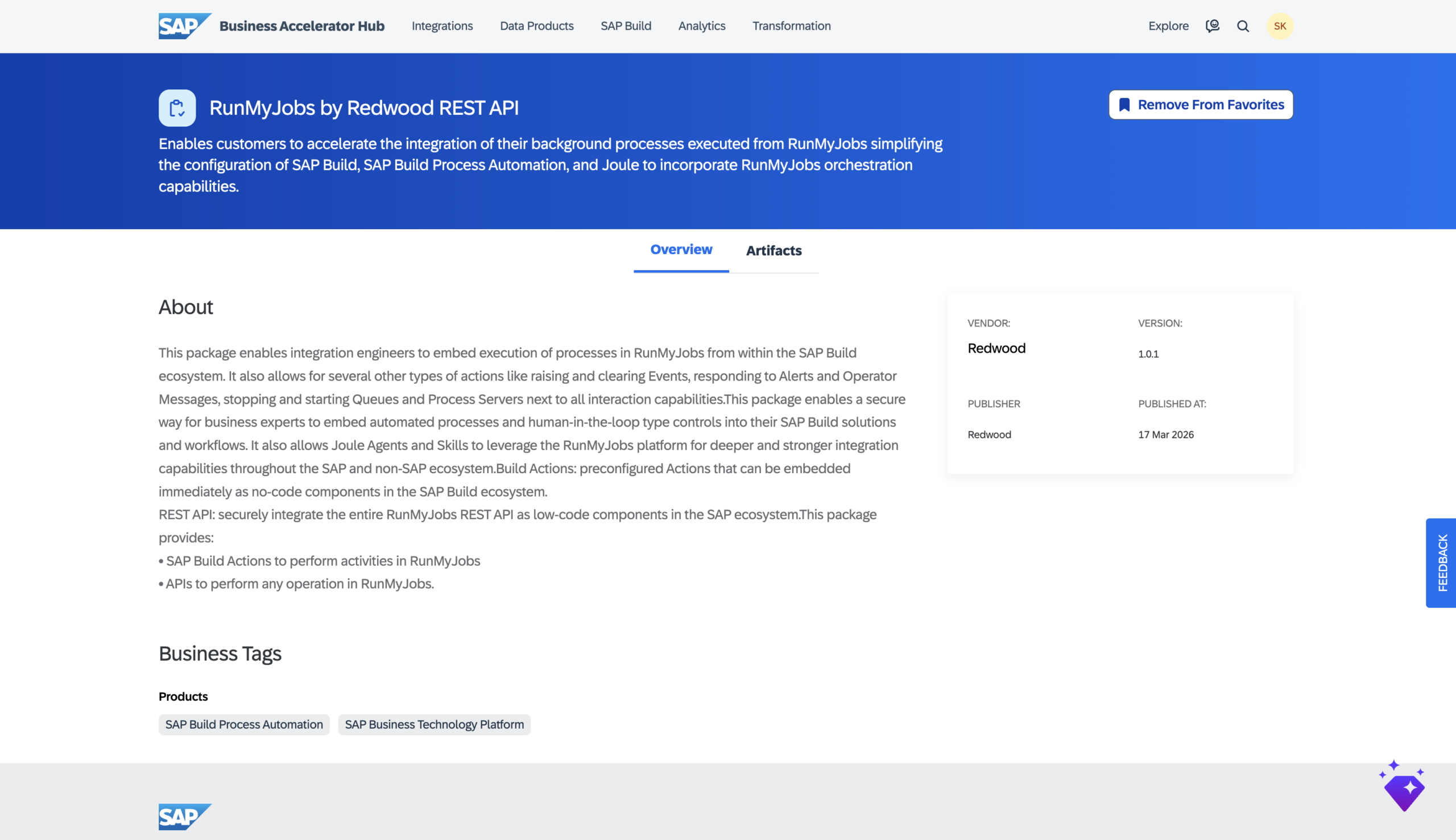
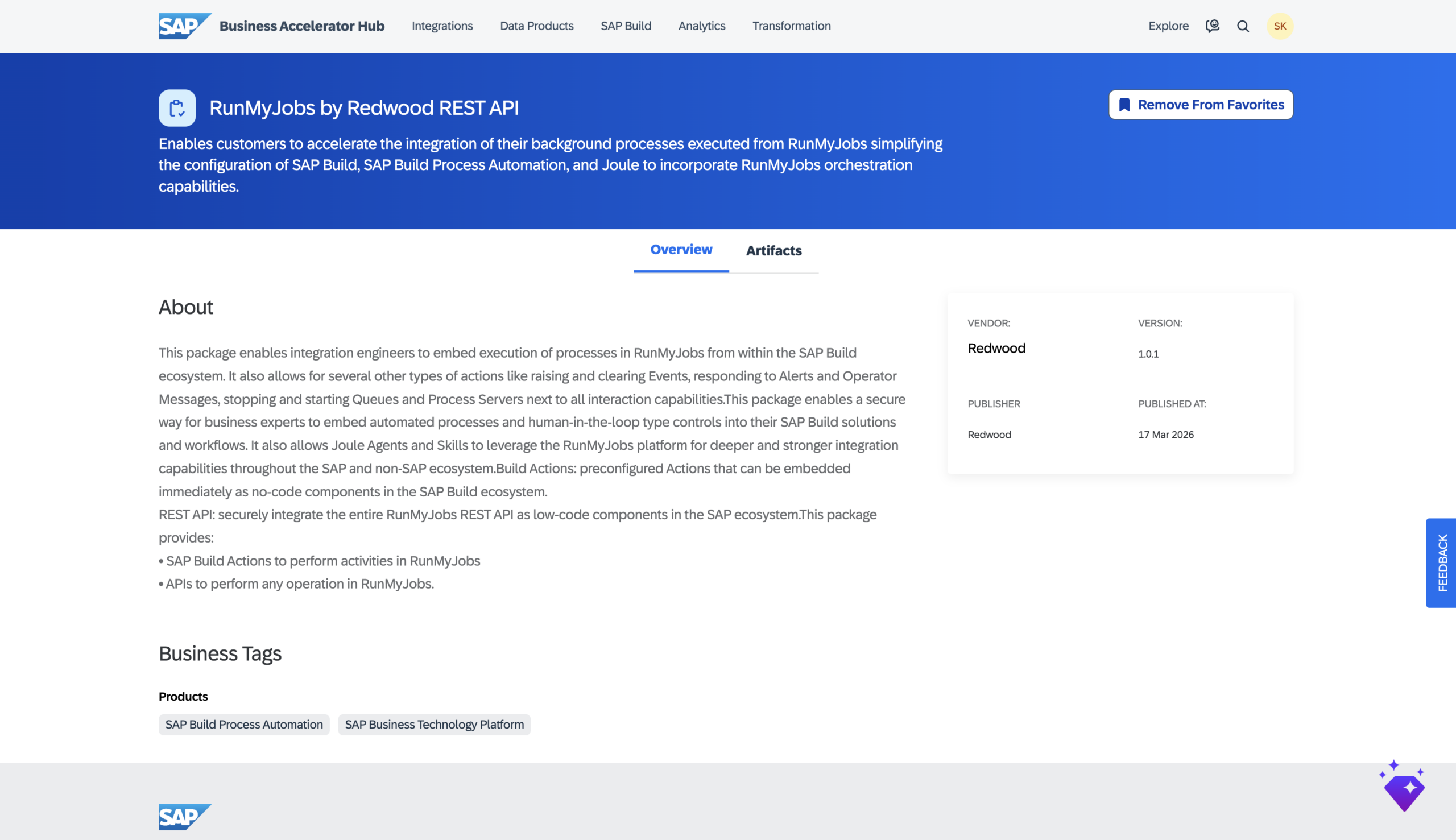
RunMyJobs’ REST API and pre-built SAP Build Actions are now published in the SAP Business Accelerator Hub, which has a few practical implications for teams building on SAP BTP. Development teams building Joule skills and agents can invoke RunMyJobs’ orchestration capabilities directly as no-code components within Joule Studio — no custom integration work required — with the full REST API accessible as low-code components for more advanced scenarios.
Inclusion in the Accelerator Hub also reflects a deeper level of alignment with SAP, as these integrations are designed within SAP’s extension framework and consistent with clean core principles and SAP BTP development standards. Furthermore, for customers with high security requirements, RunMyJobs now supports OAuth from SAP BTP, including Joule, to its REST API.
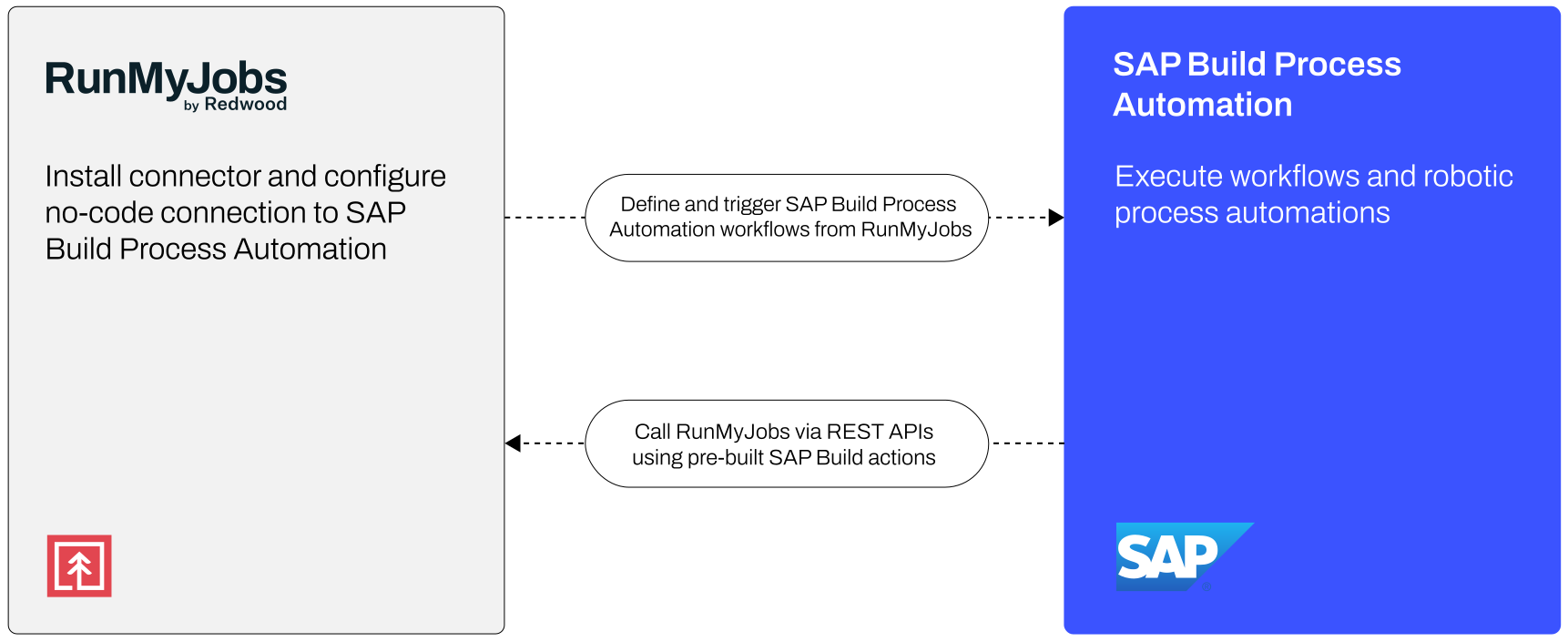
The integration is genuinely bi-directional: RunMyJobs can trigger and orchestrate SAP Build Process Automation workflows as part of larger end-to-end business processes, while SAP Build applications and workflows can call RunMyJobs capabilities — raising and clearing events, responding to alerts, managing queues — directly from within the SAP BTP ecosystem. And Joule can incorporate RunMyJobs as part of AI-driven automation scenarios, using it as the governed execution layer for Agents and Skills that need to operate reliably across SAP and non-SAP systems.
Two paths to governed agentic execution
Joule Agents can now connect to RunMyJobs in two ways: via Joule Skills using the pre-built SAP Build Actions in the SAP Business Accelerator Hub or through the Model Context Protocol (MCP) server.
MCP is an open standard that gives AI systems a shared way to connect with external tools without custom integrations, and its addition to RunMyJobs means Joule Agents can trigger workflows, check job status and interact with your automation landscape through a protocol already adopted across every major AI platform.
Whenever AI is introduced into enterprise systems, the first concern is control. That’s why governance is foundational to this approach.
In RunMyJobs, every action is governed, logged and auditable. RBAC ensures that only authorized users can trigger specific workflows. So, a new interface doesn’t expand permissions. It simply provides a different way to interact with existing, approved automation.
Policies are enforced automatically. If an approval or validation is required, the workflow will not proceed without it. Every step executed by RunMyJobs is logged, including what was triggered, when it ran, who approved it and how it executed across systems. That audit trail is always available.
This matters not just in regulated environments, but because compliance, traceability and accountability are always critical. AI automation must operate within those controls.
Maintenance is a powerful starting point, but it’s only one example. The same conversational orchestration pattern applies across SAP-driven business processes and functions:
Finance teams can trigger period close and reconciliation activities that depend on correct sequencing and validation
Supply chain operations, where timing and cross-system coordination are critical, benefit from AI orchestration that reduces manual handoffs and delays
Retail, utilities and HR teams can apply the same approach to order-to-cash, meter-to-cash and employee lifecycle workflows, respectively
When SAP introduced SAP Build at the SAP TechEd conference in 2022, the message was deliberate: automation shouldn’t require a developer. Business users, those who understand the processes, should have the tools to design workflows, automate decisions and remove manual effort from everyday tasks without writing code.
SAP Build brings together a number of capabilities on SAP Business Technology Platform (BTP): SAP Build Apps and Code for application development, SAP Build Work Zone as a portal service and SAP Build Process Automation (SAP BPA) for workflows and robotic process automation (RPA). SAP BPA merges the previous SAP Workflow Service and SAP Intelligent Robotic Process Automation (iRPA) into a single, low-code offering for workflow management — and it’s where automation becomes more accessible, more contextual and more aligned with how business teams actually work.
But accessibility at the task level creates a new operational question. Once SAP BPA is running at scale, the conversation shifts from “What can it automate?” to “How reliable, secure and efficient is the automation?” Workflows need to be sequenced, governed and run reliably across multiple systems, teams and dependencies. That’s where the design of individual automations meets the reality of enterprise process orchestration. With Redwood Software’s new SAP BPA connector and RunMyJobs by Redwood REST API actions now available in the SAP Business Accelerator Hub, that connection is now bi-directional and more accessible than ever.
Separate by design, connected by purpose
SAP BPA is designed to build custom task-level automation for common and repetitive tasks. Think of processes like:
Extracting invoice data and posting it into SAP
Uploading journal entries from spreadsheets
Parsing contract terms and triggering follow-up actions
These steps are focused on a specific function or interaction. It’s important to look at how they operate within broader business processes.
For example, order-to-cash doesn’t start and stop with a single workflow. A financial close isn’t just a sequence of approvals. Supply chain execution depends on precise timing, cross-system dependencies and conditions being met upstream before the next step can begin.
SAP BPA is well-suited to automating the tasks and user-driven workflows within those processes. RunMyJobs complements this by orchestrating the end-to-end process those tasks belong to — coordinating execution across systems, managing dependencies and ensuring every step runs at the right time, in the right sequence, with full process visibility and control.
Extending SAP BTP without fragmenting your processes
This relationship becomes especially relevant as SAP customers move deeper into cloud transformations through RISE with SAP and SAP BTP adoption. SAP’s clean core principle encourages organizations to move extensions, integrations and custom logic out of the ERP core and onto SAP BTP, where they can be maintained without disrupting the core system. SAP BPA fits naturally into this model, as it lives on SAP BTP and allows process logic to be built and maintained there rather than embedded inside the ERP.
But moving logic to SAP BTP doesn’t automatically communicate it to the end-to-end processes that logic belongs to. An SAP BPA workflow running on SAP BTP still needs to be triggered at the right moment, handed off correctly to downstream steps and governed as part of a larger orchestrated flow.
RunMyJobs provides that orchestration layer. As the only orchestration platform that is both an SAP Endorsed App and included in the RISE with SAP reference architecture, RunMyJobs coordinates execution across SAP and non-SAP systems without requiring custom code in the core or local installation of third-party software inside the ERP. It maximizes the return on your SAP investment.
The SAP Build Process Automation connector for RunMyJobs
The SAP BPA connector for RunMyJobs makes this integration concrete and operational. With the connector installed, you can incorporate SAP BPA workflows directly into larger orchestrated business processes.
In practice, across a range of use cases, that means you can:
Trigger SAP BPA workflows as a step within a broader RunMyJobs process chain
Use the outcome of an SAP BPA workflow to drive downstream dependencies across systems
Coordinate SAP BPA automations alongside SAP ERP jobs, file transfers, data pipeline steps and non-SAP workloads
Monitor SAP BPA workflow execution alongside every other step in the process from a single platform
Leverage pre-built, enterprise-grade automation activities that include the security, governance and guardrails required for mission-critical processes
Extend these workflows into SAP Joule scenarios by invoking RunMyJobs as part of Joule skills and agents
Rather than treating SAP BPA as a standalone automation tool, you embed it into the processes it supports. Instead of building workarounds to connect SAP BPA to the rest of your automation landscape, you can let the connector handle that.
Available in the SAP Business Accelerator Hub
The integration goes further than a single connector. RunMyJobs’ REST API and pre-built SAP Build actions are now published in the SAP Business Accelerator Hub, making it easier for teams building on SAP BTP to incorporate RunMyJobs orchestration capabilities directly into their SAP Build applications, workflows and extensions.
This has a few practical implications:
It lowers the barrier for SAP BTP development teams and citizen developers. Instead of building custom integrations from scratch, you can invoke RunMyJobs capabilities directly as no-code components within SAP Build and Joule Studio. Pre-configured actions are available immediately, and the full REST API is accessible as low-code components for more advanced scenarios.
It reflects a shared vision and aligned roadmap with SAP. Inclusion in the SAP Business Accelerator Hub means these integrations are designed to work within SAP’s extension framework, consistent with clean core principles and SAP BTP development standards.
It enables true bi-directional integration:
RunMyJobs can trigger and orchestrate SAP BPA workflows as part of larger business processes
SAP Build applications and workflows can call RunMyJobs capabilities — raising and clearing events, responding to alerts, managing queues and more — directly from within the SAP BTP ecosystem
Setup is designed to be straightforward and aligned with how SAP and RunMyJobs environments are typically managed.
From the RunMyJobs side, configuration consists of:
Installing the SAP BPA connector from the RunMyJobs Connector Catalog
Configuring the connection using SAP BPA endpoints and authentication
Incorporating SAP BPA workflows as steps within orchestrated process definitions in RunMyJobs
Once configured, SAP BPA workflows become fully governed participants in your broader automation landscape. They can be scheduled, triggered by events, monitored for success or failure and coordinated with every upstream and downstream dependency across your systems.
Distributed automation needs a control plane
As SAP customers move to SAP Cloud ERP, RISE with SAP and SAP BTP, process logic is becoming more distributed across services, extensions and applications. This brings flexibility but also a new requirement: those processes still need to run as one.
RunMyJobs addresses this by connecting SAP BPA workflows with the broader processes they belong to, orchestrating execution across systems, managing dependencies and ensuring that distributed automations operate as a single, reliable flow. It allows you to extend on SAP BTP without fragmenting how processes are executed or governed.
Automation at the task level is only part of the equation. Proven and efficient orchestration is what makes it enterprise-grade.
One data point from Redwood Software’s Manufacturing AI and automation outlook 2026 stood out: Upper management predominantly sees operations as 51–75% automated. Plant and front-line leaders? They report 26–50%.
Both groups are looking at the same factory. Both are telling the truth. And that’s exactly the problem.
The view from a distance
The further you are from execution, the more automated things look. Dashboards are green. KPIs trend in the right direction. Automated systems do what they were designed to do. From a leadership vantage point, the investment is paying off — and in many ways, it is.
About 6 in 10 manufacturers have cut unplanned downtime by at least 26% with automation, with a meaningful share reporting reductions beyond 50%. Uptime and throughput are improving. Production lines are more stable. These are legitimate, measurable outcomes.
The 51–75% perception reflects what leaders can see:
✅ Individual manufacturing systems performing well
✅ Investments translating into operational efficiency gains
✅ The organization trending toward greater stability
That view is inherently scoped to what happens inside those systems.
Up close, friction comes into focus
Move closer to execution, and the picture changes. Individual platforms may work, but coordination across them — ERP to MES, planning to procurement, quality events to supply chain adjustments — still depends on human intervention.
Front-line teams don’t have to be skeptical of automation to encounter its limits. What looks like a 70% automated operation from a conference room feels closer to 40% when you’re the one bridging systems with spreadsheets because they weren’t designed to talk to each other.
That dynamic shows up clearly in the data. Only 40% of manufacturers have automated exception handling, despite 22% citing it as a top source of disruption. More than a quarter still move sensitive information through email or manual methods.
Where maturity lives: The space between systems
It would be easy to treat this as a reporting problem: something better dashboards or more shop-floor visibility could close. It isn’t. The gap maps to how automation has been applied — and where it hasn’t.
Most organizations have done solid work automating within systems. ERP processes run as expected. MES workflows are stable. Control systems do their jobs. Those results show up cleanly in dashboards and quarterly reviews, and they’re real.
But no meaningful manufacturing workflow stays inside one system. Forecasting feeds scheduling, production affects inventory, quality events ripple into supply chain decisions. At every one of those handoffs, automation stops and someone picks up the slack.
That’s the 51–75% vs. 26–50% gap in a nutshell. Leadership watches systems perform. Front-line teams manage what happens in between: the timing, the manual data pulls, the spreadsheet that keeps two platforms in sync because nobody built a bridge.
Nearly three-quarters of manufacturers sit in mid-stage automation maturity right now. Tasks are automated, but the workflows connecting them remain only partially orchestrated. Each new automation initiative can make this harder to see. A new initiative makes an individual system more capable, which looks like progress from the top, while the manual stitching between systems stays unchanged and unmeasured.
78% of manufacturers have automated less than half of their critical data transfers. The majority of cross-system execution still depends on how information moves between platforms, not on how well any individual system runs.
This is also why AI readiness remains elusive for most manufacturers right now. If the coordination layer doesn’t exist for your people, it won’t exist for your models. You can’t automate your way to AI-ready if the gaps are structural.
Start with handoffs
The perception split tells you exactly where to look next. Not at the systems themselves, but at the handoffs between them.
The manufacturers breaking through have shifted their focus accordingly. They’re automating exception handling across systems, connecting data flows between platforms and using event-driven workflows instead of scheduled scripts. They’re also 2.7x as likely to have reached the higher stages of automation maturity.
The “Manufacturing AI and automation outlook 2026” breaks down where those coordination gaps show up most often, what high-maturity manufacturers do differently and how the perception divide plays out across roles, systems and KPIs.
SAP Sapphire 2026 has delivered one of the clearest, most unambiguous messages the enterprise software industry has sent in years. Not through a single announcement, but through the weight and coherence of everything taken together.
The conversation has shifted decisively. From what AI can do in theory to what it can sustain in production. From isolated tools to systems that connect highly complex critical processes end to end. From experimentation to execution. SAP has put its full organizational weight behind a single claim: the Autonomous Enterprise isn’t coming. It’s here, and it is the only viable operating model for what comes next.
SAP CEO Christian Klein said it plainly in the official press release: “For the mission-critical processes of our customers, ‘almost right’ just isn’t good enough.” That’s not the language of a company still running AI experiments, but of a company that has decided.
At Redwood Software, we agree. We’ve been at the forefront of every trend and leading the automation world for 30 years, from batch scheduling to cloud-native orchestration to agentic AI. Each wave has required enterprises to re-anchor around a governed execution layer. This moment is no different; it’s the next natural evolution of a stack we’ve been preparing the world’s leading organizations to run more autonomously for decades.
But agreeing on the destination isn’t the same as solving the journey. And the journey — the hard, unglamorous, architectural work of making AI reasoning actually do something inside the systems that reliably run your business — is where most enterprises are still stuck. The announcements from Orlando this week make that journey more achievable, but they don’t make it automatic. Here’s what each of them means for the enterprises trying to close the gap between ambition and execution.
The biggest hidden cost in this space is not model inference or integration development. It’s teaching the agent what your business actually does: the decades of mission-critical logic encoded in existing automation estates and the process knowledge that took years to build and can’t be reconstructed by prompting an AI.
Joule Work: The right interface needs the right engine
The reimagined Joule experience is the announcement that generated the most excitement in Orlando, and rightly so. As SAP describes it, Joule Work means users now interact primarily with Joule, describing a desired business outcome on desktop or mobile and letting Joule orchestrate the right combination of workflows, data and agents to get it done, across SAP and non-SAP systems alike. That vision isn’t just directionally correct. It is, increasingly, the model that early adopters and leaders in their industries will use for a competitive advantage as AI agents take on more of the decisional work across the entire enterprise, including IT, finance, supply chain, HR, CX and more.
But there’s a pattern that plays out in enterprise after enterprise, and it’s one that the Joule announcement doesn’t fully resolve on its own.
Once AI becomes part of a process, early results look positive, work moves faster, less labor is required and teams process more volume. Then, friction inevitably starts to accumulate — not because the AI is performing poorly, but because the systems around it were designed for a fundamentally different model.
In mission-critical processes such as a global financial close or complex manufacturing runs, a single event triggers thousands of interdependent steps, each governed by specific conditions across the ERP and beyond. These processes are engineered for high-fidelity, deterministic inputs. When an agentic AI produces a probabilistic result, it often fails to clear the hard gates required for the next execution step. This creates a surge of “exceptions” that quickly outstrips the team’s ability to manage them, as the mission-critical work shifts into the growing void between what the AI decides and what the production environment actually requires to move forward.
The question this creates isn’t whether Joule’s recommendations are good. They are. The question is what happens next. When Joule surfaces an insight, recommends an action or flags a supply chain exception, something still has to reach into the ERP, trigger the right next step, monitor the outcome, handle the exceptions and close the loop with a complete audit trail. That last mile is an orchestration problem, not a UI problem.
For example, if a depreciation run fails at 2 AM, Joule can see the issue and reason how to fix it, but RunMyJobs executes: it diagnoses the failure, parses the error logs, isolates the locked cost centers, executes the remediation chain within strict deterministic guardrails. The result is a complete operating model: Joule is the interface that empowers people with insight, but RunMyJobs is what gives Joule the context that enables it to reason and the safe pair of hands to act.
200+ agents: A milestone and an architectural warning
SAP details a suite deploying more than 50 domain-specific Joule Assistants, orchestrating over 200 specialized agents across finance, supply chain, procurement, human capital management and customer experience. The example given — an Autonomous Close Assistant capable of compressing the financial close process from weeks to days by automating journal entries, reconciliation and error resolution — illustrates both the ambition and the depth of domain knowledge behind it.
From a partner that has spent 30 years in enterprise orchestration, a candid observation is warranted: 200 agents without a governed bridge to production will collide. Unleashing a fleet of probabilistic thinkers on the critical processes that weave through your ERP, cloud-native apps and legacy systems is an operational liability.
A single trigger in an order-to-cash or financial close cycle can activate thousands of conditional steps that assume high-fidelity inputs. These systems weren’t built to absorb the “almost right” outputs of probabilistic reasoning. Because this logic is load-bearing, any deviation from the expected outcome doesn’t result in a clean error; it creates a ripple effect of inconsistencies that quietly degrade the process until it crashes and requires a human to step in and fix what the system wasn’t designed to handle.
AI agents don’t behave deterministically. Their outputs are probabilistic, varying with context, input quality and conditions that shift constantly. Introduced across 200 agents operating simultaneously — optimized for their own domain, interacting with shared resources, shared data and occasionally competing priorities — the conflicts aren’t theoretical. The finance agent and the supply chain agent aren’t always pulling in the same direction. At machine speed, those conflicts don’t surface in a meeting but ultimately in the core of what a business does to stay in business. The result is silent, systemic data debt, scaling inconsistency across your business faster than any human team can reconcile or even identify.
Most organizations respond predictably with more monitoring layers, more validation steps, more governance controls. Each fix addresses a local issue. Across the business process, coordination overhead climbs. The technology works and the outputs are often good enough, but the system can’t rely on them without additional effort. Scaling becomes difficult because the cost of maintaining flow increases with volume. It’s no longer a question of whether AI can be used in the process, but whether the process can run without constant intervention.
The answer requires a governed orchestration layer that sits above the agent ecosystem to coordinate interactions, manage shared context across competing goals, resolve conflicts before they reach systems of record and ensure every autonomous action is traceable, auditable and accountable.
SAP is building brilliant agents. RunMyJobs makes sure they can work reliably at enterprise scale across highly complex, high-volume and long-running end-to-end processes that go way beyond what successful execution of individual tasks requires.
Joule Studio 2.0: SAP validates the architectural bet every enterprise should be making
The press release describes SAP Business AI Platform as a new foundation that unifies SAP Business Technology Platform, SAP Business Data Cloud and SAP Business AI into a single governed environment, with Joule Studio as the AI-first development tool that lets developers build using the no-code, pro-code and AI frameworks of their choice. That last phrase matters more than it might appear.
Agent frameworks are changing every few months. The optimal model for finance workflows today may be superseded next year. The LLM that handles procurement reasoning well may not be the right choice for supply chain planning. Enterprises that embed their orchestration logic inside any single vendor’s agent framework inherit that framework’s constraints and upgrade cycle. The deterministic logic governing compliance steps, SLA requirements and audit trails must remain stable as the probabilistic layer above it evolves. If the orchestration layer and the intelligence layer are the same layer, stability and agility become incompatible goals.
Redwood’s platform is agnostic by design, because an orchestration layer must be independent of an intelligence layer, not inside it. Build agents in Joule Studio. Build them with Claude directly. Build them in LangGraph or CrewAI. RunMyJobs orchestrates all of them within a single governed execution layer, connecting their outputs to the mission-critical processes that run the business. An SAP Endorsed App, RunMyJobs has proven its effectiveness for SAP customers over the last two decades and continues to orchestrate across the newest innovations in SAP solutions.
The architectural principle SAP is endorsing this week — that the intelligence layer and the orchestration layer must be decoupled — is one Redwood has advocated for years. We don’t care where you build your agents. We care about whether they deliver results.
The Anthropic partnership: What the complete stack looks like
SAP confirmed that Claude will be among the foundation models SAP’s AI platform leverages to power Joule agents across HR, procurement and supply chain, with agents connecting to SAP Business AI Platform to ground decisions in real business context and operate safely within defined processes. This is a structural validation of the three-layer architecture the autonomous enterprise requires.
Claude provides world-class reasoning capability, grounded in SAP’s business context and data models. SAP provides the domain intelligence — process knowledge, industry-specific logic, ERP depth — that makes AI decisions relevant to real business outcomes. RunMyJobs provides the execution layer: the governed bridge between what the AI decides and what actually happens in the production systems that run the business.
These three layers are complementary, not competing. RunMyJobs is the only agentic orchestration platform that is an SAP Endorsed App and part of the RISE with SAP reference architecture. When Claude and Joule determine that an action needs to be taken, the governed pathway from that decision to production execution runs through infrastructure SAP itself has validated.
The deeper point is about the cold-start problem every enterprise faces when deploying agentic AI. The biggest hidden cost in this space is not model inference or integration development. It’s teaching the agent what your business actually does: the decades of mission-critical logic encoded in existing automation estates and the process knowledge that took years to build and can’t be reconstructed by prompting an AI. Rebuilding that logic from scratch to every new agent is not feasible at scale. And a probabilistic agent operating without that grounding, feeding outputs into deterministic downstream systems without the right constraints, can propagate errors through interconnected processes before anyone catches them.
With RunMyJobs, that work is already done. Existing jobs, workloads and enterprise connectors become governed tools that Claude-powered agents can invoke immediately, operating within the strict guardrails that mission-critical processes require, with the full process context they need to act correctly from their first interaction.
SAP Industry AI: Sector intelligence is only valuable if it reaches the operations layer
SAP describes SAP Industry AI as seven autonomous solutions enabling start-to-finish industry processes, with sector-specific logic, data models and regulatory requirements embedded throughout. The work with RWE on autonomous asset management for offshore wind turbines is the flagship example: agents designed to analyze data from thousands of past incidents, identify the likely root cause and generate pre-filled work orders with the right tools and proven fixes from other sites.
The work order, however, is not the outcome. What happens after it’s generated is where most enterprises are still losing time, trust and SLA compliance.
In a typical production environment today, that work order enters a queue. A human picks it up, navigates to the right system, verifies the data, triggers the remediation workflow, monitors it, handles the exceptions and logs the outcome. Each step is latency, a potential failure point and a cost. The insight is real, but execution is still manual. The further that manual effort sits from the original AI decision, the harder it becomes to trace, audit or trust.
RunMyJobs closes that loop with continuous monitoring for impending failures — database deadlocks, resource exhaustion, pipeline stalls — and autonomous remediation execution, parameterized restarts and data integrity confirmation before downstream consumption. Human intervention occurs at defined escalation points, not as continuous operational correction. SAP Industry AI tells you a turbine will fail, and RunMyJobs fixes it before it has a critical impact on the business.
What Sapphire 2026 tells us about where the work is
Step back from the individual announcements and the signal is clear. SAP Sapphire 2026 is the moment the enterprise software industry stopped describing the agentic future and started engineering for it.
The vision is coherent. The domain expertise is genuine. The partnerships with Anthropic, AWS, Google Cloud, Microsoft, NVIDIA and Palantir confirm that the ecosystem is converging around a shared architectural direction.
What the announcements also confirm, through an operational lens, is that the execution gap remains the defining unsolved problem.
Only 16% of organizations have successfully deployed agentic AI at scale. That number sits alongside bold keynotes and record partnership announcements, and it should give every enterprise leader pause — not because the technology is immature, but because most enterprise processes were designed for deterministic sequencing and predefined outcomes. They weren’t designed to coordinate probabilistic AI systems, human judgment, compliance policies and operational dependencies simultaneously within the same process. Until that architectural reality is addressed, organizations tend to remain in a middle state that is increasingly familiar: partial automation that looks like progress, ongoing manual validation that absorbs the productivity gains, complexity that grows faster than capability and limited ability to scale without proportional increases in operational overhead.
Leaders are asked to invest further. Outcomes remain uncertain because the system around the models can’t yet be fully trusted.
SAP’s announcements this week extend the vision and accelerate the journey. What still has to be solved — what no single vendor solves alone — is the governed orchestration layer between AI reasoning and the systems behind and running the global economy. The layer that constrains probabilistic outputs before they reach deterministic systems. That makes human intervention deliberate rather than continuous. That makes every autonomous action auditable, compliant and accountable by design rather than by retrofit.
The autonomous enterprise is here. The question is whether your execution layer is ready for it.
That’s the layer Redwood has been building, refining and proving in production across more than half of the Fortune 50 for three decades. While others build AI that thinks, Redwood builds AI that does.
If you’re an I&O leader, the execution gap is costing you more than you think in manual intervention, coordination overhead and AI initiatives that deliver pilots but not production. Give your agents direct connectivity to the mission-critical backend, without rebuilding what already works.
If you’re a CIO or Chief AI Officer, the window to establish your enterprise control plane is now — before agent proliferation outpaces your governance model. Begin your governed journey to the autonomous enterprise with the only agentic orchestration platform in the RISE with SAP reference architecture.